EasyManua.ls Logo

Sigma Metalytics PMV Pro PRO - User Manual

Sigma Metalytics PMV Pro PRO
22 pages
Print Icon
To Next Page IconTo Next Page
Loading...
ERIFIER
Precious Metal
PRO
MANUAL
MODEL #2601
Question and Answer IconNeed help?

Do you have a question about the Sigma Metalytics PMV Pro PRO and is the answer not in the manual?

Overview

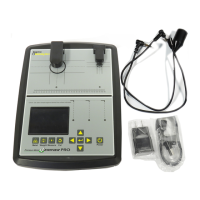
The Precious Metal Verifier PRO (Model #2601) is a device designed to determine if a coin or bar is consistent with genuine precious metals. Manufactured by Sigma Metalytics, it utilizes a combination of sensors and measurement techniques to provide verification.

Function Description:

The PMV PRO performs four primary measurements to assess the authenticity of precious metal samples:

  1. Basic Verification Mode: This mode measures the sample's resistivity just under the surface of the metal. It helps detect contaminants or foreign metals on or near the surface.
  2. Thru Mode: Using sensors above and below the sample, this mode measures the sample's bulk resistivity. This measurement checks the entirety of the sample and identifies contaminants or foreign metals anywhere between the two sensors.
  3. Thickness Measurement: The device electronically measures the thickness of the sample using the average thickness of its face.
  4. Dimension Verification: This feature allows the user to perform a specific gravity test to ensure the sample has the correct density. The user must enter the measured weight of the sample to perform this test.

Important Technical Specifications:

While specific numerical specifications like measurement ranges or precision are not explicitly detailed in the provided pages, the manual highlights several key aspects:

  • Firmware, FPGA, and Database Versions: The device displays these versions upon power-on, indicating its internal software and hardware configurations.
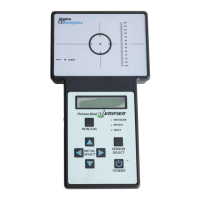
  • Measurement Scale: The device features a measurement scale, visible on the PMV PRO Diagram, ranging from 5 to 140 units, likely indicating a physical dimension or position for samples.
  • Sample Dimensions for External Bridge: For accurate measurements with the External Bridge, samples must be at least 12mm thick and 50mm wide, and no more than 45mm thick. The sample must also cover the entire black circle on the External Bridge platform.
  • Thickness Calibration Disk: The calibration disk used for thickness calibration should be between 1.60 - 1.61 mm thick. If the device reads the disk as more than 0.1 mm thinner or thicker than expected, calibration may be required.

Usage Features:

  • User Interface: The device features a display screen, power button, CAL button, METAL button, MEASURE button, WEIGHT button, ENTER button, and directional (UP, DOWN, LEFT, RIGHT) buttons for navigation and selection.
  • Calibration: The PMV PRO requires calibration each time it is turned on. This process checks internal components and prepares the device for use. Calibration involves pressing the CAL button after removing any samples.
  • Metal Selection: Before measurement, users must select the appropriate metal or alloy from a database. Navigation through metal categories and specific metals is done using the directional buttons.
  • Weight Entry: Users can enter the sample's weight in either English Units (Ozt) or Metric Units (grams). Both pre-defined values and manual entry are supported.
  • Measurement Screen: The screen displays various information including selected metal, battery indicator, basic verification mode reading, thru verification mode reading, calculated diameter, calculated sample area, precious metal weight, measured thickness, and total weight. Color-coded bars (green, yellow, red) and arrows (blue, red, sideways) provide visual cues for reading reliability and consistency.
  • Dimension Verification: This feature allows users to verify the dimensions of a sample against the selected metal and weight. It supports both round and rectangular sample shapes, guiding the user to measure specific dimensions (length, width) using illuminated LEDs and on-screen prompts.
  • Wand Use: An optional Wand attachment allows for measurements on samples that may not fit on the main sensors. When the Wand is plugged in, the device requires calibration. Only the Basic Verification Mode reading is displayed when using the Wand, along with a yellow Wand indicator.
  • PC Interface: The PMV PRO can be connected to a Windows PC (Windows 7, 8, 10, and 11) via a USB cable. Users need to download and install the PMV PRO Application Installation zip file from the Sigma Metalytics website. The PC interface allows for display of readings on both the device and the PC application.
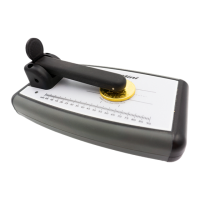
  • External Bridge: An optional External Bridge attachment extends the device's measurement capabilities. It also requires calibration upon connection. When using the External Bridge, both Basic and Thru Verification Modes are displayed. The plunger on the External Bridge must be pressed down firmly to ensure full contact with the sample.

Maintenance Features:

  • Calibration: Regular calibration is essential for accuracy. The device prompts for calibration upon power-on and when an external attachment (Wand or External Bridge) is connected.
  • Thickness Calibration: In cases of miscalibration of onboard sensors, a thickness calibration procedure is available. This involves placing a calibration disk under the affected sensor and pressing the ENTER button.
  • Care of Sensors and Bridges: The onboard sensors and bridges are highly sensitive to stress. Users are cautioned NOT to press on them, place objects on them, or lift the device by the bridges, as this can cause miscalibration and damage.
  • Display Protection: The device has a plastic cover on the display to protect the screen from damage. Users are advised NOT to remove this cover.
  • Warranty: Sigma Metalytics offers a two-year limited warranty covering defects in materials and workmanship. The warranty does not cover damage from external causes, accidents, abuse, misuse, unauthorized servicing, usage not in accordance with instructions, failure to follow instructions, use of unapproved accessories/parts, or normal wear and tear. Repairs for damage, problems, or malfunctions due to causes listed above are subject to a charge.

Sigma Metalytics PMV Pro PRO Specifications

General IconGeneral
BrandSigma Metalytics
ModelPMV Pro PRO
CategoryMeasuring Instruments
LanguageEnglish

Related product manuals