26 I EOX
®
VIEW 1200 I Operation
2.3.4 Connect heart rate sensor
You can connect a compatible BT heart rate sensor with the EOX
®
REMOTE 500 and show the heart rate information in
the multifunctional area of the EOX
®
VIEW 1200.
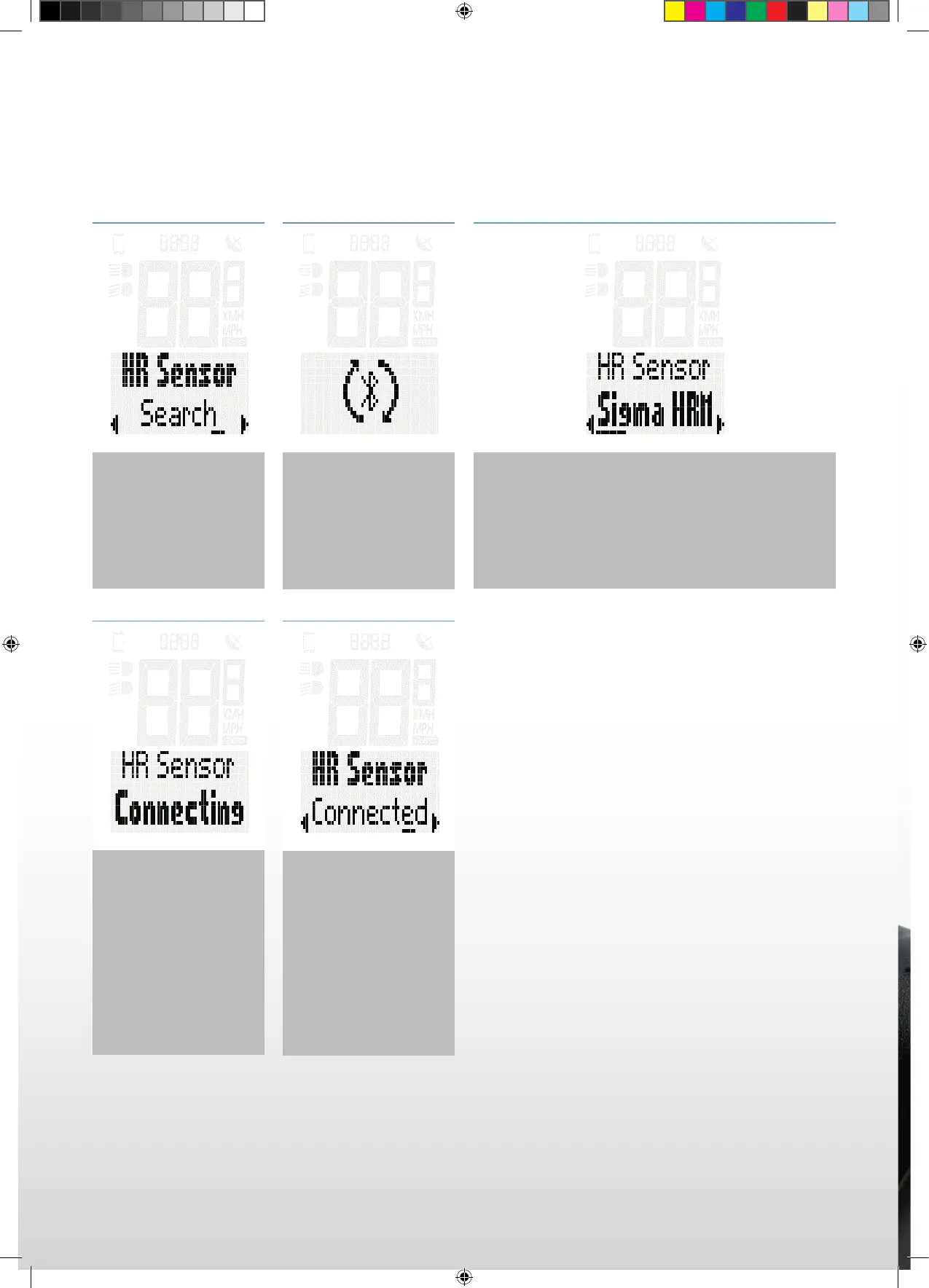
In the menut switch
to the item “Settings >
HR Sensor”
The EOX
®
REMOTE 500
connects woth the
chosen sensor.
Once the connection
has been established
the status of the menu
changes to “HR Sensor
Connected”.
To connect a new heart
rate sensor press the
B button again.
Press the B button to
search for available
Bluetooth heart rate
sensors. The heart rate
belt must be activated
before starting the
search.
All heart rate sensors found will be shown in a list.
Choose the sensor you want to connect with the
EOX
®
REMOTE 500 using the A/C buttons and
confi rm the connection by pressing the B button.
SIGMA-SPORT-EOX-Manual-EN-210x297-HZM-V1.indd 26SIGMA-SPORT-EOX-Manual-EN-210x297-HZM-V1.indd 26 16.09.2021 15:12:2916.09.2021 15:12:29



 To Next Page