KOMOOT APP I 43
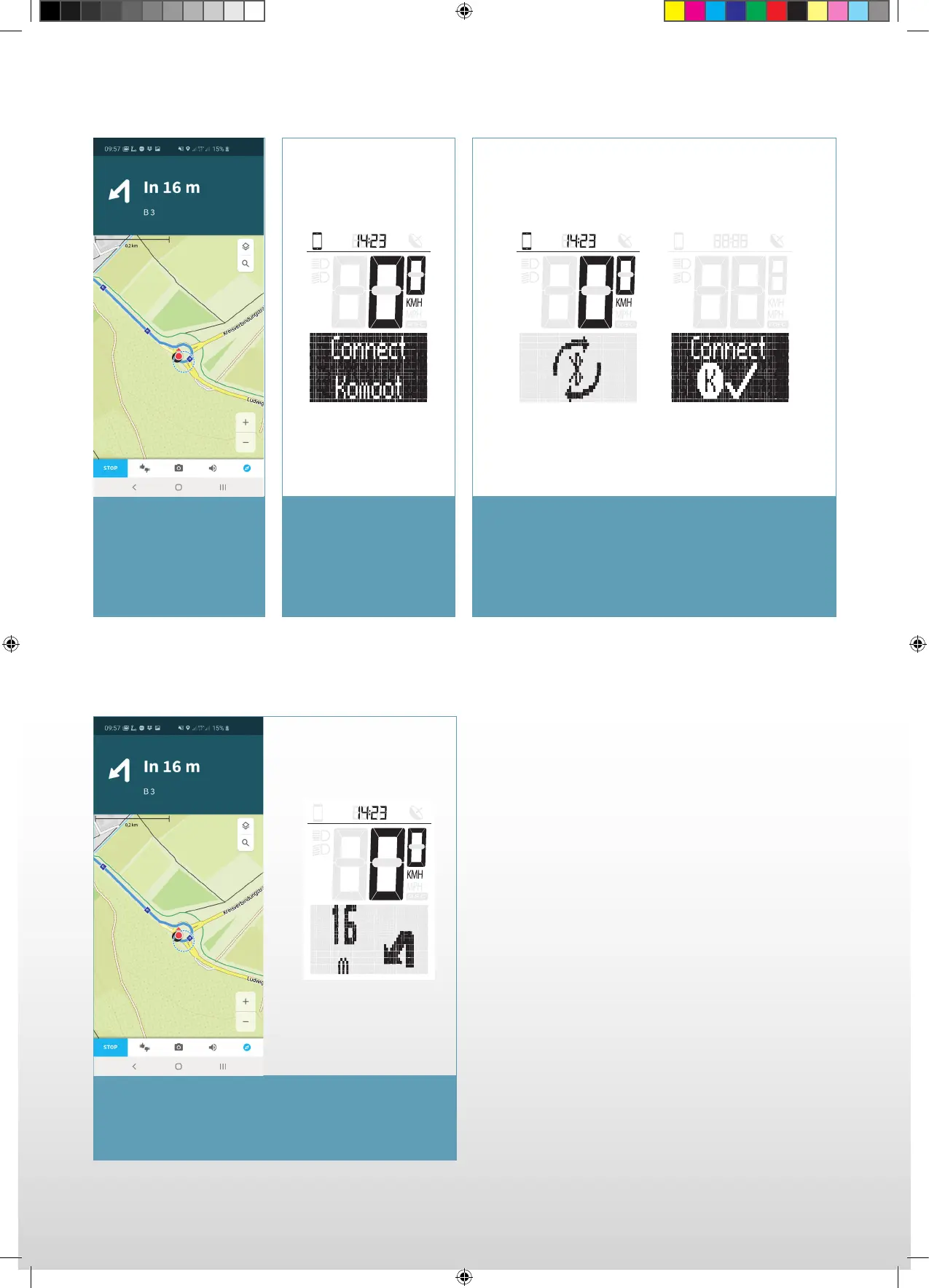
Start a navigation in
Komoot. Make sure that
your smartphone has
GPS reception otherwise
naviagtion instructions
cannot be received.
In the Ride menu of
EOX
®
VIEW 1200
navigate to the option
“Connect Komoot” and
press B.
EOX View 1200 connects to Komoot.
In case of connection diffi culties, start the EOX
®
app
and connect EOX
®
VIEW 1200.
As soon as a connection is established, navigation
instructions coming from Komoot are displayed on
EOX
®
VIEW 1200.
Subsequent Connections
SIGMA-SPORT-EOX-Manual-EN-210x297-HZM-V1.indd 43SIGMA-SPORT-EOX-Manual-EN-210x297-HZM-V1.indd 43 16.09.2021 15:13:0516.09.2021 15:13:05



 To Next Page