Manual PC 9 2009 D_GB_F_RZ 29.06.2009 15:06 Uhr Seite 13
C M Y CM MY CY CMY K
1.2 Overview: Watch, symbols and display layout 1.3 Key allocation/function overview
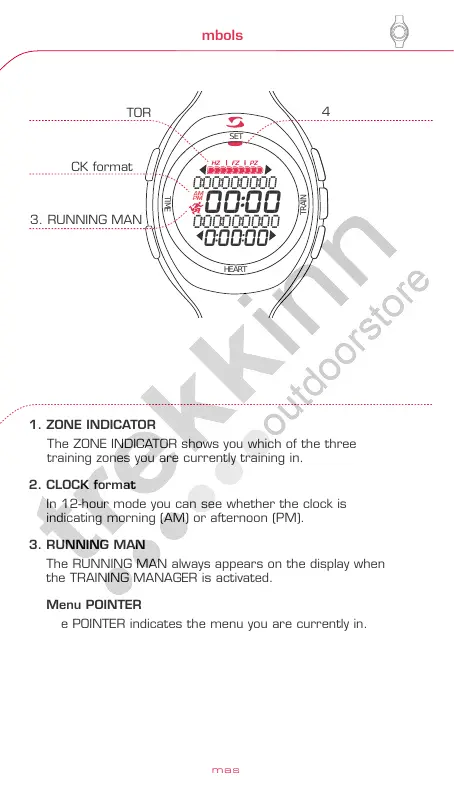
1. ZONE INDICATOR
The ZONE INDICATOR shows you which of the three
training zones you are currently training in.
2. CLOCK format
In 12-hour mode you can see whether the clock is
indicating morning (AM) or afternoon (PM).
3. RUNNING MAN
The RUNNING MAN always appears on the display when
the TRAINING MANAGER is activated.
4. Menu POINTER
The POINTER indicates the menu you are currently in.
www.sigmasport.com
24
25
HEART
TRAIN
TIME
SET
HEART
TRAIN
TIME
SET
HEART
TRAIN
TIME
SET
0:00:00:00:00
0:00:00:00:00
00:00
0:00:00
Function key 1
The key
allocation
can be read
in the display.
No display
indication =
EXIT function.
Function key 2
The key allocation
can be read in
the display.
Minus
Scroll back in
the menus...
...or reduce the
indicated numerical
value.
T-Manager key
PC 9 jumps
straight to the
TRAINING
MANAGER menu.
Plus
Scroll forwards
in the menus...
...or increase
the indicated
numerical value.
MANAGER
- Training Manager
SET (input)
- Language
- Heart Rate zones
- Clock
- Date
- Beep
- "My name"
TIME (time menu)
- Clock
- Health-Zone
- Fitness-Zone
- Power-Zone
- Total time
HEART
(Pulse menu)
- Training time
- Average
heart rate (HR)
- Kcal consumption
- Total calorie
consumption
(total kcal)
Function overview
Key allocation
1. ZONE INDICATOR
4. Menu POINTER
3. RUNNING MAN
2. CLOCK format
ENGLISH



 To Next Page