Manual PC 9 2009 D_GB_F_RZ 29.06.2009 15:06 Uhr Seite 17
C M Y CM MY CY CMY K
Start, stop and interrupt your training
session with the TRAINING MANAGER.
All data in the TIME and PULSE menu relate
to the current TRAINING MANAGER.
From each menu you reach the TRAINING
MANAGER by pressing the T-Manager key.
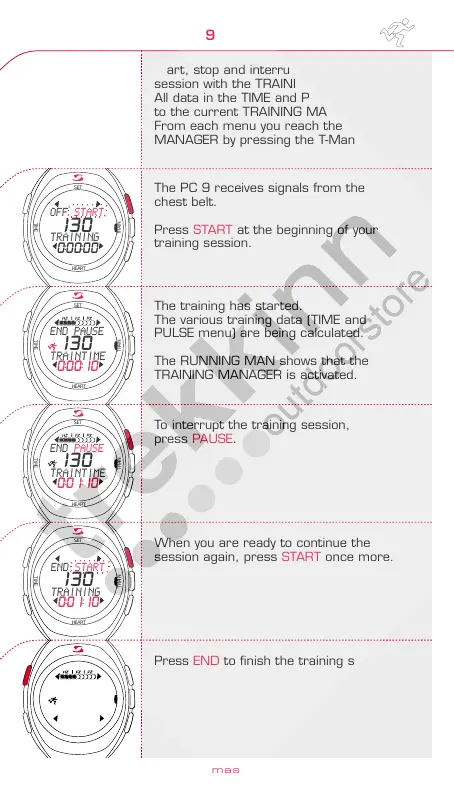
The PC 9 receives signals from the
chest belt.
Press START at the beginning of your
training session.
The training has started.
The various training data (TIME and
PULSE menu) are being calculated.
The RUNNING MAN shows that the
TRAINING MANAGER is activated.
To interrupt the training session,
press PAUSE.
To confirm the end of the training session,
press END once more.
If you decide to continue your training
session, please press EX.
To reset training data (TIME and HEART RATE
menu), press RESET.
OFF returns you to inactive mode.
Note: Resetting training data completely
deletes the last training unit.
Look at your training data before you reset
data prior to starting a new training unit.
Press YES to reset the training data to"0".
Pressing NO interrupts this procedure.
Your data have been reset.
Press OFF to reach inactive mode.
2.2 Training with the PC 9 2.2 Training with the PC 9
When you are ready to continue the
session again, press START once more.
Press END to finish the training session.
TRAINING
MANAGER
www.sigmasport.com
32
33
HEART
TRAIN
TIME
SET
HEART
TRAIN
TIME
SET
HEART
TRAIN
TIME
SET
HEART
TRAIN
TIME
SET
HEART
TRAIN
TIME
SET
HEART
TRAIN
TIME
SET
HEART
TRAIN
TIME
SET
HEART
TRAIN
TIME
SET
HEART
TRAIN
TIME
SET
OFF START
TRAINING
130
0:00:00
END PAUSE
TRAINTIME
130
0:00:10
END PAUSE
TRAINTIME
130
0:01:10
END START
TRAINING
130
0:01:10
END PAUSE
TRAINTIME
130
0:01:12
EX END
TRAINING?
NO YES
RESET?
OFF START
TRAINING
130
0:00:00
OFF RESET
TRAINING
130
0:01:15
ENGLISH



 To Next Page