Manual PC 9 2009 D_GB_F_RZ 29.06.2009 15:06 Uhr Seite 14
C M Y CM MY CY CMY K
HEART
TRAIN
TIME
SET
1.4 The main menus (functions) 1.5 Settings
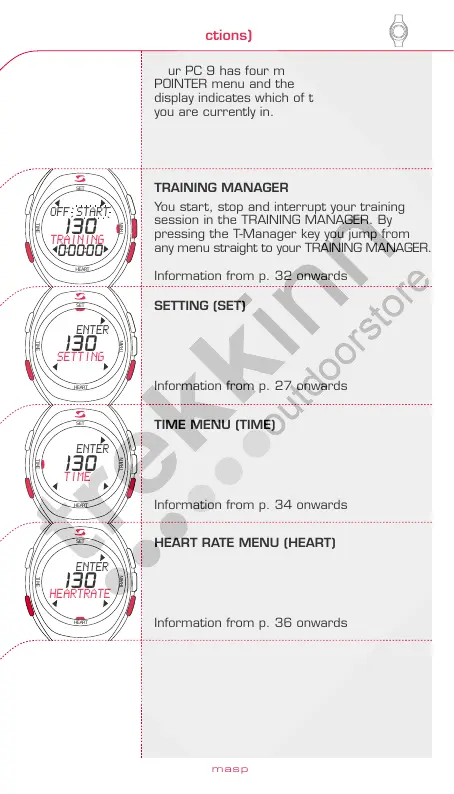
Your PC 9 has four main menus. The
POINTER menu and the description on the
display indicates which of the main menus
you are currently in.
Before you start training, you need to
“wake up” your PC 9.
To do so hold down any key for at least
three seconds.
TRAINING MANAGER
You start, stop and interrupt your training
session in the TRAINING MANAGER. By
pressing the T-Manager key you jump from
any menu straight to your TRAINING MANAGER.
Information from p. 32 onwards
Before and after training you can wear the
PC 9 as a normal wristwatch. The display
now shows date, time and “PC 9”.
SETTING (SET)
Information from p. 27 onwards
To activate your PC 9, press any key for
three seconds. You will automatically reach
the TRAINING MANAGER main menu.
TIME MENU (TIME)
Information from p. 34 onwards
HEART RATE MENU (HEART)
Information from p. 36 onwards
The four
main menus
of your PC 9
Activating
the PC 9
SETTING
menu
SETTING
principle
Before beginning training, input your personal
data in the SETTING menu.
Time, date and alarm etc. are also set in this
menu.
Inputting of your data is accomplished according
to the principle described. With plus/minus
you move to the previous/next sub-menu, or
input a numerical value. By pressing function
key 2 you confirm, and by pressing key I you
exit the menu. Example: setting the time
Accessing the SETTING menu?
By pressing the plus/minus keys in the
main menu, you reach the SETTING menu.
Press ENTER to access the SETTING menu.
www.sigmasport.com
26
27
HEART
TRAIN
TIME
SET
HEART
TRAIN
TIME
SET
HEART
TRAIN
TIME
SET
HEART
TRAIN
TIME
SET
HEART
TRAIN
TIME
SET
HEART
TRAIN
TIME
SET
OFF START
TRAINING
130
0:00:00
ENTER
SETTING
130
ENTER
TIME
130
ENTER
HEARTRATE
130
17.JAN.09
HOLD 3SEC
10:45
17.JAN.09
PC 9
10:45
ENTER
SETTING
130
ENGLISH



 To Next Page