Manual PC 9 2009 D_GB_F_RZ 29.06.2009 15:06 Uhr Seite 18
C M Y CM MY CY CMY K
2.2 Training with the PC 9 2.2 Training with the PC 9
In the TIME MENU you will see the current
time, and can access data for three training
zones and your total training time. This
menu also offers the alarm functions.
The TOTALTIME reading continually records
your training period, as soon as the Training
Manager is activated. This enables you to
record total training times over longer
periods (weeks, months).
You can decide yourself when to reset data
(RESET function).
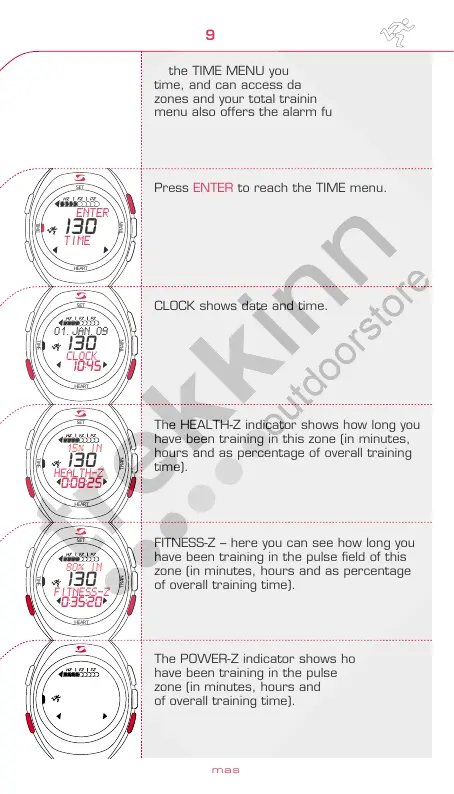
Press ENTER to reach the TIME menu.
CLOCK shows date and time.
The HEALTH-Z indicator shows how long you
have been training in this zone (in minutes,
hours and as percentage of overall training
time).
FITNESS-Z – here you can see how long you
have been training in the pulse field of this
zone (in minutes, hours and as percentage
of overall training time).
The POWER-Z indicator shows how long you
have been training in the pulse field of this
zone (in minutes, hours and as percentage
of overall training time).
TIME MENU
www.sigmasport.com
34
35
HEART
TRAIN
TIME
SET
HEART
TRAIN
TIME
SET
HEART
TRAIN
TIME
SET
HEART
TRAIN
TIME
SET
HEART
TRAIN
TIME
SET
HEART
TRAIN
TIME
SET
EX RESET
TOTALTIME
130
0:43:45
ENTER
TIME
130
01.JAN.09
CLOCK
130
10:45
15% IN
HEALTH-Z
130
0:08:25
80% IN
FITNESS-Z
130
0:35:20
0% IN
POWER-Z
130
0:00:00
ENGLISH



 To Next Page