The SIGMATEK PIM 041-W is a Panel Interface Module, essentially an attachable CPU designed for SIGMATEK touch panels (TPs). This module operates with a high-performance Intel Celeron dual-core processor, making it suitable for demanding applications. It serves as a central processing unit for multi-touch operating panels, facilitating visualization, operating, and monitoring of automated processes. The PIM 041-W is available in various models and can be mounted or exchanged in the field with minimal effort, offering flexibility in system integration.
Function Description:
The PIM 041-W acts as an interface between the touch panel and the control system, processing data and managing the display and input functions of the panel. It is designed to enhance the performance of SIGMATEK touch panels, enabling them to handle complex automation tasks efficiently. The module supports multi-touch functionality, which is crucial for modern human-machine interfaces (HMIs) that require intuitive and flexible interaction. Its robust design allows for integration into various industrial environments. The module also includes a generous M.2 hard drive, serving as storage medium for the operating system, application, and application data.
Important Technical Specifications:
- Processor: Intel® Celeron® J4005, dual-core.
- Processor Clock: 2.0-2.7 GHz.
- Internal Cache: 4 Mbytes.
- Internal Program and Data Memory (RAM): 2-Gbyte DDR4 (SODIMM).
- Graphics: Intel® UHD Graphics 600.
- Hard Drive: 64-Gbyte SATA M.2 SSD.
- Interfaces:
- 4x USB 2.0, Type A.
- 1x DisplayPort V1.2a (max. 1920 x 1200 Pixel at 60 Hz).
- 2x Ethernet (Gbit).
- 1x Panel Interface Connector (for connecting a SIGMATEK TP).
- Internal interfaces (via Panel Interface Connector): USB 3.1 (for touch and front USB, if available on the TP).
- Default IP Address: automatically (DHCP).
- Intel Ethernet (X3) / Realtek Ethernet (X4): automatically (DHCP).
- Status LEDs: No.
- Real-time Clock: Yes.
- Cooling: Passive (fanless).
- Supply Voltage: +24 V DC ±20 % (SELV/PELV), UL: Class 2 or LVLC.
- Protection Class: III.
- Current Consumption of the Voltage Supply (+24 V):
- Typically 600 mA (with no external devices connected).
- Maximum 1100 mA (with external devices connected).
- Current Consumption of the Voltage Supply (+24 V) with TP: For the total current consumption, the current consumption of this PIM must be added to that of the TP used. The current consumption specifications for the TP used can be found in the module-specific operating manual.
- Inrush Current with 24 V/10 A Fixed Voltage Supply: Maximum 2.5 A (for 2 ms, load-dependent).
- Inrush Current without Current-Limiting Supply: Maximum 3.3 A (for 6 µs, load-dependent).
- Storage Temperature: -10 ... +70 °C.
- Environmental Temperature: 0 ... +50 °C (The maximum environmental temperature allowed depends on the TP connected. The ambient temperature cannot exceed any of the permissible values).
- Humidity: 10-95 %, non-condensing.
- Installation Altitude Above Sea Level: 0-2000 m without derating; > 2000 m up to a maximum of 5000 m with derating of the maximum environmental temperature by 0.5 °C per 100 m.
- Operating Conditions: Pollution degree 2.
- EMC Resistance: According to EN 61000-6-2 (industrial area).
- EMC Noise Emission: According to EN 61000-6-4 (industrial area).
- Vibration Resistance: EN 60068-2-6, 3.5 mm from 5-8.4 Hz, 1 g from 8.4-150 Hz.
- Shock Resistance: EN 60068-2-27, 15 g (147.15 m/s²).
- Protection Type: EN 60529, protection through housing; cover: IP20 (not UL-listed).
- Article Number: 01-232-041-W.
- Hardware Version: 1.x.
- Operating System: Windows 10 IOT.
- Approvals: CE.
- Dimensions: 191 x 171.50 x 61 mm (W x H x D).
- Material: Housing: sheet steel plate, color: blue chromated.
- Weight: 1.2 kg.
Usage Features:
The PIM 041-W is designed for ease of integration and operation within SIGMATEK automation systems. Its fanless design contributes to a quiet operation and reduces maintenance requirements by eliminating moving parts susceptible to wear and dust accumulation. The module's robust construction and adherence to industrial EMC standards ensure reliable performance in harsh industrial environments. The inclusion of multiple USB and Ethernet ports provides versatile connectivity options for peripherals and network integration. The DisplayPort output allows for high-resolution display connections, supporting detailed visualizations on touch panels. The module's ability to be mounted or exchanged with minimal effort simplifies installation and servicing.
Maintenance Features:
- Check Contents of Delivery: Upon receipt, check the device for damage. If damaged, contact customer service and do not install the device. Damaged components can disrupt or damage the system.
- Installation: The device's power loss can reach up to 25 Watts. The loss from each of the TPs used must also be added. To ensure the required air circulation for cooling, the mounting instructions for the PIM, as well as the corresponding TPs, must be followed. To dissipate waste heats from the device, the clearance between the heatsink of the PIM and the back wall should be at least 45 mm. Specified installation clearances may be reduced if appropriate measures and technical precautions are taken to dissipate the generated waste heat of all connected components (e.g., displays). No other special installation guidelines apply. However, the installation guidelines for the TPs of connected components must be observed.
- Transport/Storage: This device contains sensitive electronics. During transport and storage, high mechanical stress must be avoided. For storage and transport, the same values for humidity and vibration as for operation must be maintained. Temperature and humidity fluctuations may occur during transport. Ensure that no moisture condenses in or on the device by allowing the device to acclimate to the room temperature while turned off.
- Storage: When not in use, store the device according to the storage conditions. See chapter 9 Transport/Storage. During storage, ensure that all protective covers (if available) are placed correctly, so that no contamination, foreign bodies, or fluids enter the device. The existing battery in the device must be replaced after approx. 5 years. If the device is to be stored longer, the battery must be removed to prevent leakage.
- Service: This product is constructed for low-maintenance operation.
- Repair: When sent for repair, the device should be transported in the original packaging if possible. Otherwise, packaging should be selected that sufficiently protects the product from external mechanical influences, such as cardboard filled with air cushioning. In the event of a defect/repair, send the device with a detailed error description to the address listed at the beginning of this document.
- Buffer Battery: A Lithium battery is installed at the manufacturer. The battery has enough capacity to preserve data in the absence of a supply voltage for up to circa 5 years. The battery order number is 01-690-055 (Lithium battery RENATA with 20 mm strap (one-sided), 3.0 V/235 mAh). Use type CR2032 batteries from RENATA only. Disconnect the device from the supply before changing the battery. Danger of fire and explosion: Slight to serious injuries can occur from incorrect use of the battery. Do not recharge, disassemble, or throw batteries into fire!
- Exchanging the Battery: To remove the battery, turn off the device supply, remove the locking screws in the battery cover with a TX10 Torx screwdriver, and remove the battery cover. To remove the battery from the holder, press the gold tab of the battery holder away from the battery. Caution! The battery can easily spring out of the holder, it is recommended that the tab is fix the tab in position when pulling it back. Install the new battery with the correct polarity (+ pole facing up). To install, first slide the battery underneath the plastic hooks and then with slight force, press down on the side with the gold tab. Close the battery cover and tighten the locking screws.
- Removing the PIM from the Touch Panel: The device is not Hot-Plug capable and can be damaged when the supply is not disconnected before inserting or removing the PIM. Always disconnect the supply before inserting or removing. This product is a sensitive electronic device. When mounting, as well as dismantling, note that you come into contact with ESD-sensitive areas of the device. The applicable ESD measures must be taken! Ensure that an ESD-compliant working method is followed (ESD armband, ESD clothing). Disconnect the device from the supply. Place the TP flat on its back. Loosen the 4 screws with a TX10 screwdriver. Slide the PIM in the direction of the upward as shown. Remove the PIM from the TP.
- Mounting the PIM onto the Touch Panel: Ensure that an ESD-compliant working method is followed (ESD armband, ESD clothing). Disconnect the device from the supply. Place the TP flat on its back. Place the PIM onto the TP so that the locking clamps of the PIM are securely held in the notches of the TP. Slide the PIM in the direction of the arrows shown. When locking, a "click" can be clearly heard and the thin upper section of the PIM is flush with the housing of the TP. Secure the PIM to the TP using the 4 screws provided and a TX-10 Torx screwdriver with a torque of 0.7 Nm.
- Calibrating the Touch Screen: The touch screen is calibrated at the factory. You should therefore only recalibrate the touch screen when press-point changes are noticed.
- Disposal: Should you need to dispose of the device, the national electronic scrap regulation must be observed. The device appliance must not be disposed of as household waste.

 Need help?
 General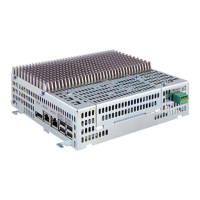

 To Next Page