AFTER SALES SUPPORT
1300 7 77 137
service@unclebills.com.au
MODEL: EA2258 PRODUCT CODE: 709435 07/2022
11
This Laser Range Finder, combined with the function of a common telescope and
laser distance-measuring instrument, can measure the distance from its scope
to an object in the distance. The Laser Range Finder’s advanced microprocessor
combined with digital technology calculates the distance by measuring the time
it takes for each pulse to travel from the Laser Range Finder to the target, and
back. Beyond distance the Laser Range Finder is capable of measuring height,
slope angles, speed and more. The Laser Range Finder is safe for your eyes, small
in size and lightweight. It only requires a single CR2 3V battery to function, which
is included for your convenience. Its measurement system is not affected by
inclement weather, nor is it affected by small obstructions such as wires, branches,
etc. The Laser Range Finder can be used in sports and recreational activities.
The Laser Range Finder can be operated in one of eight different available modes.
NOTE: When powering on the device, the Laser Range Finder will
automatically select the last mode chosen by the user before shutdown.
NOTE: The Laser Range Finder will shut down automatically if it is not used
within 15 seconds of turning it ON.
Ranging Mode
The Ranging Mode is used for the primary function of the Laser Range Finder
which is to measure distance to a distant object. This setting allows most targets
to be ranged up to 1000m. The minimum distance in this mode is 5m.
1. Put your dominant hand through the wrist strap
and rmly grip the Laser Range Finder. Bring the
eyepiece to your eye and point the Laser Range
Finder at a distant object. If the object is not clear in
your eld of vision, then rotate the eyepiece of the
Laser Range Finder until the object becomes clear.
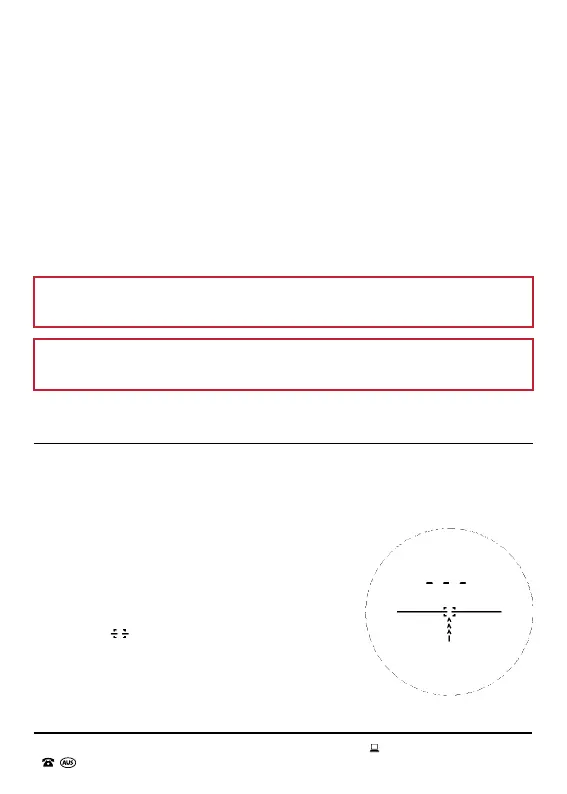
2. Press down the OPEN button. The lens will
display “ ”, which are the crosshairs (see
Fig. 2.1). If the lens displays a different mode,
then press the MODE button till you reach
the Ranging Mode display. Aim the Laser
Range Finder at your desired object. Press and
release the OPEN button (short press) until the
distance to the object is displayed on the lens (see Fig. 2.2).
INSTRUCTIONS
Fig. 2.1
M



 To Next Page