AFTER SALES SUPPORT
1300 7 77 137
service@unclebills.com.au
MODEL: EA2258 PRODUCT CODE: 709435 07/2022
14
INSTRUCTIONS (CONT.)
NOTE: If no distance is displayed on the lens display, there is a possibility that
the object is not in the measuring range of 5 to 1000m. In this case, you will
need to retarget and measure.
NOTE: The Laser Range Finder will shut down automatically if it is not used
within 15 seconds of turning it ON.
Flagpole Locking Mode
This advanced mode allows measuring distances to closer targets without
picking up distances to background targets that have stronger signal strengths
(reective capability). When more than one object has been acquired, only the
distance of the closest object will be displayed above the crosshairs.
1. Put your dominant hand through the wrist strap and rmly grip the Laser
Range Finder. Bring the eyepiece to your eye and point the Laser Range
Finder at a distant object. If the object is not clear in your eld of vision, then
rotate the eyepiece of the Laser Range Finder until the object becomes clear.
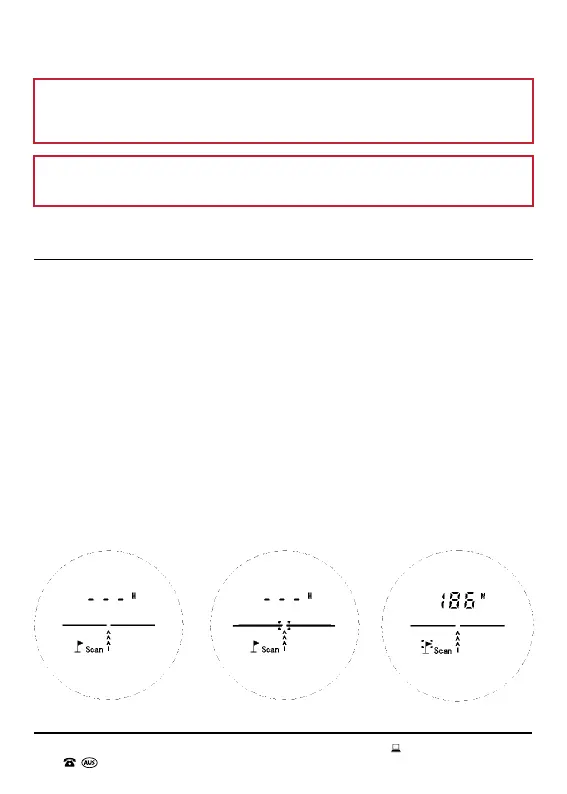
2. Press down the OPEN button. The lens will display the mode at which the
Laser Range Finder last shutdown. Keep pressing the MODE button till you
reach the Flagpole Locking Mode (see Fig. 4.1). Aim the Laser Range Finder
at the desired object. Hold down the OPEN button and the crosshairs will
start ashing (see Fig. 4.2). Once the Laser Range Finder nds a suitable
reecting object in measuring distance, the measuring distance will appear
up above the crosshairs and a solid dotted box will appear around the ag of
the agpole (see Fig. 4.3). This means that the Flagpole distance has been
Fig. 4.1 Fig. 4.3Fig. 4.2



 To Next Page