AFTER SALES SUPPORT
1300 7 77 137
service@unclebills.com.au
MODEL: EA2258 PRODUCT CODE: 709435 07/2022
20
INSTRUCTIONS (CONT.)
3. To ensure accuracy, hold the Laser Range Finder with a rm grip and keep it
steady till the measurement is displayed.
4. The default unit of measurement for horizontal distance is M (Metres). To
change the unit of measurement to Y (Yards), hold down the MODE button.
To switch between the two units keep holding down the MODE button.
Once the unit of measurement desired is selected, release the MODE button.
WARNING: Please always pass your hand through the wrist strap prior to
gripping the Laser Range Finder to avoid it from dropping and getting
damaged.
NOTE: If no distance is displayed on the lens display, there is a possibility that
the object is not in the measuring range of 5 to 1000m. In this case, you will
need to retarget and measure.
NOTE: The Laser Range Finder will shut down automatically if it is not used
within 15 seconds of turning it ON.
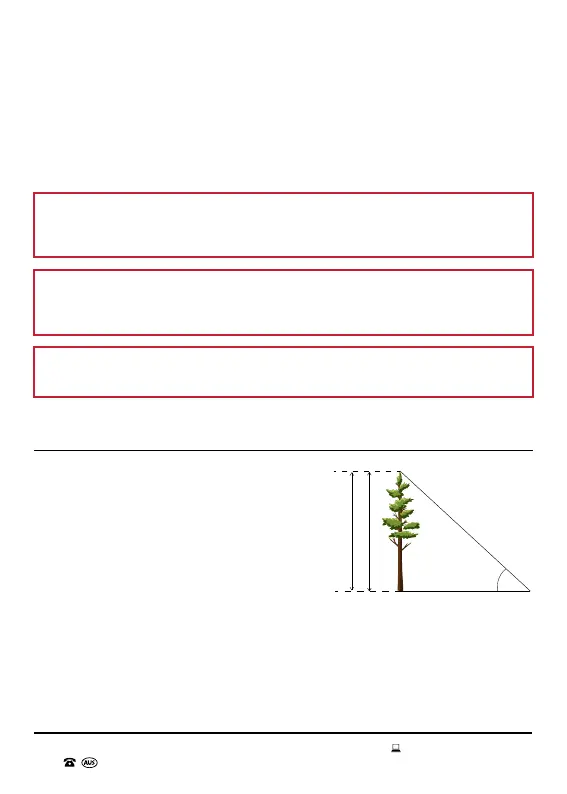
Altitude Difference Measurement Mode
The Altitude Difference Measurement Mode
or Vertical Height Measurement Mode
allows you to measure the vertical distance
between the top and bottom (height) of an
object or between a base and something
above it. The Laser Range Finder measures
the distance to the bottom and the top of an
object, and based upon the angle between
both points, calculates and displays the
altitude difference/vertical height (see
Fig. 8.1).
1. Put your dominant hand through the wrist strap and rmly grip the Laser
Range Finder. Bring the eyepiece to your eye and point the Laser Range
Finder at a distant object. If the object is not clear in your eld of vision, then
rotate the eyepiece of the Laser Range Finder until the object becomes clear.
A
Tree
Height
a
Fig. 8.1



 To Next Page