AFTER SALES SUPPORT
1300 7 77 137
service@unclebills.com.au
MODEL: EA2258 PRODUCT CODE: 709435 07/2022
9
GETTING STARTED
Before First Use
Prior to using your Laser Range Finder, please read all safety and operating
instructions thoroughly. Please ensure you follow the steps below before using
this device. We recommend you keep the original packaging for storing your
Laser Range Finder when not in use.
Unpack the product but keep all packaging material until you have made sure
your new Laser Range Finder is undamaged and in good working order. Plastic
wrapping can be a suffocation hazard for babies and children so ensure all
packaging materials are out of their reach.
Inserting the Battery
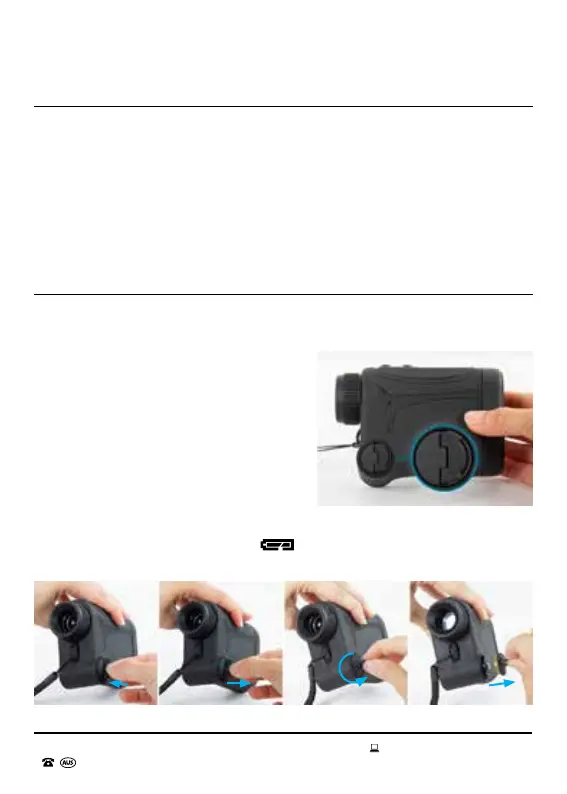
The battery compartment is located at the bottom left corner of the Laser Range
Finder (see Fig 1.1).
To access the battery compartment,
lift the battery cover tab (see Fig. 1.2
and Fig. 1.3) and rotate in anticlockwise
direction (see Fig. 1.4) till the cover pops
out (see Fig. 1.5). Insert the battery into the
compartment with the negative end rst.
Once the battery cannot go further, cover
the compartment with the battery cover.
Rotate tab in clockwise direction till it is
securely locked into position. At this point
the cover is secure so please do not rotate
further as excessive force can damage the
cover. You can now put down the tab, so it
is back to its original ush position. If
symbol appears on the display, the battery
is low. In this case, replace the battery.
Fig. 1.1
Fig. 1.2 Fig. 1.3 Fig. 1.4 Fig. 1.5



 To Next Page