15"
"
Other treatment parameters:
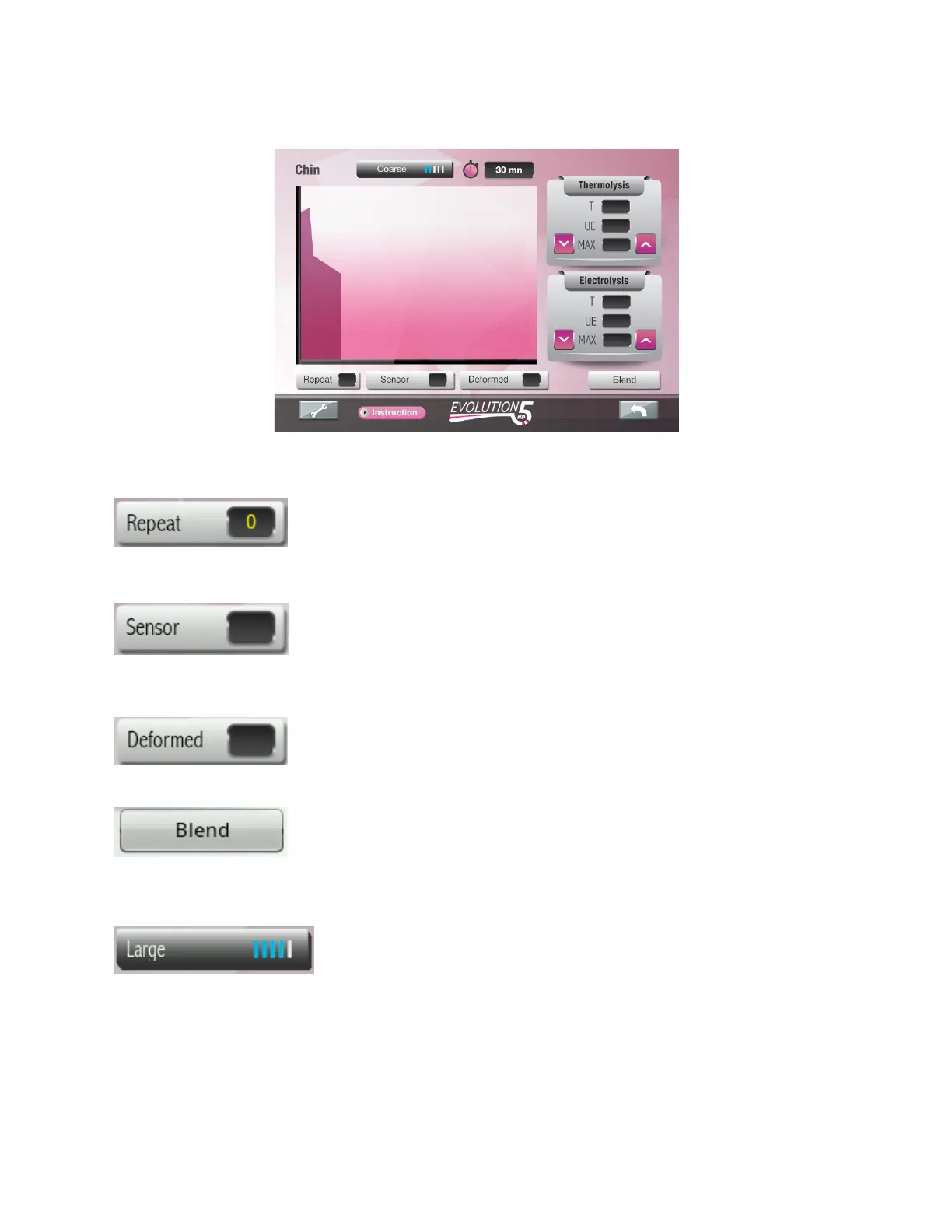
“Repeat” key can be used to repeat the modulation wave up to 3 times
without re-inserting the needle or having to activate the pedal. Pressing
this key will increment the repeat count until it reaches 3. Pressing
once more will reset it back to zero. Zero means that the modulation wave will discharge once. A
“Repeat 1” will discharge once and then repeat.
“Sensor” key is used to select the “Insertion Delay” “On”/ “Off”. The
blue color confirms that the “Insertion delay” function is “On”. When the
sensor key is activated, the current will automatically flow upon
detecting insertion. When Sensor is “Off” (black color), the current must be activated with the
pedal.
”Deformed” key is used to provide extra bursts of energy when
working with difficult or distorted hair follicles.
“Blend” key will only appear if Blend modality is available for the
selected area or hair type. Activating this key will switch modality from
“Thermolysis” to “Blend”. When blend is selected, an extra
“Electrolysis” dial will appear which can be used to modify galvanic parameters. Pressing the
“Thermo” key will switch back to Thermolysis mode.
The hair selection bar displays the selected hair. The blue lines
represent a graphic of the power output. For coarse hair, the power
is 80% of the total available power. To select a different hair size
while working in the same area, simply press this bar key, the hair selection icons will appear.


 To Next Page