SilverCrest STLK 8 D2
40 - English
9.2.5 Adjusting the fan speed
After it is switched on, the air cooler is initially set to fan speed 1. If necessary, you can adjust the air
flow to your requirements. The procedure is as follows:
1. Press the fan speed button (3). The mood light flashes blue twice and the fan moves to speed 2.
2. Press the fan speed button (3) again. The mood light flashes blue three times and the fan moves to
speed 3.
3. Press the fan speed button (3) again. The mood light flashes blue once and the fan reverts to
speed 1.
9.2.6 Switching the air cooler off
How to switch the air cooler off:
1. Press the On/Off button (2) to switch the air cooler off.
The fan switches off and the mood light goes out.
10. Cleaning the air cooler
WARNING! Disconnect the air cooler from the power supply before cleaning for safety reasons.
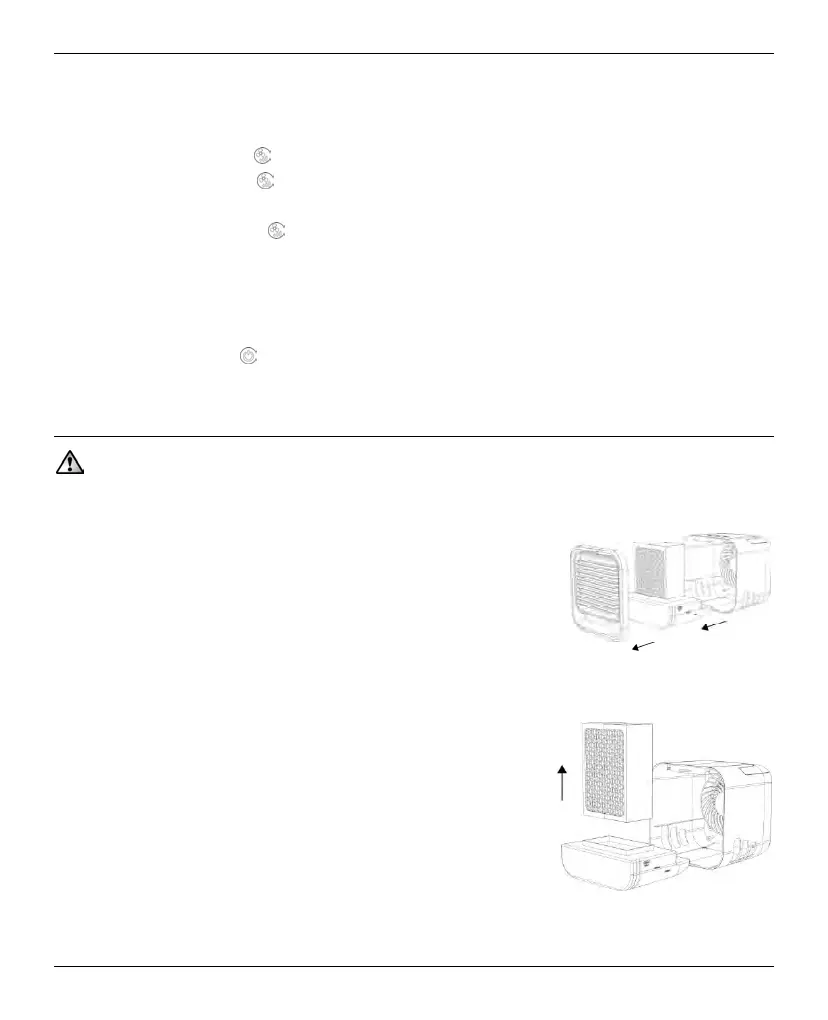
To clean the air cooler, open the housing (12) and disassemble the air cooler. The procedure is as
follows:
1. Disconnect the mains power adapter (B) from the mains socket and
disconnect the power adapter cable from the power input socket
(6) on the air cooler.
2. Press sightly with your finger on the top of the closure flap of the
front panel (1). This allows it to be detached from the housing.
3. Now pull the water reservoir (13) with the air filter (11) inserted
carefully forwards out of the housing (12).
4. Lift the air filter (11) up out of the water reservoir (13). If the air filter
is still wet, place it in a bowl, in the sink or in a wash-basin where it
can drip.



 To Next Page
 Loading...