19
ORIENTATION
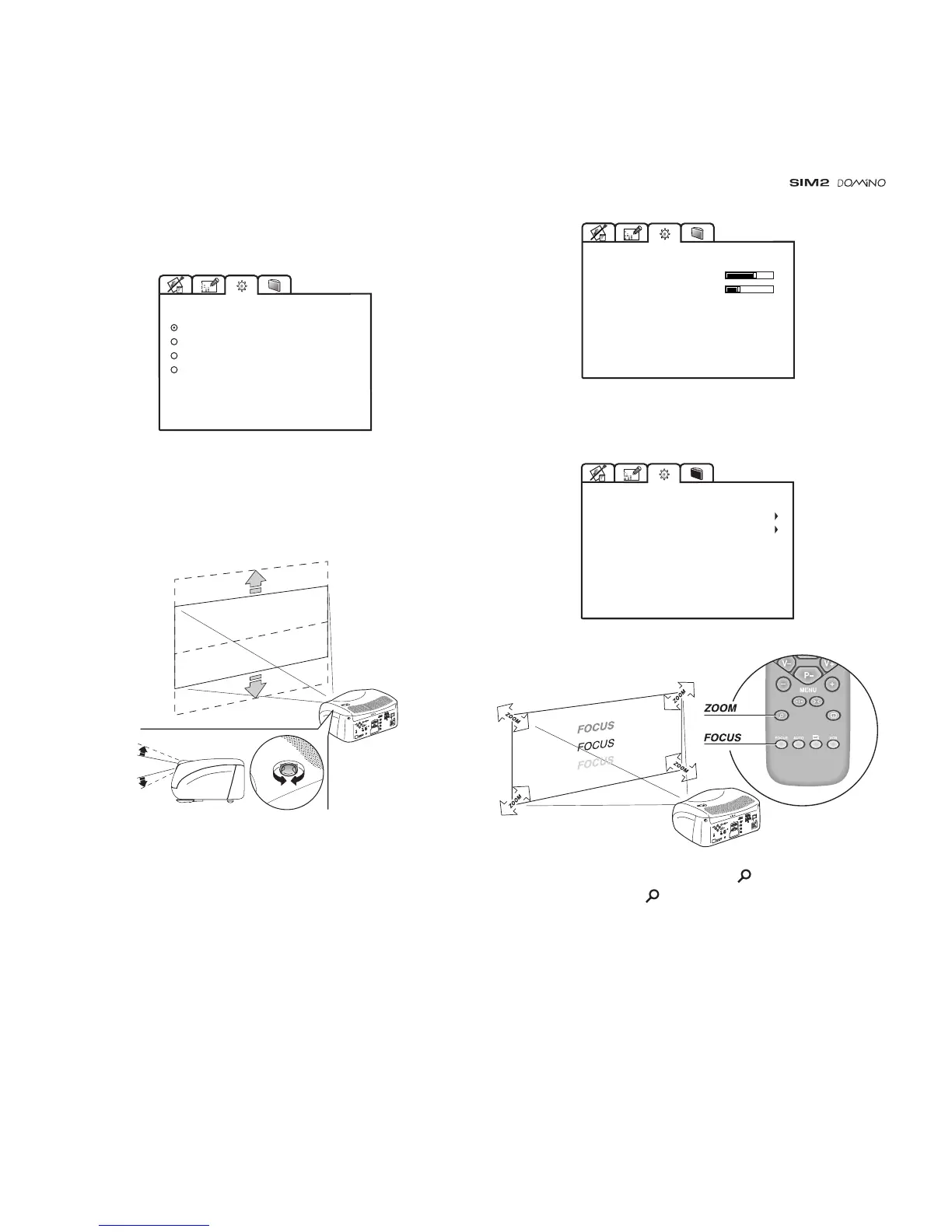
Select the option that best describes the installation i.e. desktop
front, ceiling front, desktop rear and ceiling rear.
FLOOR
CEILING
FLOOR-REAR
CEILING-REAR
ORIENTATION
HORIZONTAL / VERTICAL KEYSTONE
To obtain maximum quality of the projected image, we
recommend the installation of the projector on a level platform
parallel and central to the screen. In the event that the picture
is not correctly positioned use the lens shift feature
(Fig. 26)
.
C
-
S
Y
N
C
Fig. 26
Should it not be possible to centralize the image by adjusting
the lens height, tilt the projector and use the keystone
adjustment to restore the projected image to the correct shape.
0
-10
KEYSTONE
HORIZONTAL
VERTICAL
PROJECTION LENS
To adjust Focus and Size of the projected image, use the
lens settings.
FOCUS
ZOOM
PROJECTION LENS
C
-
S
Y
N
C
Alternatively, press keys Focus and (Zoom) on your re-
mote control, or the key -Focus-Esc on keyboard pad.
TEST PATTERNS
Displays a series of five test patterns, useful for the installation
of the projector.



 To Next Page