SFX-10 Video Mixer Basic Operations
16
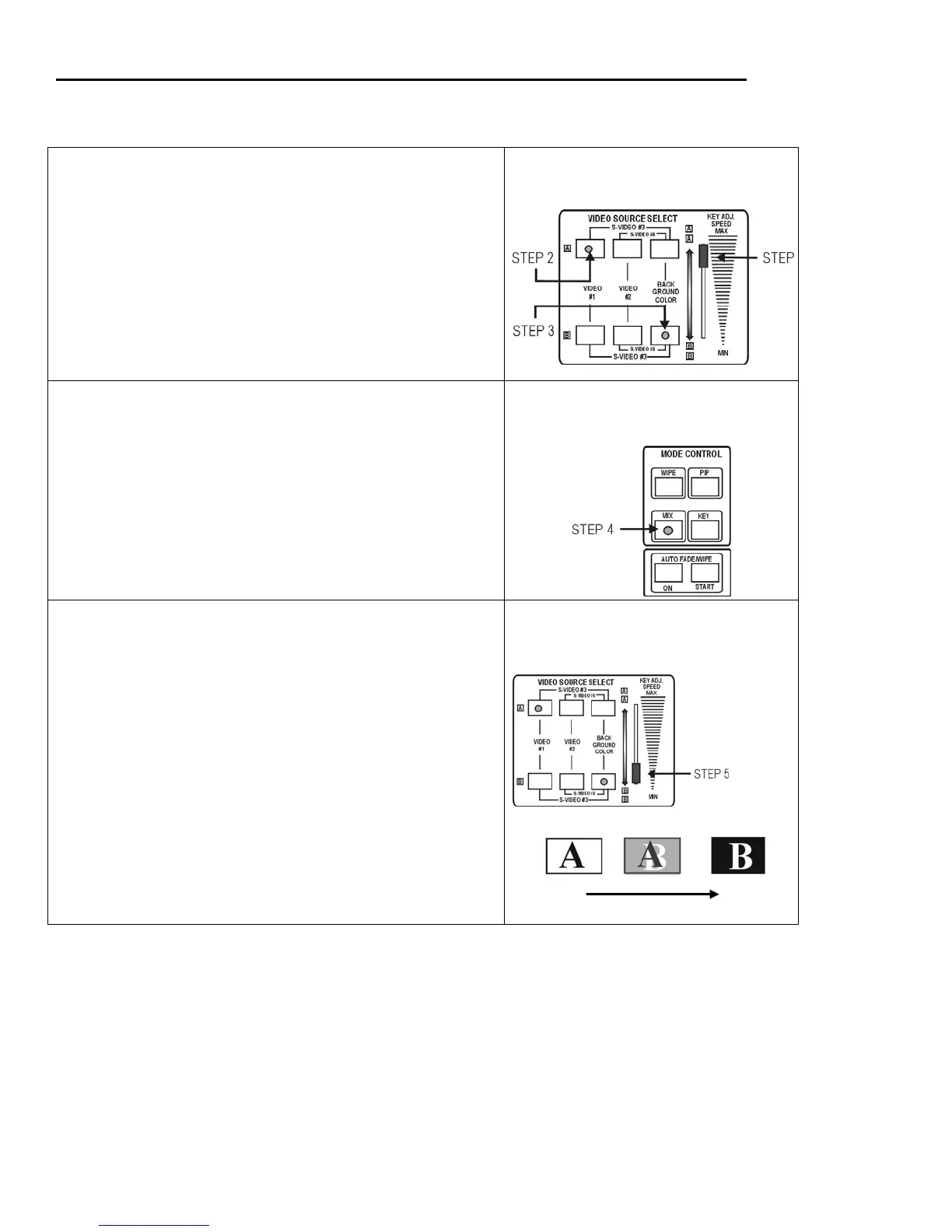
To Try a Typical MIX (Dissolve)
Step 1 Push the Video Source Select slide to the top “A”
position.
Step 2 Select any video input to be Source A by pushing the
appropriate button(s).
Note: To select S-Video #3 press both end buttons at the same time.
To select S-Video #4 press the middle and far right button at
the same time. Red LED lights indicate which input is
selected. (Video #1 is selected in the example at right.)
Step 3 Select any video input to be Source B by pushing the
appropriate button(s). (Background color is selected as
Source B in the example at right.) Move the slide control
between the “A” and “B” positions to view the two source
images.
Source Selection
Step 4 Press the MIX button (yellow) in the MODE CONTROL
panel.
TIP: MODE controls determine the type of transition you want to
make between Source A and Source B. The MIX selection
lets you dissolve from one image into another smoothly and
gradually. Use the MIX mode to fade to and from black.
Mode Selection
Step 5 Move the slide control from “Source A” to “Source B” to
make the transition. The example (bottom right) shows an
A to B mix.
TIP: The speed of the mix is determined by the speed with which
you move the control slide. Also, after completing the mix,
you can change the input for Source A and then return the
slide to the A position to dissolve into a new image.
Mix


 To Next Page