SFX-10 Video Mixer Basic Operations
6
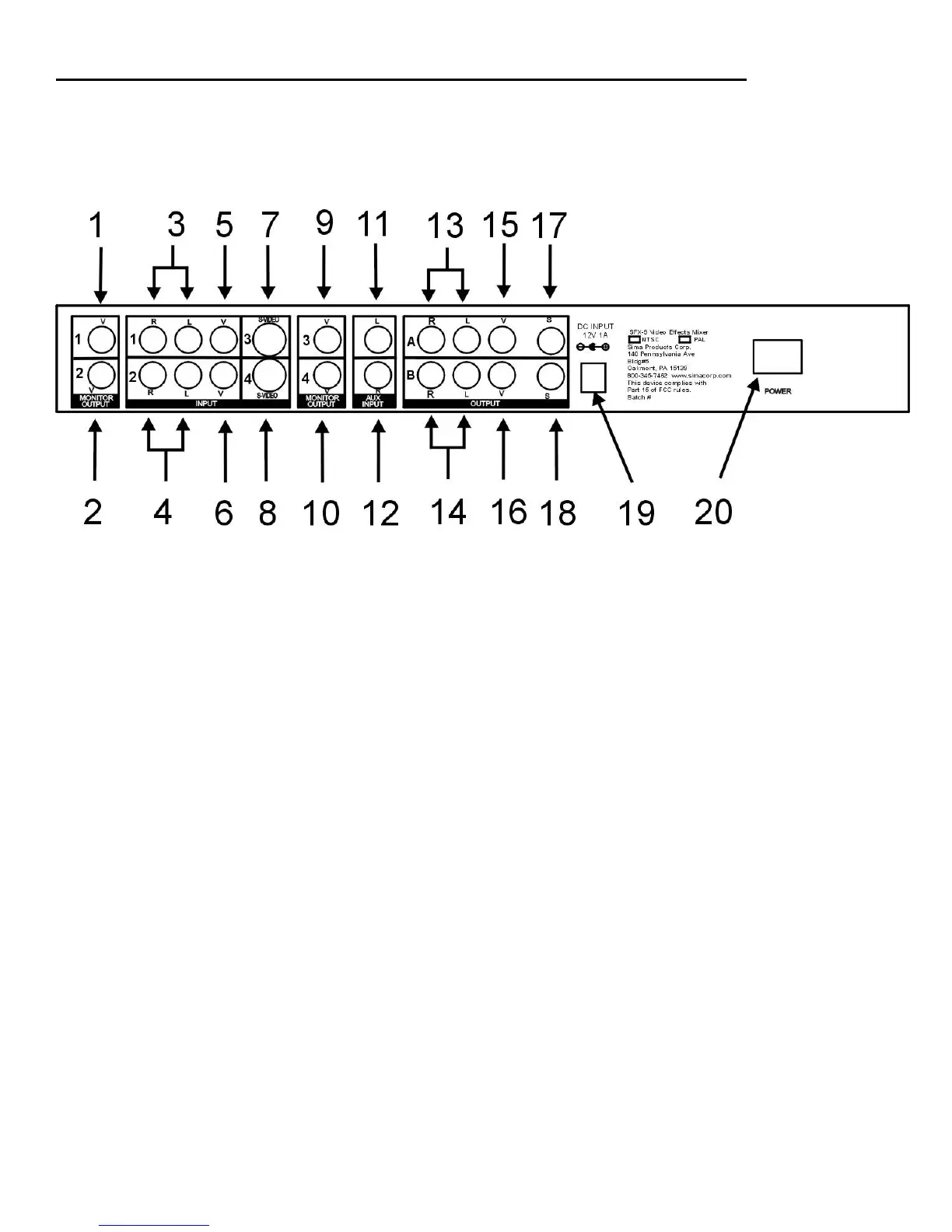
Rear panel diagram
1. Video Monitor Output (Source 1)
2. Video Monitor Output (Source 2)
3. Audio R / L Input (Source 1)
4. Audio R / L Input (Source 2)
5. Composite video Input (Source 1)**
6. Composite video Input (Source 2)**
7. S-video Input (Source 3)**
8. S-video Input (Source 4)**
9. Video Monitor Output (Source 3)
10. Video Monitor Output (Source 4)
11. Aux L audio input
12. Aux R audio input
13. Audio R / L Output *
14. Audio R / L Output *
15. Composite Video Output *
16. Composite Video Output *
17. S-Video Output *
18. S-Video Output *
19. 12V DC power jack
20. 12V DC power supply
21. 120V AC power cord
22. Off/On Power switch
* Note: The A and B outputs are identical sets of the same output signals. These
outputs do not correspond to the A and B source selections on the control panel.
** Note: the SFX-10 abides by copy protection regulations and will not accept copy-protected
signals. When a copy-protected signal is fed into the SFX-10, the unit will display a blank screen
and the Video Source Select Key light will flash.


 To Next Page