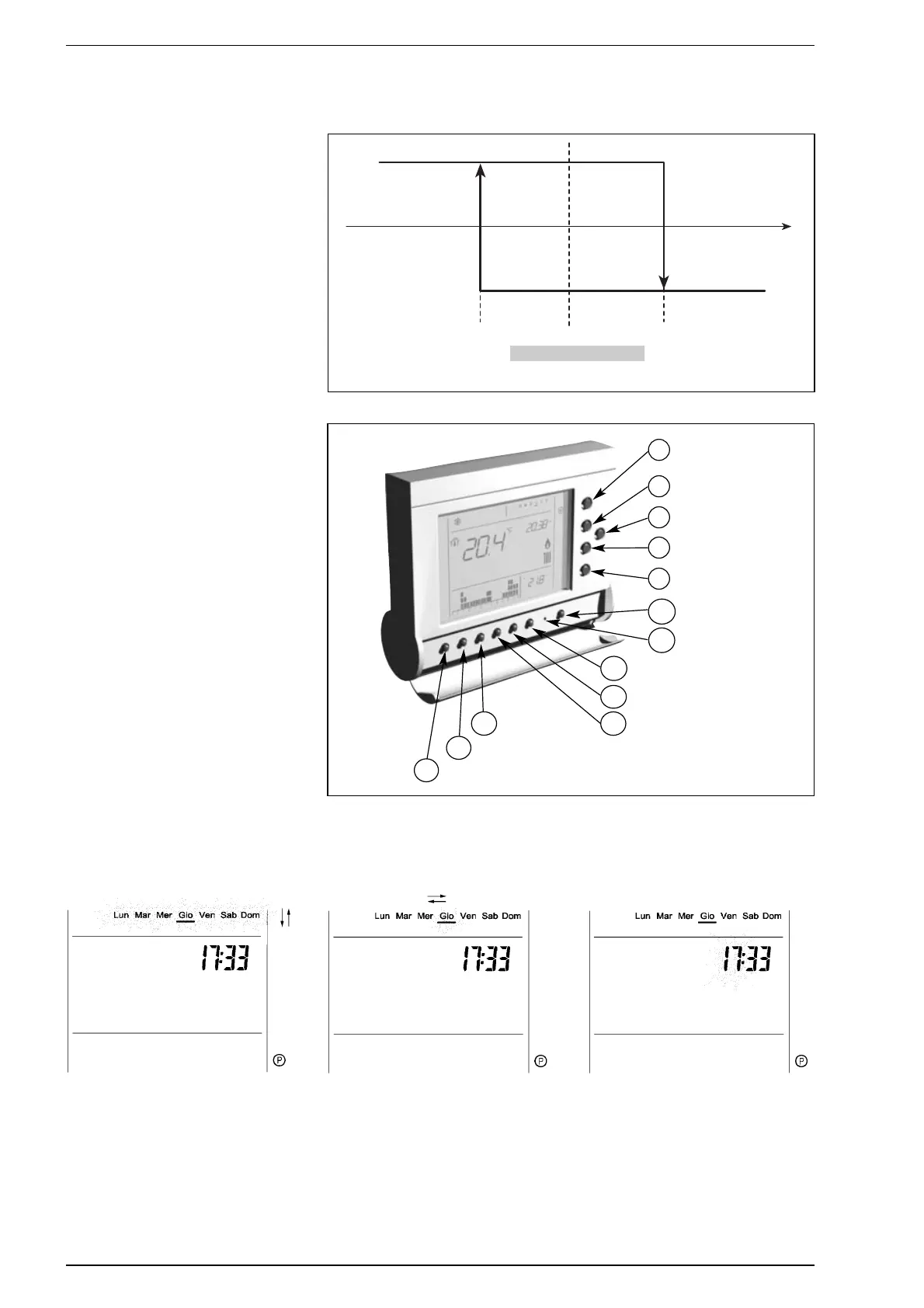
TEMPERATURE REGULATION
According to programming and the environ-
ment temperature detected, the remote
control will generate the request for hea-
ting and will activate the output relay by
hysteresis (fig. 7).
CONTROLS (fig. 8)
Programming and use of the device are
explained in a standard manner and graphi-
cally with certain simple commonly used
symbols.
In programming and configuration, only
what is significant for the operation in que-
stion is displayed, and what is being modi-
fied flashes on and off (“blink” effect).
LANGUAGE/DATE/TIME SETTING
The key [CONFIG.] gives access to the
“CONFIGURATION” of the remote control,
where it is possible to:
- select the day display mode: Italian or
English
- set the current day of the week
- set the current hour
- set the current minutes
- select the time display mode:
0-24/AM-PM
- total resetting of the device or the manu-
facturer’s setting
71
Fig. 7
∆Turn ON ∆Turn OFF
0.5°C 0.5°C
[ + ] and [ - ]: to select Italian or English
[OK]: proceed with setting the day
[CONFIG.]: exit configuration
[ + ] and [ - ]: to set the day
[OK]: allows to proceed with setting the
time
[CONFIG.]: exit configuration mode
[ + ] and [ - ]: to set the hour
[OK]: allows to proceed with setting the
minutes
[CONFIG.]: exit configuration mode
The flashing part of the display is in grey
LANGUAGE DAY TIME
Fig. 8
Change of functioning
mode
Increase
+
Decrease
–
Next page
Configuration
CONF.
Programming
PROG.
Reset
Paste
Incolla
Copy
Copia
Heating setting
RISC
Sanitary water setting
SAN
S
Reset
M
Confirmation
ok
Plant filling
RIEMP.




 To Next Page