EasyManua.ls Logo

SIMOLIO SM-828D1 - User Manual

SIMOLIO SM-828D1
12 pages
Print Icon
To Next Page IconTo Next Page
Loading...
2.4GHz Wireless TV Earphones
SM-828D1/
SM-828D2
Support Email:
support@simolio.com (for NA/AU)
support_uk@simolio.com (for UK)
User Manual
Support Email:
support@simolio.com (for NA/AU)
support_uk@simolio.com (for UK)
TO
N
E
+ VOL -
R
L

Questions and Answers

  • R
    Rebecca MaloneAug 14, 2025
    What to do if SIMOLIO SM-828D1 doesn’t work, or has no voice received?
    • M
      Mark Schultz Jr.Aug 14, 2025
      If your SIMOLIO Headphone isn't working, and you're not receiving any sound, it might be because the TV volume is set to zero. Adjust the TV volume to a sufficient level. If you want to mute the TV, click the MUTE key on the TV remote control or go to TV settings to turn OFF the Internal TV speaker. Also, make sure the earphone is within the transmitting range of the transmitter; move it closer if necessary.
  • P
    Paige HayesAug 22, 2025
    How to fix SIMOLIO Headphone voice heard only with one ear?
    • R
      Randy MaynardAug 22, 2025
      If the voice is only heard in one ear with your SIMOLIO Headphone, try these steps: 1. Adjust the balance control to ensure it's properly set. 2. If the audio source is mono and the transmitter is set to STEREO, switch the transmitter to MONO. 3. If using RCA connection, try waggling the RCA audio cable or re-inserting the RCA audio cable to ensure they are fully inserted into the RCA audio out port of the TV or other audio source. 4. Try using another audio cable or another audio device to rule out a faulty cable or audio out port.
  • M
    maria30Aug 29, 2025
    What to do if SIMOLIO SM-828D1 Headphone sound cuts in and out or has noise?
    • T
      Taylor JonesAug 29, 2025
      If you're experiencing sound cutting in and out or noise with your SIMOLIO Headphone, here's what you can check: * Ensure the audio source's volume isn't too low; adjust it properly. * Make sure the battery is fully charged. * Move the transmitter away from metal objects or electromagnetic interference. * Verify the connection between the transmitter and the audio source is secure. * Try connecting to a different audio output port to rule out a defective port. * If listening to streaming media, position the transmitter at least 4 feet away from WiFi devices to avoid interference.
  • B
    Bethany KochNov 6, 2025
    Why my SIMOLIO SM-828D1 Headphone doesn’t work, or has no voice?
    • T
      Tina BaileyNov 6, 2025
      If your SIMOLIO Headphone isn't working, and you're not receiving any sound, there might be a few reasons: * Ensure the transmitter is powered on by switching to MONO or STEREO. * Check that the AC adapter and audio cable are securely plugged into the transmitter. * If using an optical cable, unplug any analog audio cables from the transmitter. * Verify the connection between the transmitter and the audio source is correct and secure. * Make sure the audio source (TV, etc.) is on and the volume isn't too low. * Confirm that the TV audio output is enabled and set to "External TV Speakers" in your TV settings. * Ensure the audio output format of your TV or AV devices is set to PCM. * Try switching the earphone off and on again. * Check that the battery is properly inserted...

Summary

Important Safety Instructions

General Safety Precautions

Covers essential handling, environmental, and operational safety guidelines for the product.

Pacemaker Safety Warning

Advises consulting a physician before use with a pacemaker or medical device.

Overview

System Purpose and Benefits

Explains the purpose and benefits of the wireless TV hearing assistance system.

Features

Hearing Assistance and Protection

Highlights voice highlighting, noise cancelling, and hearing protection features.

Connectivity and Audio Options

Details long distance transmission, by-pass, balance, tone, and mono/stereo settings.

Charging and Power Management

Covers multiple charging solutions and auto power-off function.

Multi-Listener Support

Explains the system's ability to support multiple receivers from one transmitter.

Product Diagram

Component Illustration

Illustrates the physical components and ports of the transmitter and earphone.

Package Contents

Included Items List

Lists all items included in the product packaging for setup and use.

LED Indication

Transmitter LED Status

Describes the meaning of LED indicators on the transmitter for status monitoring.

Earphone LED Status

Explains the meaning of LED indicators on the earphone for status monitoring.

How to Use

Initial Setup and Powering On

Guides on checking TV output options and powering the transmitter and earphone.

Digital Optical Connection

Details the process of connecting the transmitter to a TV using a digital optical cable.

RCA Analog Connection

Explains how to connect the transmitter using RCA analog audio cables.

TV Audio Settings for RCA

Provides instructions on configuring TV audio output and speaker settings for RCA connection.

3.5 mm;AUX Analog Connection

Details connecting the transmitter via 3.5mm/AUX analog audio cable.

TV Audio Settings for 3.5 mm;AUX

Guides on TV speaker settings and audio output for 3.5mm/AUX connection.

Special Connection Cases

Covers connections for digital coaxial ports and by-pass features.

TV Audio Format Settings

Explains necessary TV audio format settings for special connections.

Simultaneous Use

Instructions for using multiple sets of earphones simultaneously.

Charging the Earphone

Details methods for charging the earphone using the stand or USB cable.

Customizing Your Device Settings

Guides on adjusting balance, tone, and mono/stereo options.

Ear Tip Maintenance

Provides instructions for cleaning and maintaining the ear tips.

Troubleshooting

Earphone No Voice or Not Working

Addresses issues with the earphone not producing sound or functioning.

Sound Cuts In;Out or Noise Issues

Helps resolve problems with intermittent sound or unwanted noise.

Mono Audio or Single Earbud Sound

Troubleshoots issues where sound is only heard from one ear or source is mono.

Earphone Charging Problems

Provides solutions for the earphone failing to charge successfully.

No Sound with By-pass Feature

Addresses lack of sound when using the by-pass feature with sound systems.

Limited Warranty

Warranty Coverage and Exclusions

Details the 12-month warranty period, coverage, and common exclusions.

Technical Specifications

System and Performance Details

Lists technical data including transmission mode, frequency, range, and battery life.

Overview

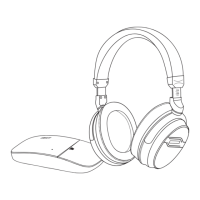
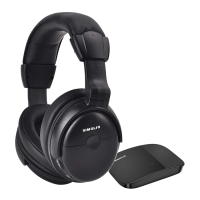
The SIMOLIO SM-828D1 / SM-828D2 is a 2.4GHz wireless TV earphone system designed to provide a customized hearing experience for television viewing, offering both hearing assistance and protection. It aims to deliver crystal-clear sound without disturbing others and to prevent hearing damage often associated with prolonged use of normal wireless headphones at high volumes.

Function Description:

The core function of the SIMOLIO SM-828D1 / SM-828D2 is to transmit TV audio wirelessly to the user's ears. It employs 2.4GHz Digital Automatic Frequency-Hopping Spread Spectrum (FHSS) technology to ensure a stable, clear, and interference-free wireless connection. This system is particularly beneficial for individuals with hearing impairments, as it addresses the limitations of traditional hearing aids and standard headphones by selectively enhancing TV dialogue while reducing background noise.

The system includes a transmitter and one or two earphones (depending on the model, SM-828D1 for one earphone, SM-828D2 for two). The transmitter connects to the TV or other audio source, and the earphones receive the audio signal wirelessly.

Usage Features:

  1. Wireless Freedom and Range: The 2.4GHz FHSS technology provides a wireless range of up to 100 feet without obstacles, allowing users to move freely while listening to their TV programs.

  2. Voice Highlighting Technology: This feature is designed to reduce TV background sounds, making dialogues stand out and easier to understand. This is especially helpful for those who struggle to distinguish speech from other audio elements.

  3. Noise Cancelling Technology: The earphones incorporate noise-cancelling technology to minimize ambient noise, helping users focus on the TV dialogues without distractions.

  4. Automatic Signal Control: A special circuit design in the system adjusts for sudden volume changes, ensuring a stable output volume and protecting users' hearing from unexpected loud sounds.

  5. BALANCE Control: Users can adjust the right/left volume balance using a dial on the headset. This allows for personalized sound adjustment, ensuring both ears hear equally well, which is crucial for individuals with varying hearing abilities in each ear.

  6. TONE Control: The transmitter offers a TONE control with options for Treble, Normal, and Bass. This allows users to select the optimum sound parameters based on their individual sound frequency sensitiveness, ensuring clear reception of the target audio source.

  7. MONO/STEREO Optional: The system provides a switch to select between STEREO mode for enjoying Hi-Fi music quality and MONO mode for clearer TV dialogues. If a user can only hear sound with one ear despite correct balance adjustment, switching to MONO mode on the transmitter can resolve this.

  8. Multiple Charging Solutions:

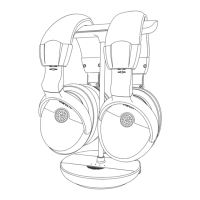
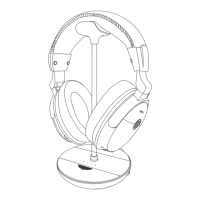
    • Magnetic Charging Stand: The earphones can be conveniently placed on the magnetic charging stand for recharging. The stand's LED indicator shows charging status (solid red for charging, green for complete).
    • USB Charging Cable: The included micro USB charging cable allows users to connect the earphone to a compatible USB charger (e.g., phone charger, PC USB port, TV USB port) for charging.
    • Spare Battery Compartment: The transmitter base includes a spare battery charging compartment, ensuring a fully charged spare battery is always ready for quick replacement when the earphone battery runs low.
  9. Auto Power Off Function: To conserve power, the earphone automatically powers off after 10 minutes of no signal reception.

  10. Multi-Receiver Support: One transmitter can support multiple SIMOLIO 2.4GHz wireless receivers (earphones), allowing several listeners to enjoy the same audio source simultaneously. When using two sets in the same house, they should be placed at least 10 meters apart.

  11. Good Compatibility: The system is compatible with a wide range of TVs, cable TV boxes, set-top boxes, DVD players, and other audio devices that have Digital Optical, RCA, or 3.5mm AUDIO OUT ports.

  12. "By-pass" Feature: This unique feature allows the wireless TV earphone system to be used simultaneously with a soundbar or other audio system connected to the same TV. This means users can enjoy personalized audio through the earphones while others listen through the soundbar.

  13. Variety of Ear Tips: The earphones come with replaceable, washable, and durable silicone ear tips. Additionally, memory foam ear tips are provided to reduce irritation and fatigue during extended use. It is recommended to replace memory foam ear tips every 30 to 60 days for comfort and hygiene.

  14. Easy Setup: The manual provides detailed instructions for connecting the transmitter to various TV/audio source output options, including Digital Optical, RCA Analog, and 3.5mm/AUX Analog connections. It also guides users on configuring TV audio format and speaker settings to ensure proper sound output.

Maintenance Features:

  1. Cleaning Ear Tips: The silicone ear tips can be easily removed, cleaned with warm soapy water, rinsed thoroughly, dried, and then reattached to the earphone. This helps maintain hygiene and comfort.

  2. Battery Management: The system supports rechargeable Li-ion batteries. The spare battery compartment in the transmitter ensures continuous use by allowing quick battery swaps. Proper insertion of batteries and regular charging are emphasized to prevent issues.

  3. Troubleshooting Guide: The manual includes a comprehensive troubleshooting section that addresses common issues such as no sound, sound cutting in and out, noise, and charging problems. It provides clear causes and solutions for each scenario, empowering users to resolve minor issues independently.

  4. Product Care: Users are advised to keep the product dry, avoid extreme temperatures, keep devices away from liquid, and use only a slightly damp cloth for cleaning. The importance of using the supplied power adapter and setting up the products on a stable, dust-free surface is also highlighted.

  5. Interference Avoidance: To prevent electronic wave interference, users are instructed to place the product away from microwave ovens, mobile phones, and WiFi routers.

  6. Long-Term Storage: When not in use for an extended period, it is recommended to switch off the transmitter and receiver and unplug the power adapter from the wall socket.

SIMOLIO SM-828D1 Specifications

General IconGeneral
Frequency Response20Hz-20kHz
TypeOver-Ear
Driver Size40mm
Impedance32Ω
Wireless Range10 meters
Power Supply of HeadphoneBuilt-in rechargeable battery
Charging TimeAbout 3 hours
Technology2.4GHz RF
Power Supply of TransmitterDC 5V/1A

Related product manuals