EasyManua.ls Logo

SIMOLIO SM-826D - User Manual

SIMOLIO SM-826D
10 pages
Print Icon
To Next Page IconTo Next Page
Loading...
SM-826D
User Manual
SM-826D
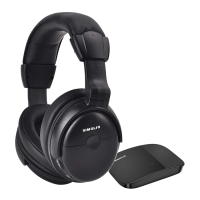
2.4GHz Wireless TV Headphones
Sales & Support Email: support@simolio.com (for NA/AU)
support_uk@simolio.com (for UK)
TECHINICAL SPECIFICATIONS
Signal-to-noise ratio
Transmission mode
Automatic Frequency-Hopping Spread Spectrum
Carrier frequency
2.4GHz ISM BAND
Power Supply
output: DC 5V, 1A input : 100~240V
built-in 500mAh Li-ion Battery
Transmitter
Headphone
Frequency response
Distortion
1%
20 Hz – 20 KHz
70dB
Range:
Up to 100 feet (without obstacles)
Working time 10 hours under wireless hearing mode
Charging time
3 hours
plug of power cable : 4.0*1.7mm
USB charging cable
18
This warranty is provided at the discretion of Simolio Ltd. And does not cover
cosmetic damage or damage due to acts of nature, accident, misuse, abuse,
negligence, commercial use, or modification of or to any part of the product.
Accessories such as audio cables, power adapter and perishable items such as ear
tips and batteries are not covered under this warranty.
Please contact: support@simolio.com (for NA/AU) or support_uk@simolio.com
(for UK) and provide your Amazon order ID to register the warranty.
LIMITED WARRANTY
12 months limited warranty: The 12 months warranty will cover defects in
manufacturing and product failure for a period of 12 months from the original
date of purchase. The warranty period is not extended if we repair or replace a
warranted product.
0
3
0
2
01
Headphone
can not be
charged
successfully
Faulty Power source.
Please change another power source
like PC USB port, socket, different
USB charger (5V/500mA-2A).
Faulty USB charging cable.
Please change another workable USB
charging cable to see if it works.
Phenomena Causes Solutions
Part 3

Questions and Answers

  • K
    Kathryn AndrewsAug 6, 2025
    Why does my SIMOLIO SM-826D Headphone sound cut in and out?
    • D
      Daniel CarrAug 6, 2025
      If the sound on your SIMOLIO Headphone cuts in and out, or if you're experiencing noise, consider these potential causes: * Ensure the audio source's volume is properly adjusted. * Charge the headphone's battery fully. * Make sure the connection between the transmitter and the audio source is firm. * Connect to another audio out port to exclude the possibility of defective audio out function. * Keep the transmitter away from metal objects or electromagnetic interference. * If using streaming media, place the transmitter base at least 4 feet away from smart WiFi TV/WiFi TV box/TV sticks.
  • J
    James PooleAug 14, 2025
    Why is SIMOLIO Headphone audio only in one ear?
    • A
      Austin NormanAug 14, 2025
      If you only hear sound in one ear with your SIMOLIO Headphone, here are a few things to check: * If using RCA connection, ensure the RCA audio cable is fully plugged in at both ends (TV/audio source and transmitter); try wiggling or re-plugging the cable. * If the audio source is mono, switch the transmitter to MONO. * Try using a different audio cable or audio device to rule out a faulty cable or audio out port.
  • C
    Christina MasseyAug 21, 2025
    What to do if SIMOLIO SM-826D TV audio output is disabled?
    • C
      Chelsea BradfordAug 21, 2025
      If the TV audio output is disabled or not activated, follow the instructions in your TV user manual to change the TV’s AUDIO OUT setting to 'External TV Speakers'.
  • C
    Clifford RodriguezOct 29, 2025
    How to fix SIMOLIO Headphone when no sound?
    • M
      michael29Oct 29, 2025
      If your SIMOLIO Headphone isn't working or you're not receiving any sound, there are several potential causes and solutions: * Ensure the headphone is switched on. If it is powered off automatically, switch it off and then on again. * Check that the transmitter is powered on by switching to MONO or STEREO. * Verify that the AC adapter and audio cable of the transmitter are securely plugged in. * Make sure the connection between the transmitter and the audio source is correct and in place. * Confirm that the audio sources are turned on and their volume is at a sufficient level. * If connected with an optical cable, unplug the analog audio cable from the transmitter. * Adjust the TV volume to an audible level or disable the internal TV speaker via the TV settings. * Ensure t...

Summary

Safety Instructions

Pacemaker Safety

Consult physician before using product with pacemaker or medical device.

Features

LED Indication

How to Use

Check TV;Audio Source Output Options

Verify TV/audio source output options before proceeding with setup.

Connect Transmitter to TV;Audio Source

Guides connection to TV/audio source via various cable types.

Troubleshooting

Headphone Not Working or No Voice

Addresses issues like no power, poor connection, or low volume.

Sound Cuts In and Out or Noise

Troubleshoots interference, connection issues, or low battery.

Voice Heard Only in One Ear

Resolves issues related to audio source mono/stereo settings or faulty cables.

SIMOLIO SM-826D Specifications

General IconGeneral
TypeOver-Ear
Wireless TechnologyBluetooth
Weight9.9 ounces
Connectivity TechnologyWireless
Power SourceBattery
Driver Unit40mm
Frequency Response20Hz - 20kHz
Impedance32 Ohms
Ear CouplingOver-Ear
MicrophoneYes
Special FeaturesNoise Cancellation
Connector3.5mm
Wireless Range10 meters
Cable Length1.2m

Related product manuals