15
•
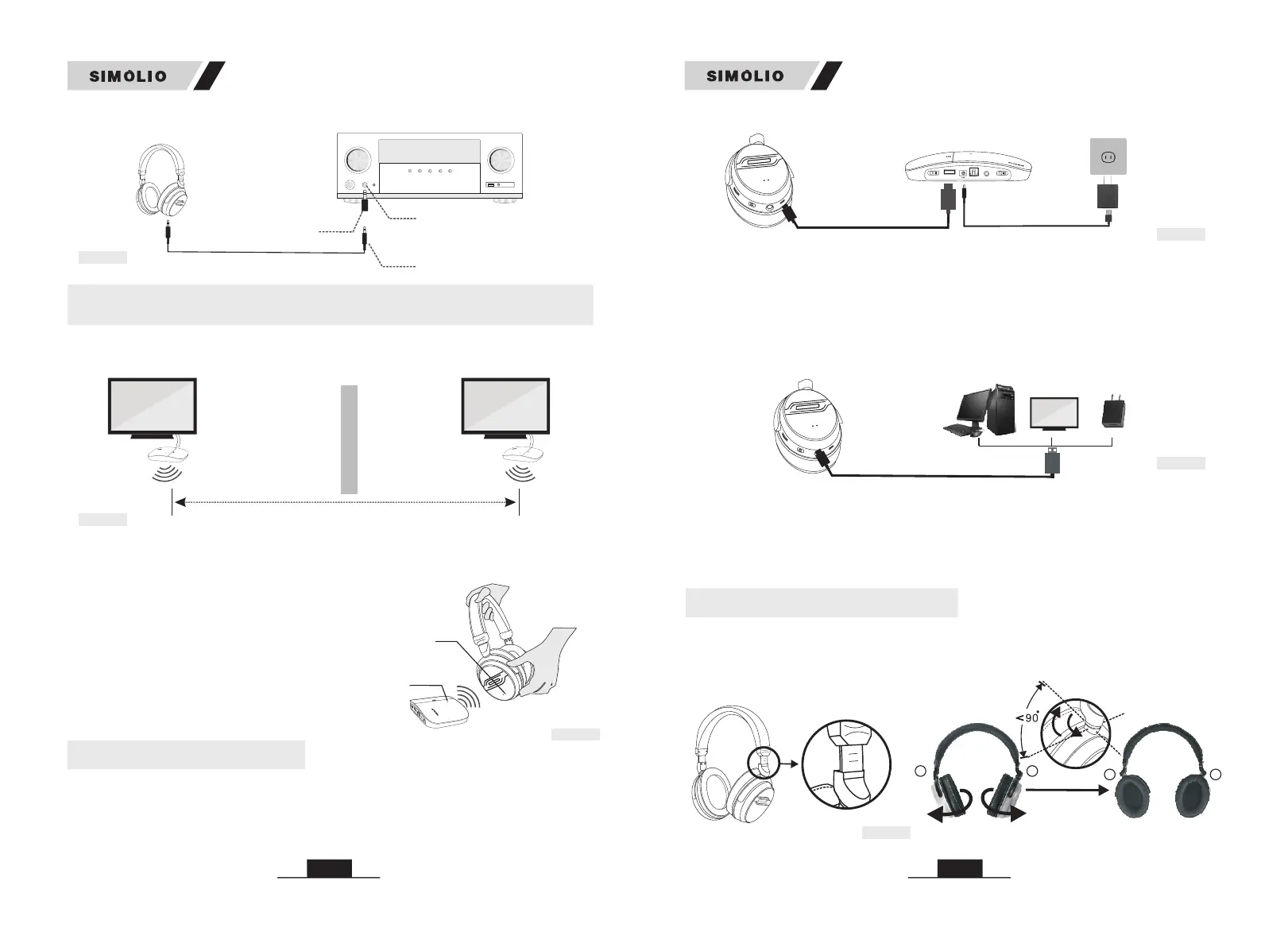
headphone and make sure the green LED indicators are facing towards each other
for about 5 seconds.
Take the headphone close to the transmitter, then turn on the transmitter and
Note: If two headphones are used on
the same TV, only one transmitter
needs to be connected, because one
transmitter supports multiple
headphones to work simultaneously.
• The two sets of SIMOLIO 2.4GHz units should be put at least 10 meters away
from each other when using them simultaneously.
Fig 3-23
AV Receiver
6.35mm Audio adapter
(purchase separately)
3.5mm Audio Cable
6.35mm Phone jack
4. Use Two Sets of SIMOLIO 2.4GHz Wireless TV Headphones
Simultaneously in the Same House
Fig 4-1
room 1 room 2
SM-826D
(Transmitter 2)
SM-826D
(Transmitter 1)
Distance >10M (at least)
Pho nes
14
SM-826D
SM-826D
Notes: The charging time is approx. 3 hours. Before using the spare rechargeable
battery for the first time, charge it for at least 3 hours. The headphone battery will
last around 10 hours on a full charge, but will last a lesser or greater amount of
time depending on the average volume level of the headphone.
1) Please make sure the headphones are being worn properly. Each side of the
headphone has a letter to guide the wearer: "L" for left and "R" for right. You can
adjust the retractable headband to fit you better.
6. Customizing your SM-826D
POWER OUT
DC 5V/500mA
STEREO
MONO
OFF
OFF/ON
DC 5V
POWER IN
OPTICAL IN
AUDIO IN
BASS
TREBLE
NORMAL
TONE
(Transmitter)
micro USB charging cable
B: Through the universal USB charger/outlet
You can charge your headphone by plugging the micro USB power cable into a
phone charger (5V/500mA-2A output), PC USB port, TV USB port or any other
USB outlet. You don't need to go back to the transmitter base next to the TV to
charge. It takes about 3 hours to fully charge the headphones. The LED will turn
RED during charging and turn off once charging is completed.
(Headphone)
micro USB charging cable
(phone charger / PC USB port/
TV USB port / any other USB outlet)
A: Through the USB charging port on the rear of the transmitter base
You can use the included micro USB charging cable to connect the headphone to
the USB charging port on the rear of the transmitter base for charging.(make sure
the transmitter base is powered on)
5. Charge the Headphone
Fig 5-1
Fig 5-2
Power
adapter
Fig 6-1
(Headphone)
Wireless Receiving
Indicator (Green)
(Transmitter)
Power &Working
Indicator (Green)
POWER OUT
POWER OUT
DC 5V/500mA
STEREO
MONO
OFF
OFF/ON
OFF/ON
DC 5V
POWER IN
POWER IN
OPTICAL IN
AUDIO IN
BASS
TREBLE
NORMAL
TONE
TONE
Fig 4-2
(Receiver)
LR
LR
03
02
01
03
0
2
01


 To Next Page