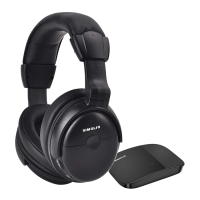
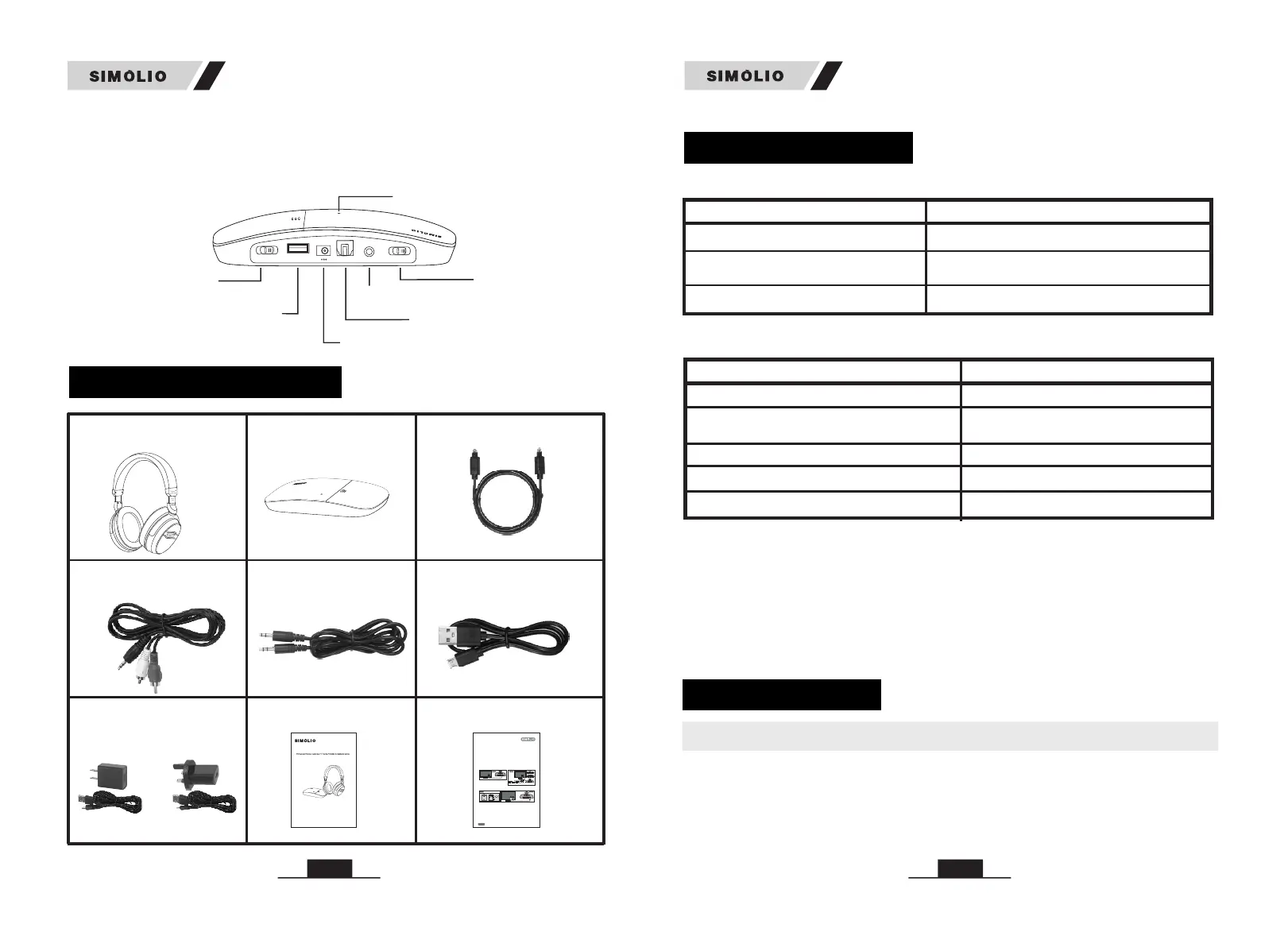
2. Transmitter
04
PACKAGE CONTENTS
LED INDICATION
LED Status
Transmitter Status
Green LED flashes slowly No audio signal in within 5 minutes
Bright green LED lighting steadily
Dark green LED lighting steadily
In standby mode (no audio signal in
for more than 5 minutes)
Wireless working mode
LED Indicators of the Transmitter
User Manual
Quick Guide
USA
UK
Power Adapter
5. If no Optical Audio Out port available, we suggest to connect the transmitter base to the red and white
RCA ports which labeled as AUDIO OUT of your TV. If the RCA AUDIO OUT port of your TV is unavailable,
you can connect the transmitter base to your
which is hooked up with your TV.
Smart TV box/Cable TV box/Set-top box/DVD/other audio
device
TV Rear
Transmitter
3.5mm
Audio In
Audio Out
TV or Cable Box
QUIC K GUIDE for SM-823D, SM-824D & SM-825D
IMPORTANT:
When use it as a wireless TV headset, the working
indicator is on. As a personal sound amplifier, the MIC indicator is on.
TV/Smart TV box/
Cable TV box/Set-top box/DVD/other audio device
1. The unit will not work with the optical audio if the optical cable is carrying a Dolby Digital or DTS signal.
In this case, set the Audio Out Format of your TV and TV related AV devices (e.g., cable box/DVD etc) to
PCM to get the unit to work.
2. Three different audio cords: digital optical cord, RCA cord and 3.5mm cord. In the end, only one of these
cords is needed to complete the installation.
3. This device is a wireless TV headset as well as a personal sound amplifier. You can find a MIC ON/OFF
button at the rear of headset. It is designed for hearing impaired people to clearly hear what people’s
talking to him/her nearby when watching TV. Just press MIC ON/OFF button , you can turn this headset to
a personal sound amplifier which could amplify the people's voice around. When you want to back to
watching TV, just press the MIC button again.
4.We suggest to hook up the transmitter base to the Optical Audio Out port of your
in priority, for enjoying the super sound quality.
For streaming media watching (Netflix, Amazon Prime Video, etc.), place the transmitter base at least 4
feet away from your smart WiFi TV/WiFi TV box/TV sticks to avoid interference.
green
red
Page 1
TONE
TREBLE
NORMAL
BASS
AUDIO IN
STEREO
MONO
OFF
DC 5V
OPTICAL
TONE
TREBLE
NORMAL
BASS
AUDIO IN
STEREO
MONO
OFF
DC 5V
OPTICAL
Optical
Audio Out
TV Rear
Optical Splitter
Optical In
Optical Out
Sound Bar
Transmitter
Audio In
Optical
Optical
Audio Out
TONE
TREBLE
NORMAL
BASS
AUDIO IN
STEREO
MONO
OFF
DC 5V
OPTICAL
Audio In
Optical
TV Rear
Transmitter
If you has a sound bar/HiFi need to be connected
with, we suggest to buy an optical splitter, so you
can connect your sound bar/HiFi and the transmitter
to your TV at the same time, shown as figure 2.
TV or Cable Box
TV or Cable Box
R
L
Figure 2
Figure 1
Figure 3
Figure 4
SEVEN F REQUE NCY ASKE D QUESTI ONS (FAQ ) from marketing statistical analysis:
1.Outside noise overpowers the TV voice.
It is possible that the MIC ON/OFF button at the rear of headset is pressed on inadvertently, in this case the MIC
indicator is solid red. To back to watching TV, just press the MIC ON/OFF button again or switch off the headset
and then restart with the red MIC indicator off and the green TV receiving indicator on.
2.The connections are correct and in place, but no TV sound is heard or sound cuts in and out.
1) It is possible that the volume of the audio source is set too low. If you connect STB/Cable box/DVD etc to the
TV to watch programs, then the audio source is the STB/Cable box/DVD etc. Please use the audio source's
remote control to set its volume to a sufficient level to ensure a steady sound signal. If you want to mute the TV
sound and only hear from this headset, please use your TV remote control to click MUTE menu. (For most TVs,
the TV's speakers are separately controlled from the TV's audio out).
2) When do connection with the optical cable, set the Audio Out Format of your TV and TV related AV devices
(e.g., cable box/DVD etc ) to PCM to get the unit to work. ( Settings > Sound > Digital Audio Out Format >
VIDEO IN
COMPONENT
IN
AUDIO IN
RCA
AUDIO OUT
RCA
BASS
TREBLE
NORMAL
STEREO
TONE
AUDIO IN
MONO
OFF
DC 5V
OFF/ON
POWER IN
POWER OUT
DC 5V/500mA
OPTICAL IN
BASS
TREBLE
NORMAL
STEREO
TONE
AUDIO IN
MONO
OFF
DC 5V
OFF/ON
POWER IN
OPTICAL IN
SM-823D
SM-824D
SM-825D
or
Optical Fiber Cable
Transmitter
Headphone
Micro USB
Charging Cable
-
Audio Cable
Ø3.5mm RCA
3.5mm
Audio Cable
Ø
05
(for headphone)
LED Indicators of the Headphone
Headphone charging
LED Status
Headphone Status
Green flashes slowly LED No signal received
Green LED quickly and
headphone beeps every minute
flashes
Green LED lighting steadily
Wireless working mode
Low power indication
Red LED on
Headphone charging completed
Red LED off
Note:
• The transmitter will automatically enter standby mode within 5 minutes of no
signal input, and it will automatically restart when there is an audio signal input.
• The headphone will power off automatically after 10 minutes of no audio signal
in. Using it again, you need to slide ON/OFF switch to “OFF” position, then slide
to “ON”.
HOW TO USE
SM-826D is compatible with OPTICAL output, AUX 3.5mm output, and RCA
(labeled “AUDIO OUT”) (Ref. Fig 1-1)
1. Check Your TV/Audio Source Output Options before the Set up
POWER IN
DC 5V
OFF/ON
OFF/MONO/STEREO
Power &Working
Indicator (Green)
AUDIO IN
TONE
TREBLE/NORMAL/BASS
OPTICAL IN
POW
ER OUT
DC 5V/
50
0m
A
STE
R
EO
M
O
N
O
O
F
F
OFF/
O
N
D
C 5
V
P
OW
ER I
N
O
P
TI
C
AL I
N
A
U
DIO I
N
BA
S
S
T
R
EB
L
E
N
O
R
M
AL
T
ON
E
POWER OUT
(charging port)
USB DC 5V
Note:
• Three different audio cables included: digital optical cable, RCA cable and 3.5mm
cable. In the end, only one of these cables is needed to complete the installation.
2.4GHz Wirel ess TV Head pho nes
SM-826D
Use r Manua l
Sale s & Suppo rt Emai l: supp ort@s imoli o.com (f or USA)
supp ort_u k@sim olio.c om (for E urope )
01
02
03
SM-826D
SM-826D
03
02
01


 To Next Page
 Loading...