Phenomena Causes Solutions
Sound cuts
in and out
or
some noise
is occurred
The connection between the
transmitter and the audio source is
wrong.
Make sure the connection is correct and
in place between the transmitter and the
audio source.
The audio sources (TV and TV
related AV devices) are not turned
on or their volume are set too low.
Turn on the audio source, and adjust its
volume to a sufficient level.
The headphone is out of the
transmitting range.
Move the headphone closer to the
transmitter.
The battery’s power is too low. Charge the battery fully.
The transmitter is placed too close
to metalworks or other
electromagnetic wave objects.
Put the transmitter far away from the
interference sources.
The headphone is powered off
automatically.
Switch the headphone off, then on.
The audio out port of the
connected audio device is
defective (no sig al out ).n
Connect to another audio out port .
TV audio output is disabled or not
activated.
Follow the instructions in your TV user
manual to change the TV’s AUDIO OUT
setting to "External TV Speakers".
Set it to PCM. For example: Settings >
Sound > Digital Audio Out Format>
Dolby/DTS/PCM, menu depends on TVs.
The audio out format of TV and
TV related AV devices (e.g.,
Cable box,STB, DirecTV, etc.)
is not set toPCM.
The analog audio cable is plugged
into the AUDIO IN jack of the
transmitter when connecting with
the optical cable.
Unplug the analog audio cable from the
transmitter.
TV volume is turned down to
ZERO.
Adjust the TV volume to a sufficient level.
If you want to mute the TV, please click
the MUTE key on the TV remote control
or go to TV settings to OFF the Internal
TV speaker.
The audio source’s volume is set
too low.
Adjust its volume properly.
Part 2
17
Fig 6-2
TONE
TREBLE/NORMAL/BASS
POWER OUT
DC 5V/500mA
STEREO
MONO
OFF
OFF/ON
DC 5V
POWER IN
OPTICAL IN
AUDIO IN
BASS
TREBLE
NORMAL
TONE
(Transmitter)
AU
DIO IN
B
A
SS
T
RE
BL
E
NO
R
M
A
L
TONE
16
SM-826D
SM-826D
OFF/ON
OFF/MONO/STEREO
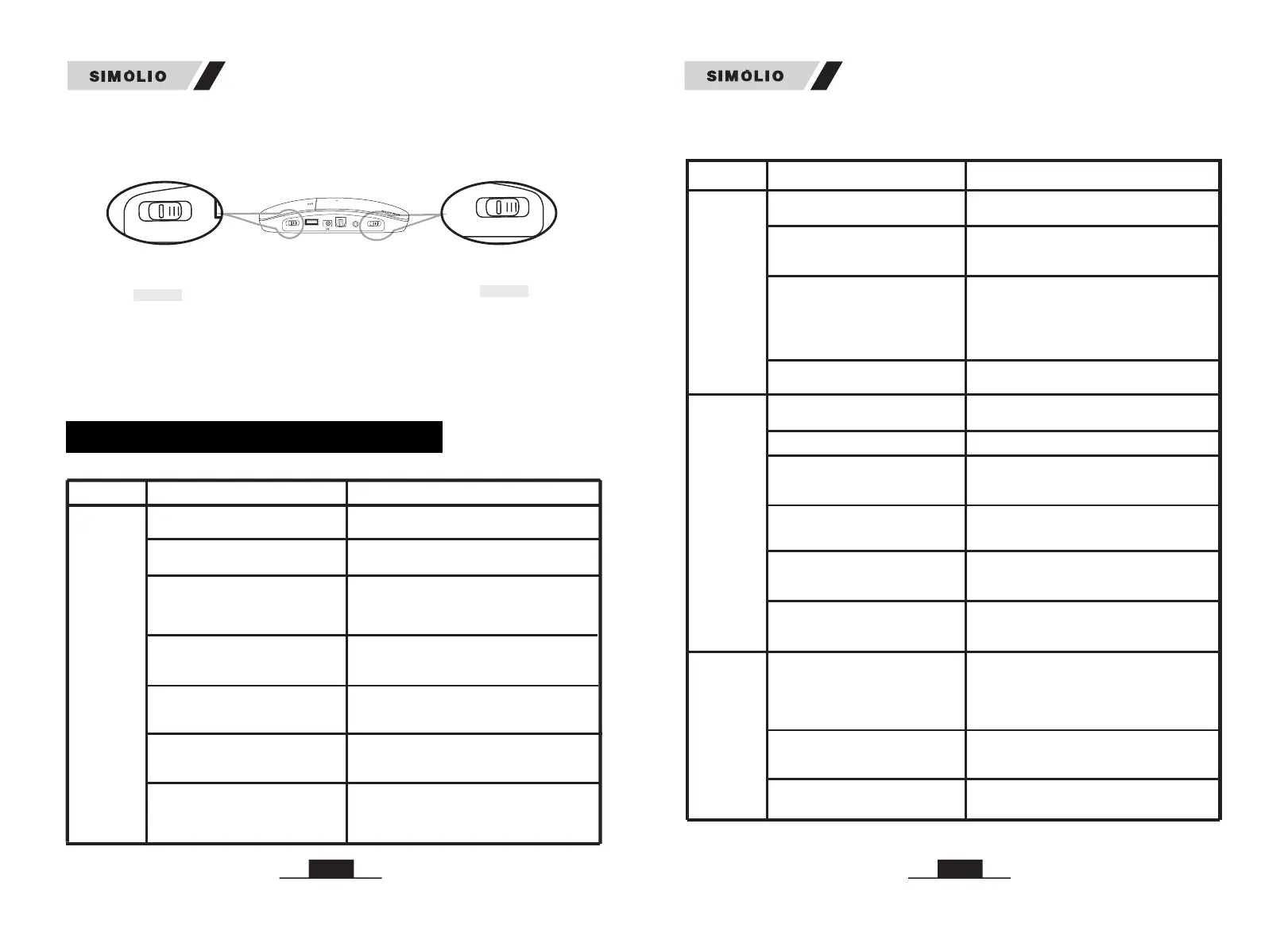
3) Mono/Stereo option: You can switch to STEREO for enjoying Hi-Fi sound
quality music or select MONO for enjoying more clear TV dialogues. If, despite a
correct balance adjustment, you can hear the sound only with one ear: Set the
STEREO/MONO switch on the transmitter to MONO. (Ref. Fig 6-3)
Fig 6-3
TROUBLESHOOTING
Phenomena Causes Solutions
The transmitter is not connected
well.
Make sure the AC adapter and the audio
cable of the transmitter are plugged in place.
Switch to MONO or STEREO to power the
transmitter on.
The transmitter is not powered on.
Part 1
Headphone
doesn’t
work, or
no voice
received
The audio out function of the
connected audio device is
defective(poor signal out).
The connection between the
transmitter and the audio source
isnot in place.
Make sure the connection is firm between
the transmitter and the audio source.
Connect to another audio out port .
Place the transmitter base at least 4 feet
away from smart WiFi TV/WiFi TV box/
TV sticks to avoid interference.
The headphone is used for listening
to streaming media (Netflix,
Amazon Prime Video etc).
If you are using RCA connection,
the RCA audio cable connecting
the transmitter and your TV/audio
source is NOT FULLY plugged at
BOTH ends.
Try to wiggle the audio cable or unplug
and plug the audio cable from both the
ends on TV/audio source and the
transmitter .
The voice
is heard
onlywith
one ear
Switch the transmitter to MONO.
The audio out signal of audio
source is mono, but the transmitter
is switched to STEREO.
Faulty cable/audio out port issue
Try another audio cable or another audio
device.
Headphone
doesn’t
work, or
no voice
received
2) Tone Control: Select the TONE (TREBLE/NORMAL/BASS) at the rear of
transmitter to find the best feature, make sure you can hear the TV voice clearly.


 To Previous Page