EasyManua.ls Logo

Simplicity SunStar 1692521 - Adjustments.24; Seat Adjustment.24; Brake Adjustments.24

Simplicity SunStar 1692521
36 pages
Print Icon
To Next Page IconTo Next Page
To Previous Page IconTo Previous Page
Loading...
Adjustments
^
WARNING
To
avoid
serious
injury,
perform
adjustments
only
with
engine
stopped,
key
removed
and
trac¬
tor
on
level
ground.
SEAT
ADJUSTMENT
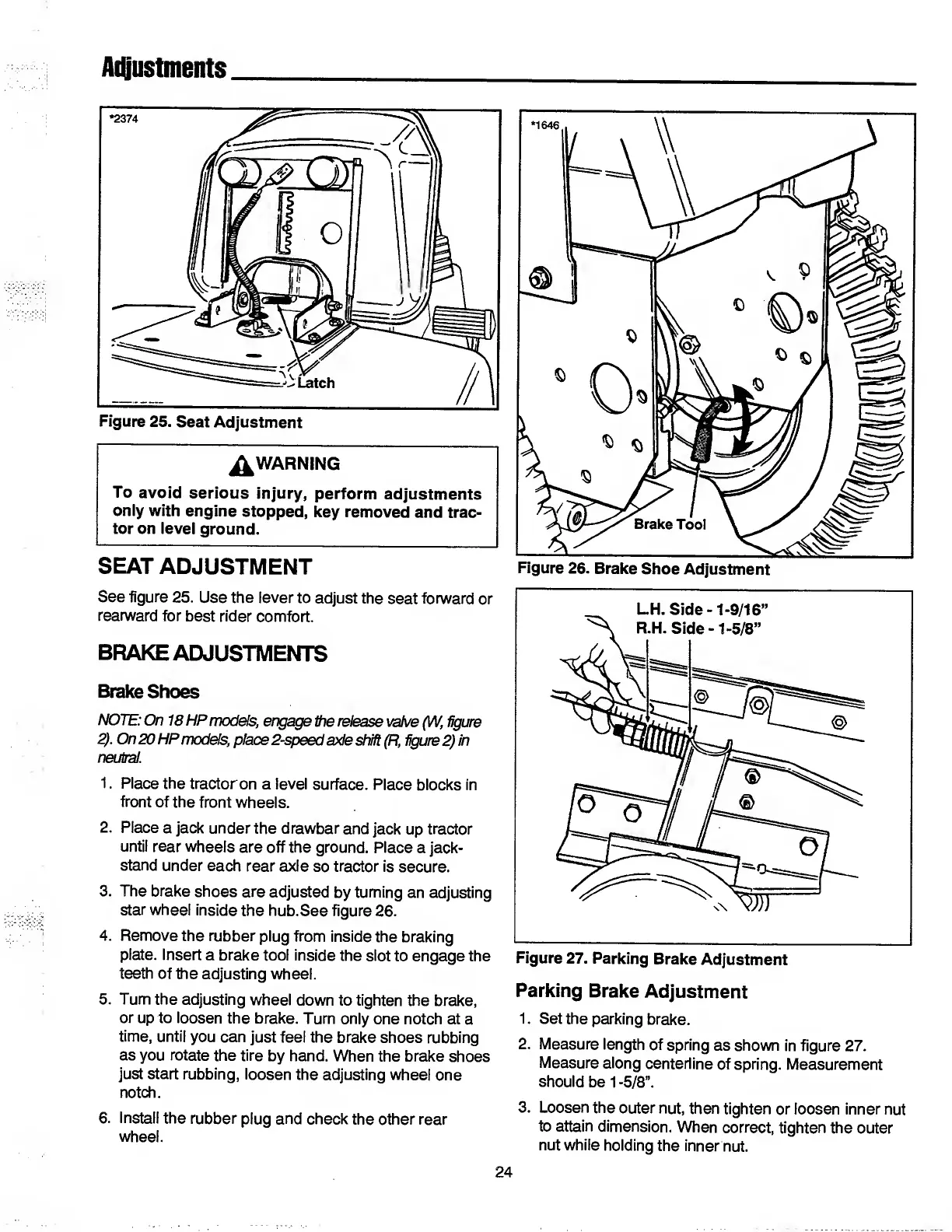
See
figure
25.
Use
the
lever
to
adjust
the
seat
forward
or
rearward
for
best
rider
comfort.
BRAKE
ADJUSTMENTS
Brake
Shoes
NOTE:
On
18
HP
models,
engage
tie
release
valve
(W,
figure
2).
On
20
HP
models,
place
2-speed
axle
shift
(Ft,
figure
2)
in
neutral.
1.
Place
the
tractor
on
a
level
surface.
Place
blocks
in
front
of
the
front
wheels.
2.
Place
a
jack
under
the
drawbar
and
jack
up
tractor
until
rear
wheels
are
off
the
ground.
Place
a
jack-
stand
under
each
rear
axle
so
tractor
is
secure.
3.
The
brake
shoes
are
adjusted
by
turning
an
adjusting
star
wheel
inside
the
hub.See
figure
26.
4.
Remove
the
rubber
plug
from
inside
the
braking
plate.
Insert
a
brake
tool
inside
the
slot
to
engage
the
teeth
of
the
adjusting
wheel.
5.
Turn
the
adjusting
wheel
down
to
tighten
the
brake,
or
up
to
loosen
the
brake.
Turn
only
one
notch
at
a
time,
until
you
can
just
feel
the
brake
shoes
rubbing
as
you
rotate
the
tire
by
hand.
When
the
brake
shoes
just
start
rubbing,
loosen
the
adjusting
wheel
one
notch.
6.
Install
the
rubber
plug
and
check
the
other
rear
wheel.
Parking
Brake
Adjustment
1.
Set
the
parking
brake.
2.
Measure
length
of
spring
as
shown
in
figure
27.
Measure
along
centerline
of
spring.
Measurement
should
be
1
-5/8”.
3.
Loosen
the
outer
nut,
then
tighten
or
loosen
inner
nut
to
attain
dimension.
When
correct,
tighten
the
outer
nut
while
holding
the
inner
nut.
24

Related product manuals