EasyManua.ls Logo

SimPure Q3-600 - Operation and Maintenance Guide; Control Panel Overview; Warning Indicators Explained; Reset Button Functionality

SimPure Q3-600
23 pages
Print Icon
To Next Page IconTo Next Page
To Previous Page IconTo Previous Page
Loading...
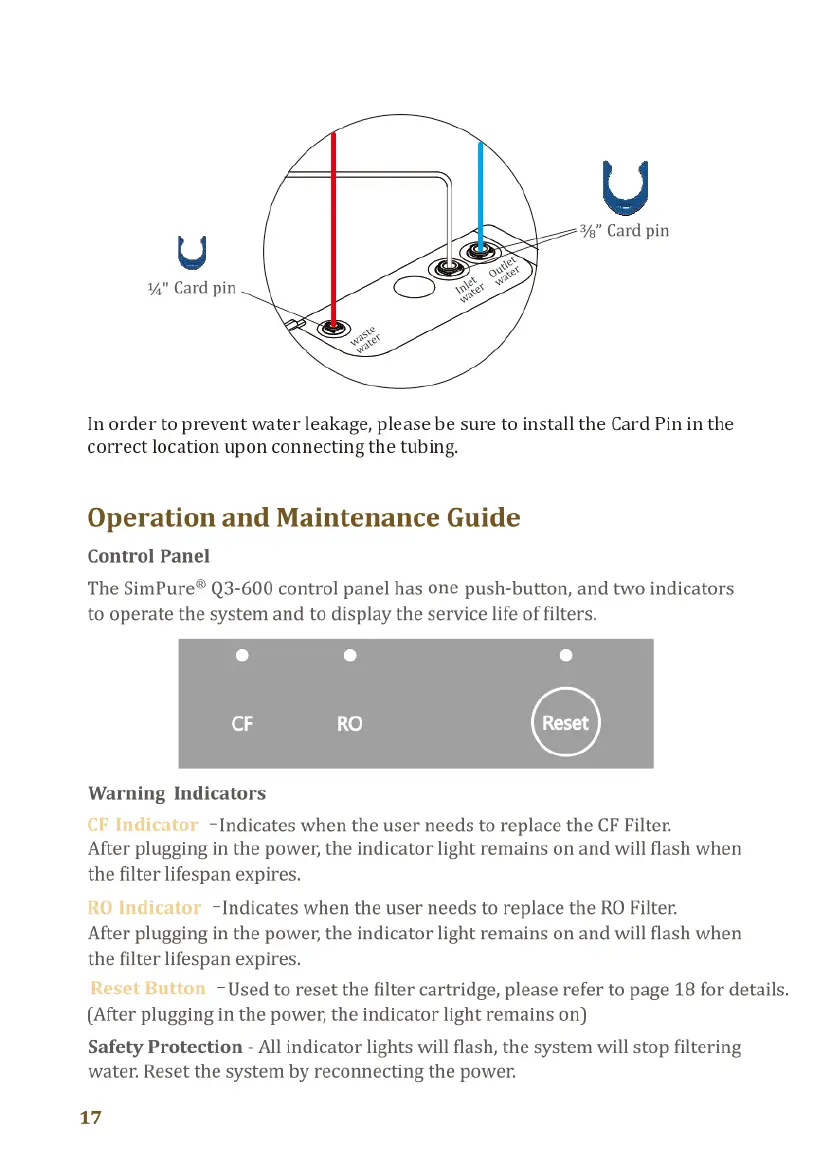
L
%"
Card
pin
V
%"
Card
pin
In
order
to
prevent
water
leakage,
please
be
sure
to
install
the
Card
Pin
in
the
correct
location
upon
connecting
the
tubing.
Operation
and
Maintenance
Guide
Control
Panel
The
SimPure®
Q3-600
control
panel
has
one
push-button,
and
two
indicators
to
operate
the
system
and
to
display
the
service
life
of
filters.
Warning
Indicators
CF
Indicator
-Indicates
when
the
user
needs
to
replace
the
CF
Filter.
After
plugging
in
the
power,
the
indicator
light
remains
on
and
will
flash
when
the
filter
lifespan
expires.
10O
Indicator
-Indicates
when
the
user
needs
to
replace
the
RO
Filter.
After
plugging
in
the
power,
the
indicator
light
remains
on
and
will
flash
when
the
filter
lifespan
expires.
Reset
Button
-Used
to
reset
the
filter
cartridge,
please
refer
to
page
18
for
details.
(After
plugging
in
the
power,
the
indicator
light
remains
on)
Safety
Protection
-
All
indicator
lights
will
flash,
the
system
will
stop
filtering
water.
Reset
the
system
by
reconnecting
the
power.
17
Replacing
Filter
Cartridges
After
replacing
the
filter
cartridges,
please
follow
the
following
steps
to
reset
the
filter
indicator
light,
and
then
flush the
system
(refer
to
page
15
for
details).
Reset
Button
—To
reset
the
filter
cartridge.
S
Step1:
Hold
the
Reset
button
down
for
3-seconds;
you
will
hear 1-beeps.
Step2:
Select
the
filter
cartridge
you
want
to
reset.
After
1-beeps.
the
"CF"
indicator
light
will
flash.
Move
to
step
3
to
complete
CF
reset;
if
you
want
to
reset
the
RO
filter,
please
just
press
the
Reset
button
once
to
select
the
"RO",
then
the
"RO"
indicator
light
will
flash.
Step3:
Hold
the
Reset
button
down
for
at
least
3-second
to
complete
the
reset
process,
you
will
hear
1-beeps,
the
selected
filter
indicator
light
will
change
from
flashing
to
steady,
and
the
system
will
return
to
regular
operation.
If
there
is
no
operation
within
10
seconds,
during
each
stage
of
the
filter
reset
process,
the
System
will exit
the
setting
state
automatically.
Note:
the
above
steps
can
only
reset
one
selected
filter
cartridge
at
a
time,
and
it
cannot
reset
two
filter
cartridges
at
the
same
time.
Filter
Replacement
Details
Replacement
Filter
Part
Number
Q3-CF
CF
Filter
Cartridge
6-12months
Q3-RO
RO
Filter
Cartridge
12-18months
Note:
Due
to
the
difference
in
feed
water
quality, the
above
is
an
estimate
only.
Please
contact
SimPure®
for
purchase
options:
Customer
Service:service@simpurelife.com
Toll-Free
Phone:
1-866-528-4572
18

Related product manuals