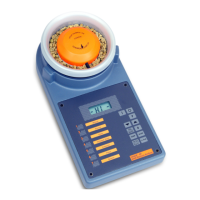
2.Oscillating Weight Balance
2
e) Switch on Analyzer by pressing — HI —
f) Press channel number (1—7), e.g. 2 2
g)Press %H
2
0. Moisture content will
be displayed after 5 seconds, e.g. 14.5
h) Remove the sample cell and empty it.
Notes on Instrument Use
a) Do not tap or shake the filled sample cell as this will change
the packing density.
b) If the product does not flow freely through the hopper, then
fill the cell by pouring the sample over the cell cap. Do not
fill directly into the bottom of the cell.
c) A small sample, which does not reach the lower edge of the
plastic cell cap, can be used because the weight balance
corrects the moisture measurement for the weight of the
sample. However, the calibration curve of each product is
created with full sample cells as this gives the highest
accuracy.
d) The flexible temperature sensor below the plastic block in
the cell should be in contact with the sample, so that the
temperature correction will be accurate. If the sample
temperature is very different from ambient, then leave the
sample for 30 ‘seconds in the cell before the measurement (or
until a stable temperature reading is reached).
e) If the sample is too small to reach the sensor then care
should be taken that the instrument and sample have
approximately the same temperature.
f) The minimum weight of sample is 20 grams, below this weight
the display will show
Err.0
after %H
2
0 is pressed.


 To Next Page