14
Technical Information
Service Manual
6. Function and Control
6.1 Remote Controller Introduction
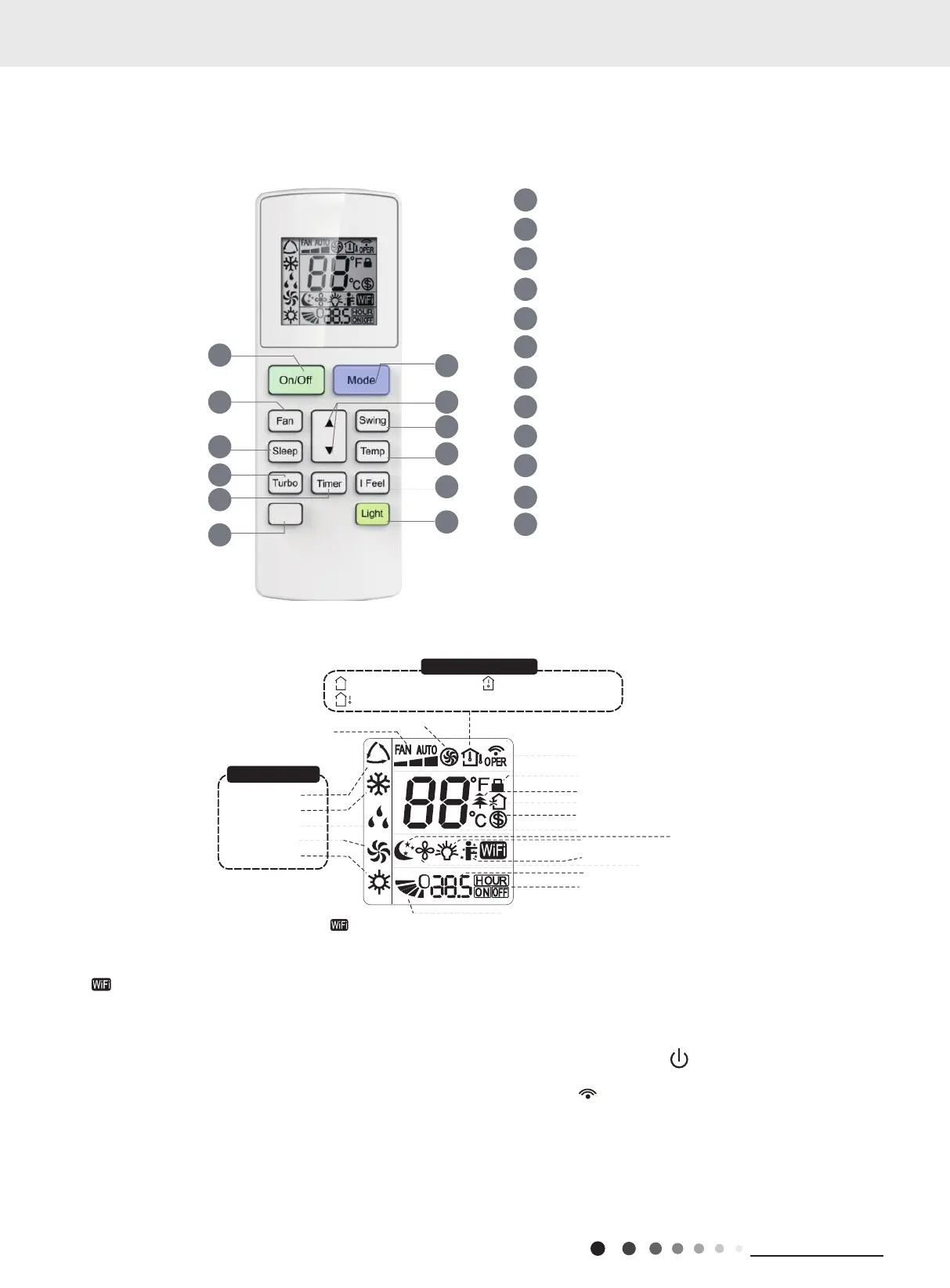
Icon Display on Remote Cont
rolle
r
Operation introduction of remote controll
er
Buttons on Remote Controlle
r
Note:
“ ” This is a general remote controller. Some models have this function while some do not. Please refer to the
actual models.
● This is a general use remote controller, it could be used for the air conditioners with multifunction; For some function, wh
i
ch
the model doesn't have, if press the corresponding button on the remote controller that the unit will keep the original running
status
.
●After putting through the power, the air conditioner will give out a sound.Operation indicator " " is ON (red indicator, th
e colour is
different for different models). After that, you can operate the air conditioner by using remote controller
.
● Under on status, pressing the button on the remote controller, the signal icon " "on the display of remote controller wi
ll
blink once and the air conditioner will give out a “de” sound, which means the signal has been sent to the air conditioner
.
● Under off status, set temperature and clock icon will be displayed on the display of remote controller (If timer on, timer of
f and
light functions are set, the corresponding icons will be displayed on the display of remote controller at the same time); Under
on
status, the display will show the corresponding set function icons
.
1
2
5
4
6
7
8
11
12
9
On/Off button
▲/ button
3
F
an button
Swing button
WiFi button
Turbo button
Light button
10
Temp button
I Feel button
Timer button
Sleep button
Mode button
▲
Send signal
T
urbo mode
8
ć
heating function
Set temperature
Set time
TIMER ON /TIMER OFF
Child lock
Up & down swing
Set fan speed
Light function
T
emp. display type
:Set temp.
:Outdoor ambient temp
.
:Indoor ambient temp.
Sleep mode
Heat mode
Fan mode
Dry mode
Cool mode
Auto mode
Operation mode
I f
eel function
X-fan mode
health function
ventilation operation
2
5
7
9
4
12
3
1
6
8
10
11
NOTICE:
“ ” This is a general remote controller. Some models have this function while some
do not. Please refer to the actual models.
WiFi
YAW1F5(WiFi)



 To Next Page