16
Technical Information
Service Manual
Function introduction for combination buttons
Press " " and " "
buttons simultaneously 3s to lock or unlock the keypad. If the remote
pressing any button, blinks
three times.
controller is locked, is displayed. In this case,
▲
Combination of "" and " " buttons: About lock
▲
▲
▲
About switch between Fahrenheit and centigradeCombination of "MODE" and " " buttons:
▲
At unit OFF, press "MODE" and " " buttons simultaneously to
switch between ć and .
▲
Nixie tube on the remote controller displays
"
SE
"
. Repeat the operation to quit the function.
Combination of "TEMP" and "TIMER" buttons: About Energy-saving Function
Press "TEMP" and "TIMER" simultaneously in COOL mode to start energysaving function.
(46 if Fahrenheit is adopted). Repeat the operation to quit the function.
Combination of "TEMP" and "TIMER" buttons:
About 8
ć
Heating Function
Press "TEMP" and "
TIMER
" simultaneously in HEAT mode to start 8
ć
Heating Function
Nixie tube on the remote controller displays
"
"
and a selected temperature of
"
8ć
"
.
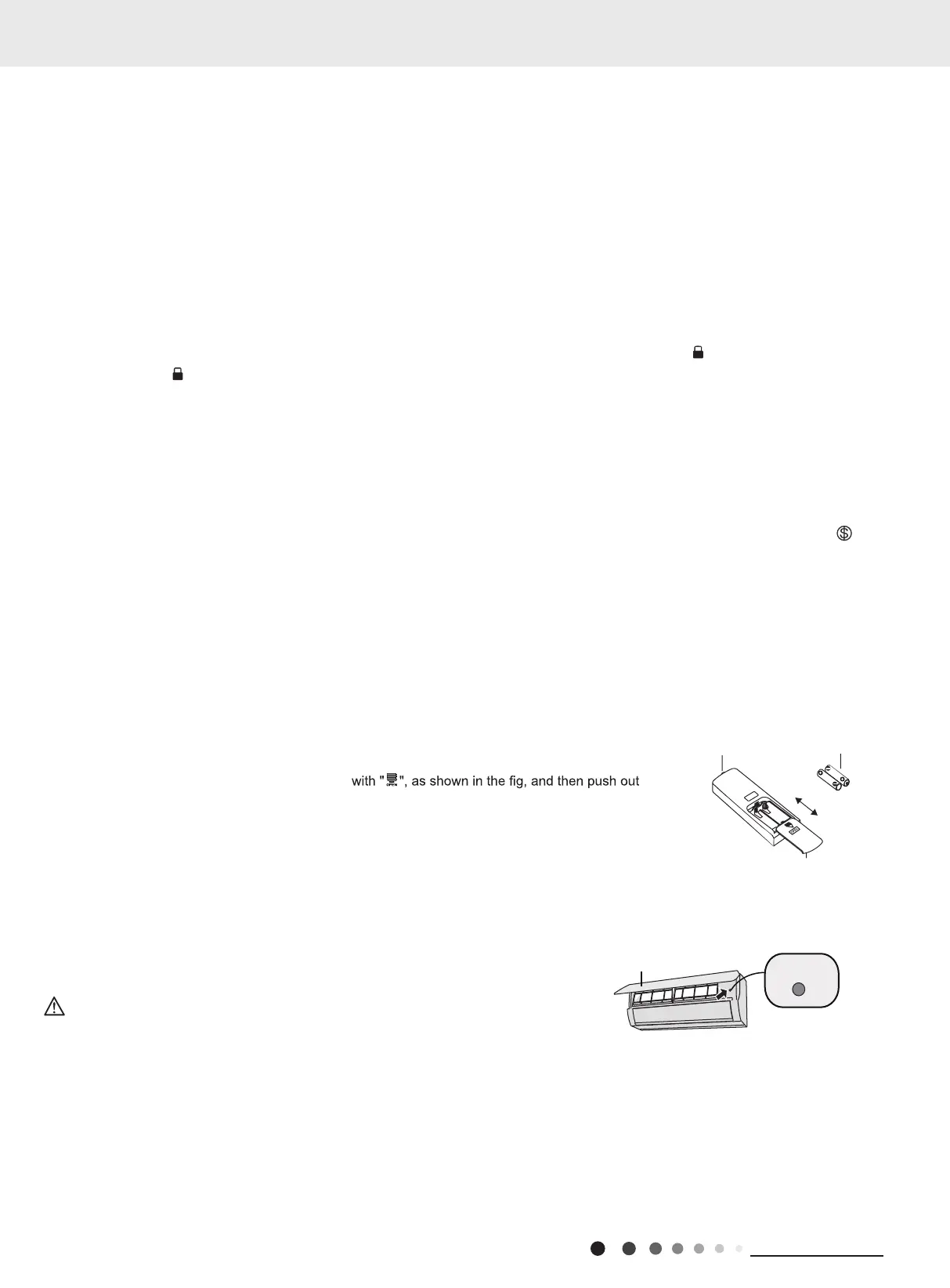
Replacement of batteries in remote controller
Emergency operation
If remote controller is lost or damaged, please use auxiliary button to turn on or turn off the air conditioner.
When the air conditioner is turned on, it will operate under auto mode.
aux. button
panel
WARNING:
Use insulated object to press the auto button
As shown in the fig.Open panel ,press aux.button to turn on or turn off the air conditioner.
The operation in details are as below:
1. Press the back side of remote controller marked
If “H1” is displayed on the remote controller while it’s not operated by the professional person/after-sales person, it belongs to the misoperation.
Please operate it as below to cancel it.Under the OFF status of remote controller, hold the Mode button for 5s to cancel “H1” display.
Note:
● If remote controller displays “H1”, it belongs to the normal function reminder. If the unit is defrosting under heating mode, it operates
according to H1 defrosting mode. “H1” won’t be displayed on the panel of indoor unit;
● Once you set H1 mode, if you turn off unit by remote controller, H1 will display 3 times on the remote controller and then disappear;
● Also, when you set H1 mode, when you change to heating mode, H1 will display 3 times on the remote controller and then disappear.
the cover of battery box along the arrow direction.
2. Replace two 7# (AAA 1.5V) dry batteries, and make sure the position of "+" polar and "-" polar
are correct.
3. Reinstall the cover of battery box.
signal sender battery
Cover of battery box
remove
reinstall
11. WIFI button
12. Light button
Press " WiFi " button to turn on or turn off WiFi function. When WiFi function is turned on, the " WiFi " icon will be displayed on remote
controller; Under status of unit off, press "MODE" and " WiFi " buttons simultaneously for 1s, WiFi module will restore to factory defaultset-
ting.
● This function is only available for some models.
Press this button to turn on the display's light and press this button again to turn off the display's light.



 To Next Page