UI Menu Function
2-2
2
1. UI Home Screen Functions
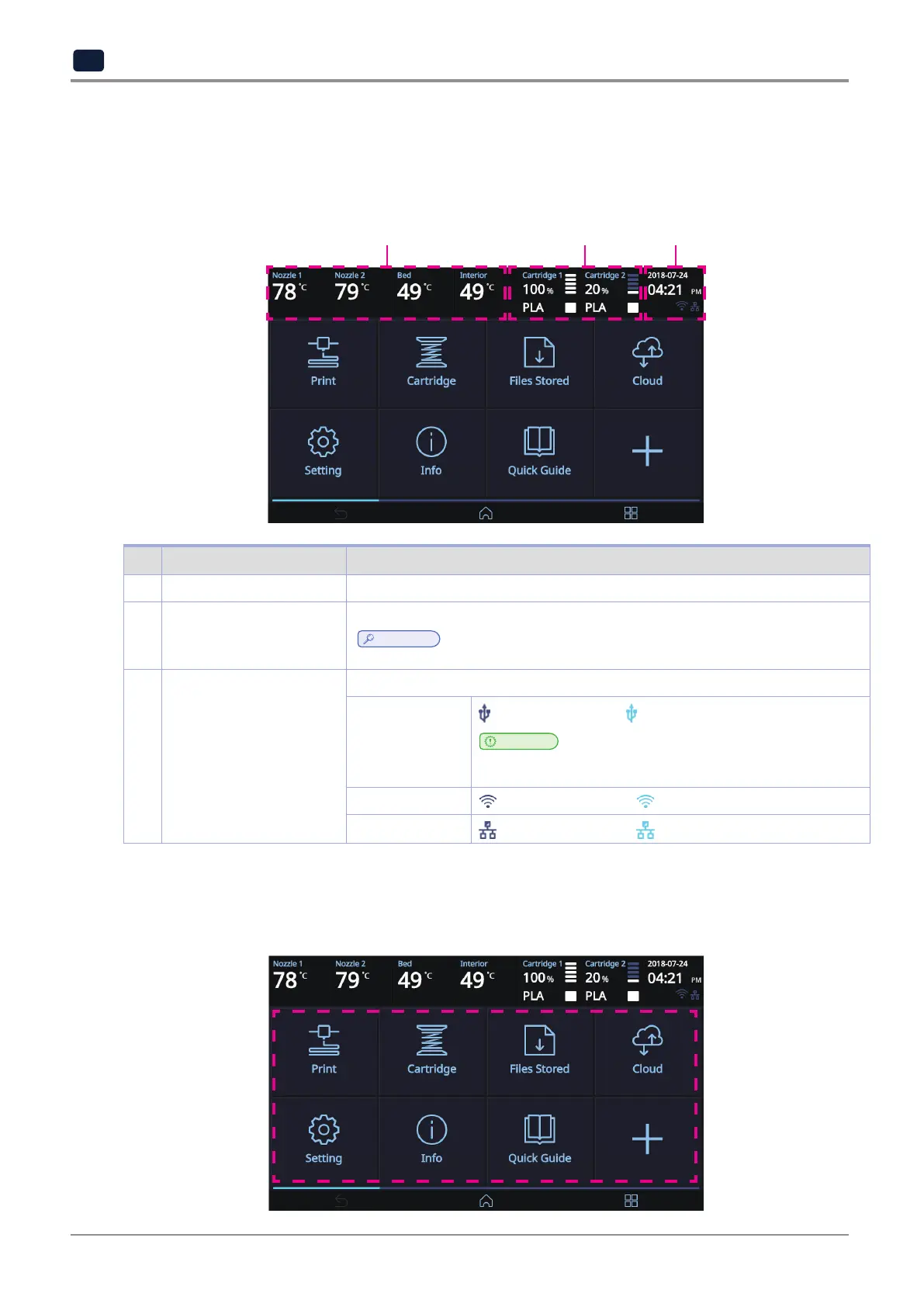
1.1 Device Status Display
Displays information about the current state of the device.
1 2 3
No. Name Description
1 Termperature Display
Displays the current temperature inside the nozzle, bed and device.
2 Cartridge Status Display
Displays the material, color, and remaining amount of the filament.
Reference
-
Does not display the remaining amount while operating under "Open Material Mode".
3 Time and Connection
Status Display
Displays the current time and various connection status set on the device.
USB Memory
Connection
Not connected Connected
Important
-
The dotted line blinks during the file transfer. While the dotted line is
flashing, do not remove the USB Flash Drive.
Wifi Connection Not connected Connected
LAN Connection
Not connected Connected
1.2 UI Function Control
Under this menu, various UI functions can be operated.
You can run the functions you want to use by tapping the screen.



 To Next Page