36
Buttonholes
Recommended settings.
Stitch Selection: Buttonhole Stitch (1A)
Stitch Width: Pre-set hot: Buttonhole (L)
Needle Plate: General Purpose (A)
Step 1
• Raise presser foot.
• Place fabric under foot.
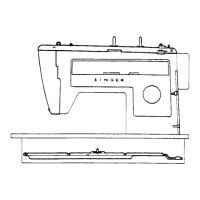
• Centre 3 red guidelines (1) of foot around
beginning line of buttonhole.
• Turn buttonhole dial to the buttonhole sym-
bol (1) for the first step.
• Position needle in fabric at point (2) by turn-
ing the hand wheel towards you.
• Stitch down to point 3.
Step 2
• Raise needle out of fabric.
• Turn buttonhole dial to the buttonhole sym-
bol (2) for the second step.
• Make at least four stitches ending at point
(4)



 To Next Page