3. straight
Stitching
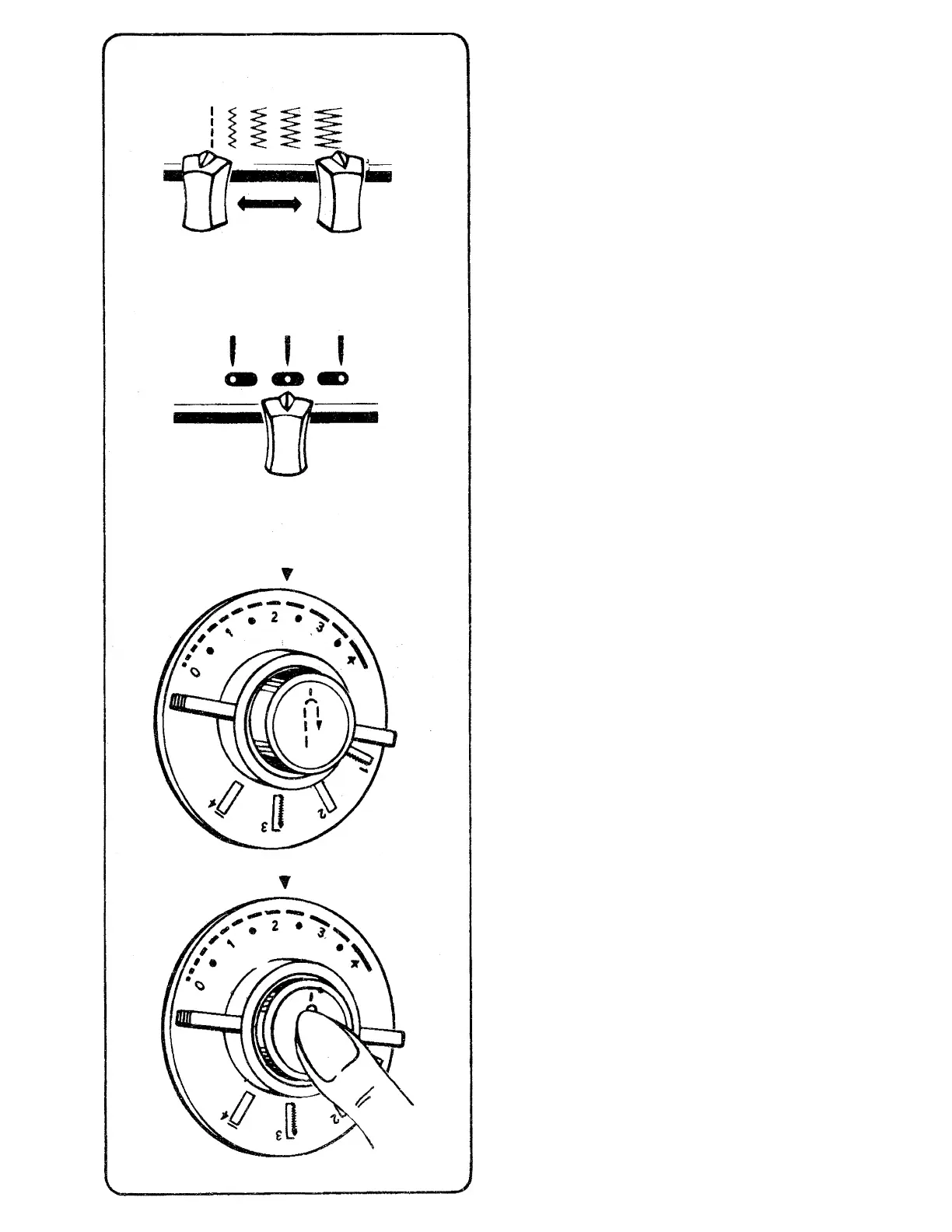
Stitch Width Selector
Before you move the selectors to set your
machine for straight stitching, turn the hand
wheel toward you until needle is above the
needle plate.
Straight stitching can be performed with pattern
selector in any position; stitch width lever must
be set at ' only.
Needle Position Selector positions the needle in
left I >, center (^), or right ( ^ ) needle
positions.
Stitch Length Selector
The stitch length indicator is numbered 0 to 5.
The lower numbers áre shorter stitches. Shorter
stitches are best for lightweight fabrics; longer
ones for heavy fabrics. To adjust the length of
your stitches, turn the dial so that desired stitch
length is positioned under {▼) symbol.
• To shorten stitch length, turn dial toward a
lower number.
• To lengthen stitch length, turn dial toward a
higher number.
For reverse stitching, push in on push button
located in center of dial, hold in until reverse
stitching is completed, then release push
button. Push button can be pushed in while
machine is sewing.
27



 To Next Page