4. Zig-Zag Pattern
Stitching
/VWv'VVvWvW\'Wv'v\.'V
Setting Selectors
Before turning selector, make sure needle is out
of the fabric.
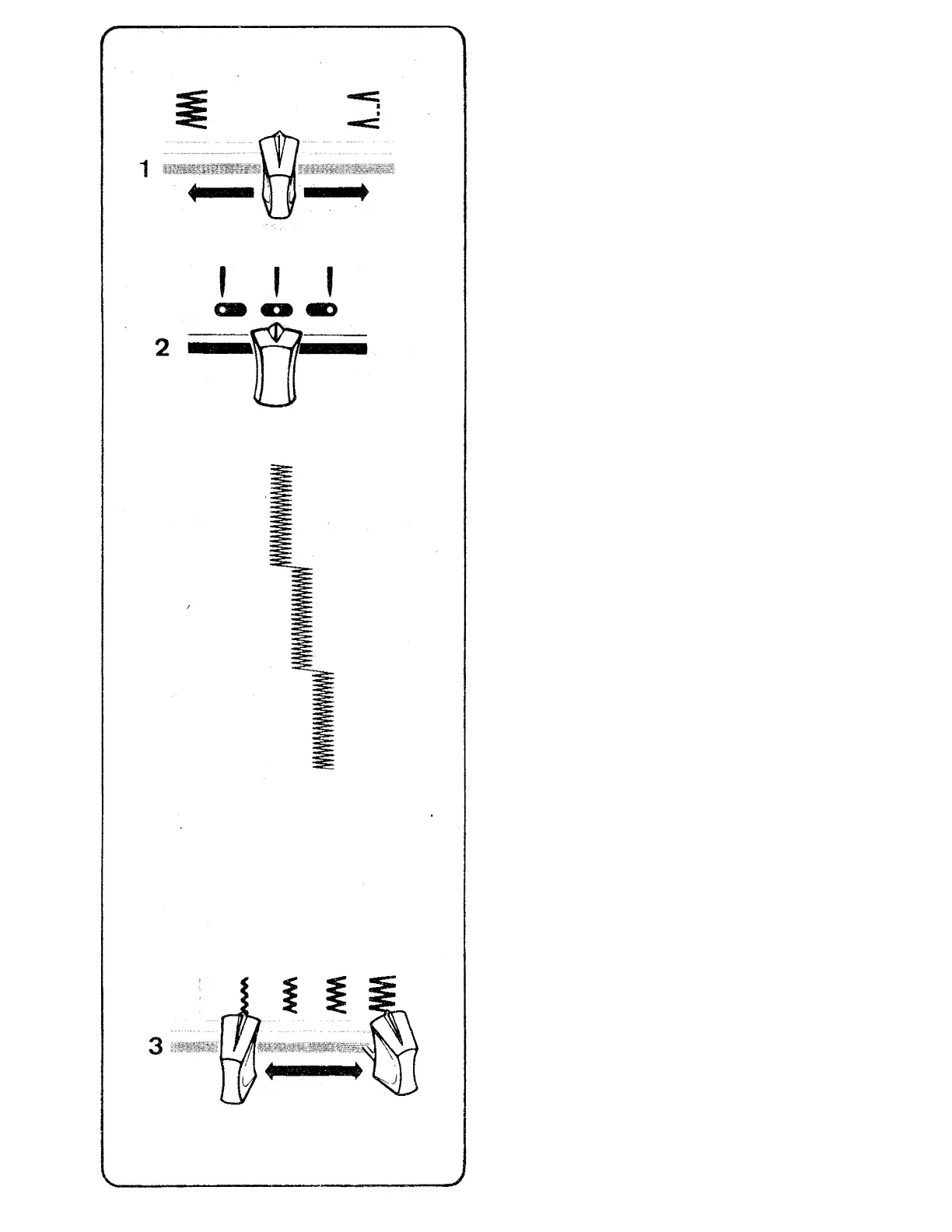
1. Stitch Pattern Selector
# With your sewing machine you can do two
kinds of zig-zag stitching; plain
zig-zag
and blindstitching
The pattern selector, located on the control
panel, controls stitch selection.
To Select Pattern
• First make sure needle is above fabric.
e For plain zig-zag stitching, slide pattern
selector lever to ^
• For blindstitching, slide pattern selector
lever
2. Needle Position
Selector
e Most of your zig-zag stitching will be done
in centre ( ^ ) needle position.
• Left ( ) and right ( ) settings are used
for special stitch placement.
3. stitch Width Selector
To produce a plain zig-zag or a decorative
stitch, the stitch width selector is moved
from its straight stitch position J to
any of its other four positions. The further
you move the selector toward the right, the
wider your stitch will be.
35



 To Next Page