50
DECORATIVE & LETTER
STITCH SEWING
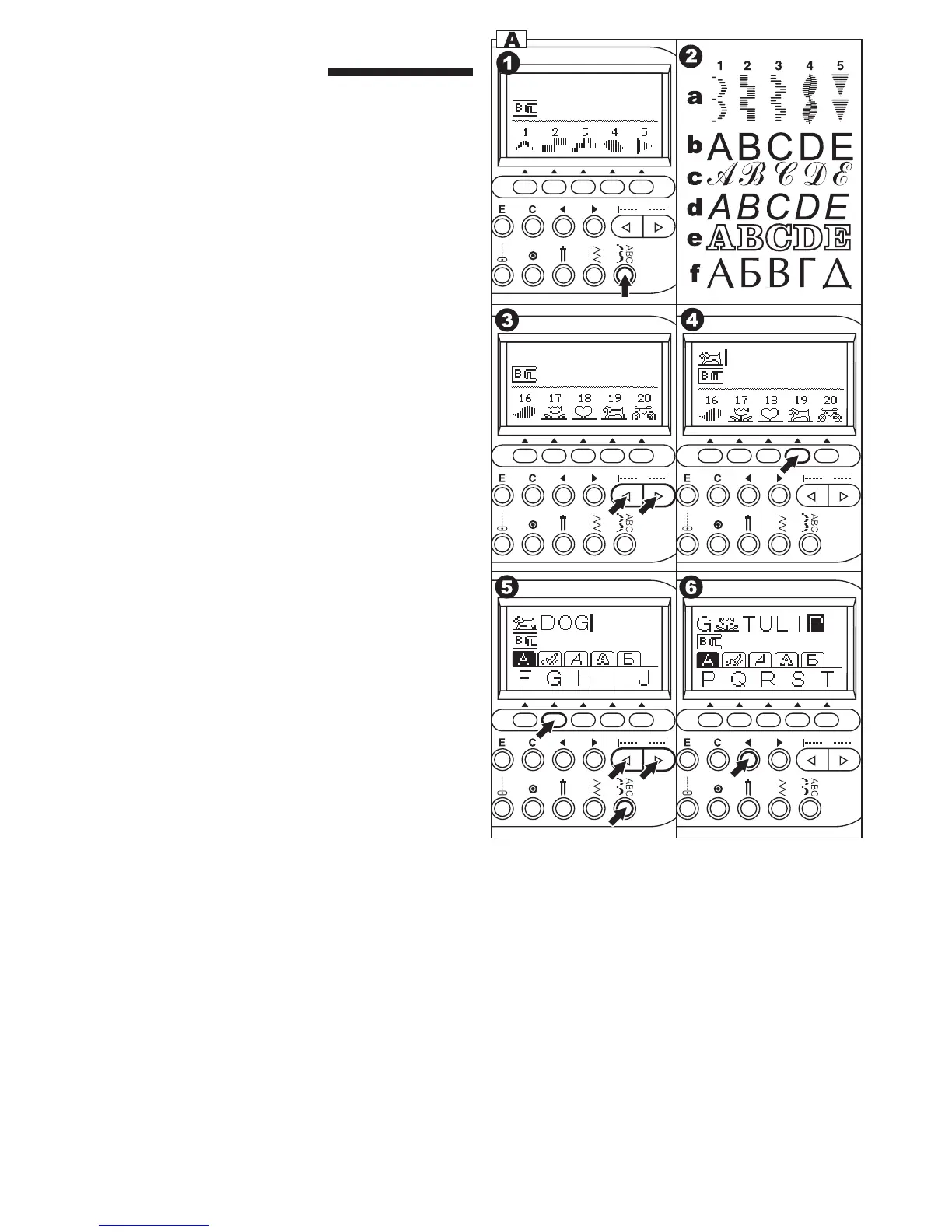
You can combine decorative & letter stitches into a
sequence by selecting each pattern.
A. SELECTING DECORATIVE & LETTER
STITCH (selecting mode)
1. Press the decorative & letter stitch button.
First 5 patterns of decorative patterns will be
indicated on the lower line of LCD.
2. By pressing the decorative & letter stitch button,
selecting group will change as below.
a. Decorative pattern
b. Gothic letter stitch
c. Script letter stitch
d. Italic letter stitch
e. Outline letter stitch
f. Russian letter stitch
3. After you select the group, press the scroll
down button. Next 5 patterns of selected group
will appear.
By pressing the scroll up or down button, you
can scroll up or down in increments of 5
patterns.
4. To select a pattern, press the function button
directly under the indicated pattern.
Selected pattern will be indicated on the top left
side of LCD.
5. Using this same procedure, select the next
patterns.
Patterns will appear at the top of the LCD in the
order selected.
6. As selected patterns over the indicating area,
disappear from the screen, you can check them
by pressing the cursor buttons. (See next page)
NOTE:
Machine can memorize a maximum of 60
patterns. You can combine the tack stitch by
pressing the tack button. This is used for
sewing a single combination of patterns. (See
next page 48)


 To Next Page