26
ADJUSTING CONTRAST OF
LCD; TURNING OFF
AUDIBLE BEEP
You can adjust the contrast of the LCD and turn
off the audible beep by following these
procedures.
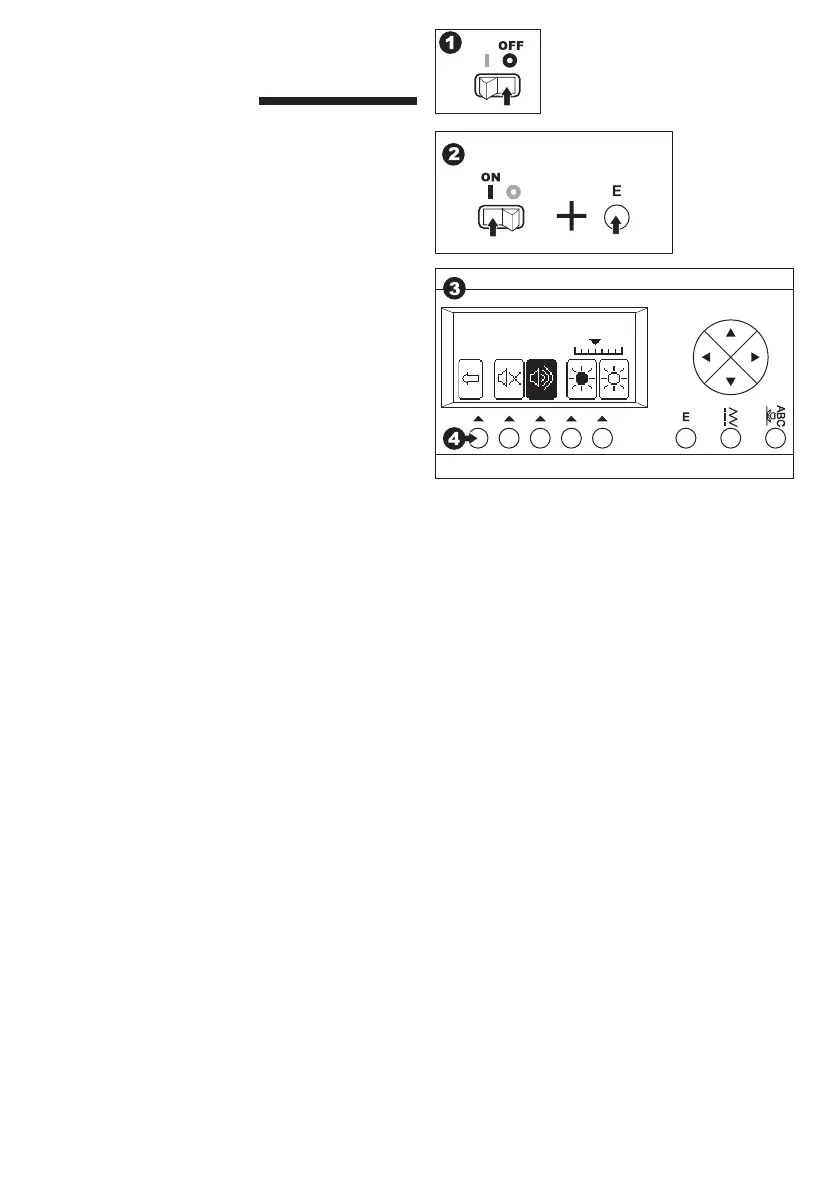
1. Turn off the power switch.
2. Turn on the power switch while pressing the
Edit button.
Adjust screen will turn on.
3. Adjust the contrast and beep sound as follows.
a. To turn off the beep, press the F2.
To turn on the beep, press the F3.
b. Press F4 or F5 to adjust the contrast of LCD.
4. Press the F1 to go stitch information mode.
This function is kept until you change them.
This function turns off the single beep only.
Multiple beeps will not turn off.
F1 F3F2 F4 F5



 To Next Page