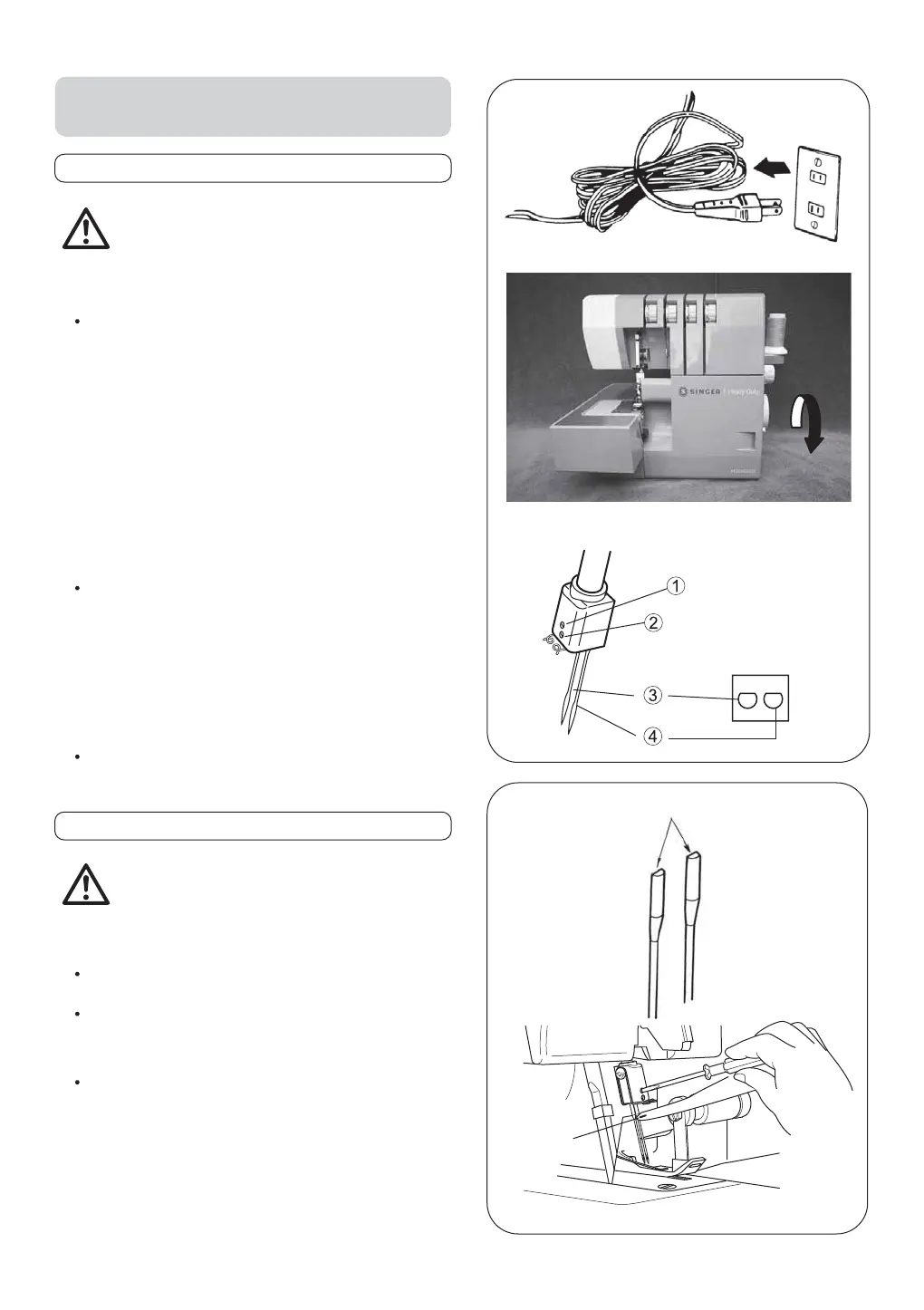
Flat surface to the rear
10. HOW TO REMOVE AND INSERT
NEEDLES
To Remove Needle(S)
To Insert Needle(s)
Caution:
Be sure to disconnect the machine from the
electric outlet before removing needle(s).
Caution:
Be sure to disconnect the machine from the
electric outlet before replacing needle(s).
Hold the needle with the flat surface to the back.
Insert the needle into the needle clamp as far as it
will go with help of lint brush.
Securely tighten the needle set screw.
Turn the hand wheel toward you until the needle is
at its highest position.
Loosen, but do not remove the needle set screw
with the small screwdriver.
1 Left needle set screw
2 Right needle set screw
3 Left needle
4 Right needle
Remove the needle(s).
Note: * This machine uses #2022 needles. Refer
to page 7 for additional needle information.
* Remove the cloth plate if you find it difficult
to remove and replace the needle.
lint brush
11


 To Next Page