TEMP
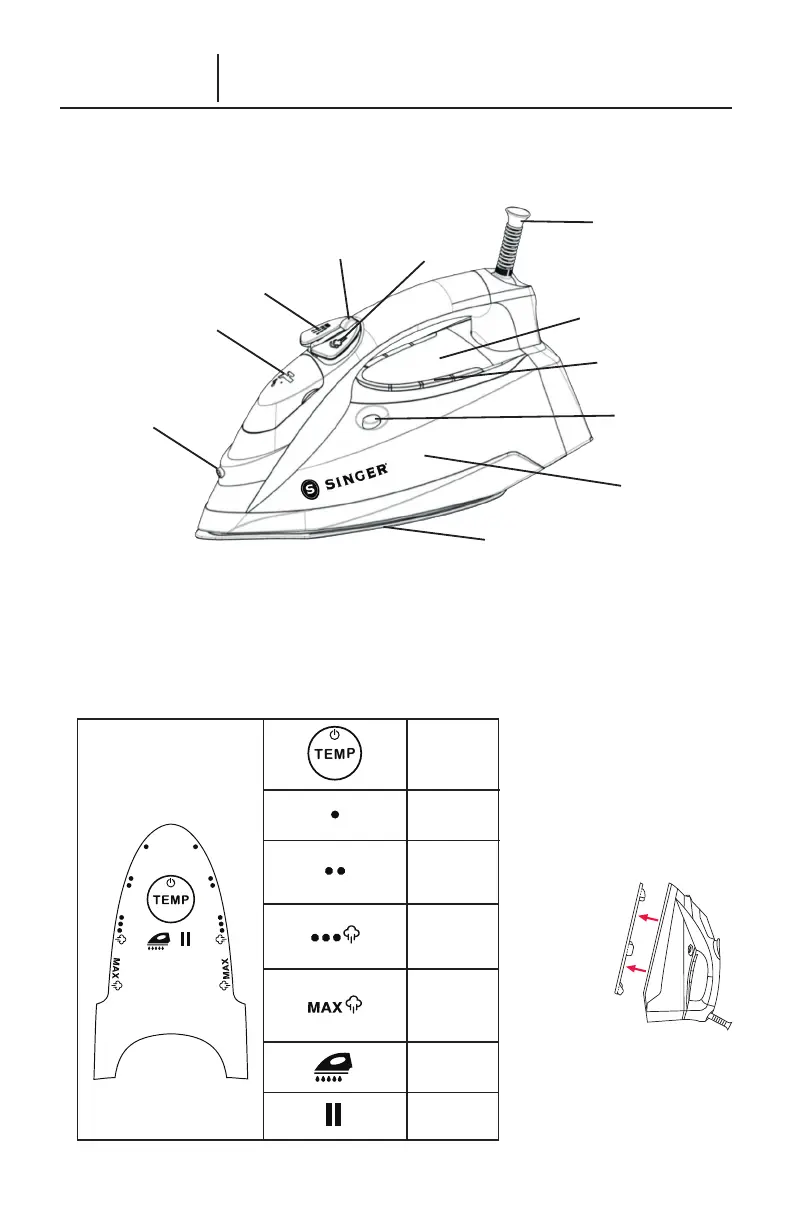
Self-Clean
Indicator
Auto Shut Off
Indicator
Temperature
Set & Power
Button
Low Setting
Medium Setting
High Setting
Max Setting
CONTROL PANEL
1
2
3
4
5
6
7
8
9
10
11
1. Burst of Steam Button
2. Steam Selector
3. Spray Button
4. Water Tank Door
5. Spray Nozzle
6. Power Cord Guard
7. Control Panel
8. Temperature Indicator Lights
9. Self-Clean Button
10. Water Tank
11. Soleplate
4 – ENGLISH
Product Information
The following features and accessories are included with your steam iron. Carefully inspect
packaging material as some parts are shipped inside Styrofoam packaging. To obtain pos-
sible missing parts, refer to Consumer Support section of this manual.
BEFORE FIRST USE
1. Remove any protective
lms or stickers from
appliance.
2. Unwind and straighten
power chord and remove
cardboard soleplate cover
before use.
NOTE: When using the
steam function for the rst
time, test on an old towel, as
some residue may remain
inside the appliance. Press
the steam trigger to ensure
all residue is completely
released.



 To Next Page