Quick Installation Guide | 98 | Quick Installation Guide
Section A: Network Name (SSID) and Network Key
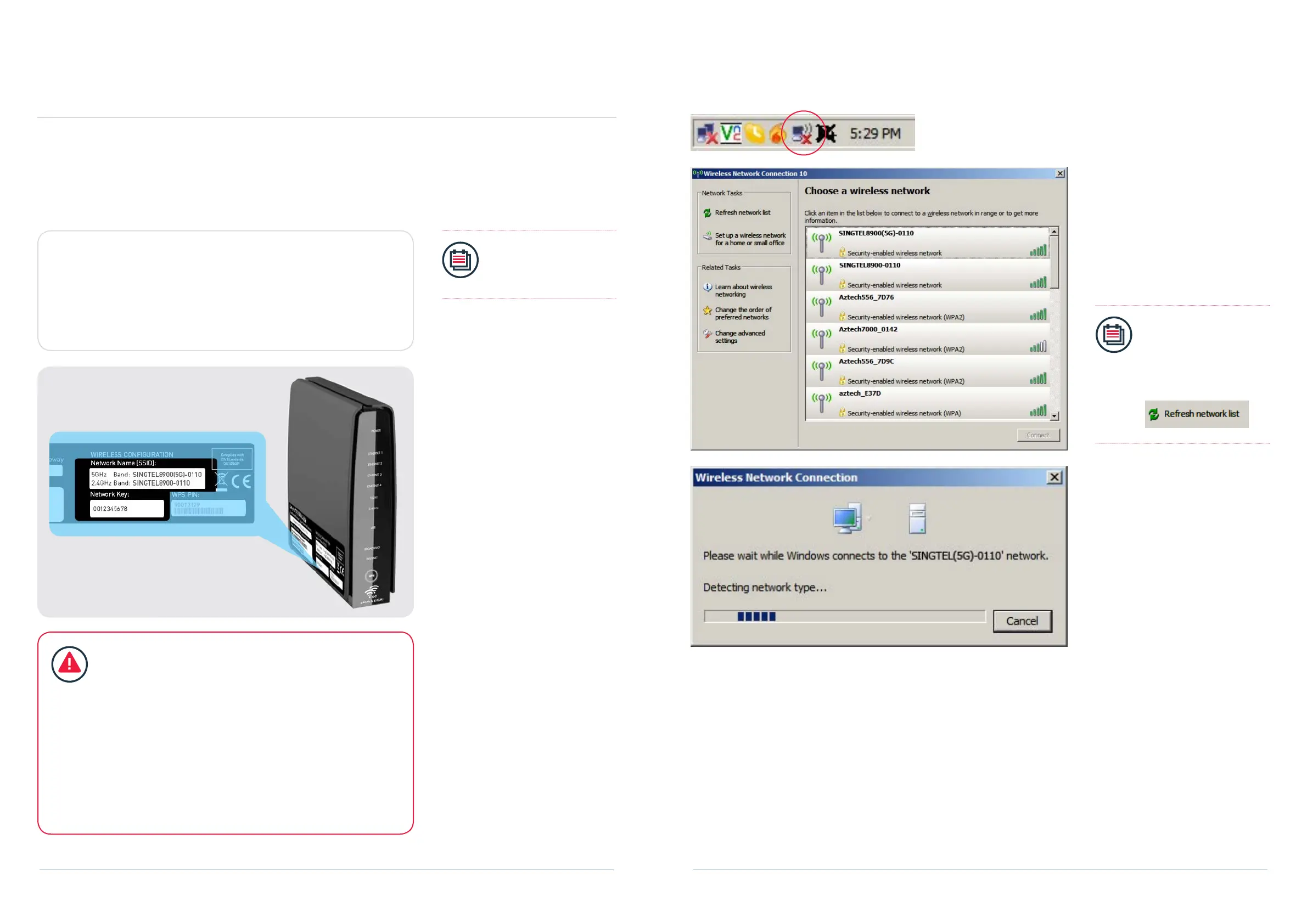
Network Name (SSID):
SINGTEL8900(5G) -____
SINGTEL8900 - _______
Network Key:
____________________
Write the last 4 numbers of your Network
Name here.
Write the 10 digit of your
Network Key here.
Step 3: Wireless Network Setup (Optional)
Please refer to the two numerical codes found on your router, namely Network Name
and Network Key for Wireless Network Setup.
You may ll in these details on the box below for future references.
Note:
The default wireless
encryption option is Mixed
WPA2/WPA-PSK.
IMPORTANT!
You will need a wireless adapter (wireless PC card or wireless
USB adapter) or a wireless-enabled Notebook before you can
proceed to the next section.
Please refer to your operating system’s instructions:
Section B. If You Are Using Window’s XP
Section C. If You Are Using Windows Vista
Section D. If You Are UsingWindows 7
Section E. If You Are UsingWindows 8
Section F. For Other Wireless Managers
Section B: If You Are Using Windows XP
1. Double click on the wireless icon on
your task bar.
2. You should see the available wireless
networks, if you are prompted to use
another wireless manager, please
refer to section E.
3. Select and double click the Network
Name of your wireless network (e.g.
SINGTEL8900(5G)-0110) and wait for
the network to be detected.
Note:
Please refer to section A
if you are unsure of your
Network Name and try
refreshing your Network
List if you do not see it.


 To Next Page