Quick Installation Guide | 1514 | Quick Installation Guide
Section D: If You Are Using Windows 7
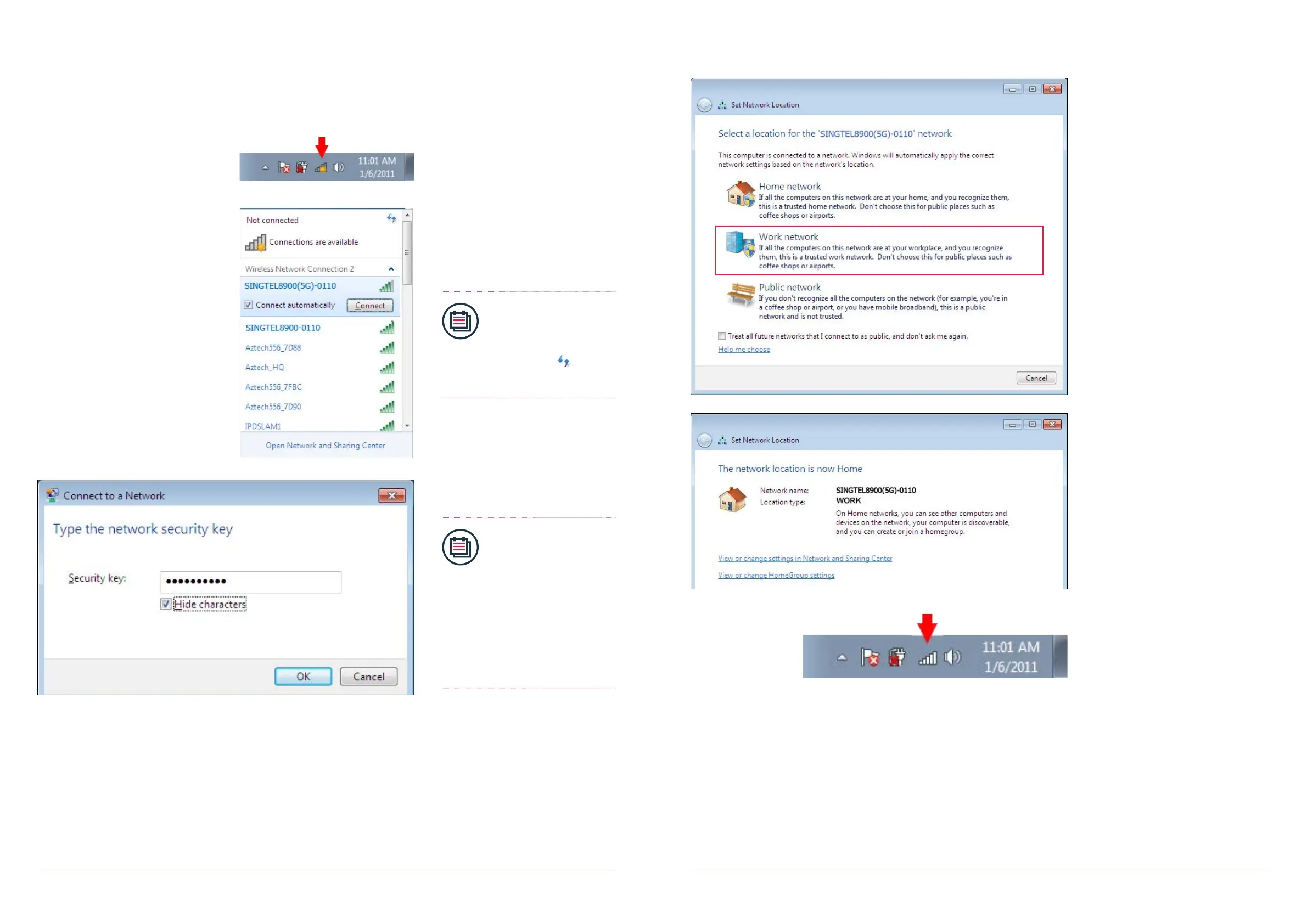
1. On the right hand side of the task
bar, click on the wireless network
icon like the one on the left.
2. You will see a window of the
available networks, locate and select
your own wireless network
e.g. SINGTEL8900(5G)-0110.
Click on connect.
Note:
Please refer to Section
A if you are unsure of
your Network Name or
try refreshing your
network list if you do not
see it.
3. Input your Network Key on the
“Security Key” eld.
Note:
• Please refer to Section
A if you are unsure of
your Network Key.
• You will see this when:
(i) You are connecting to
the Router for the
rst time.
(ii) You had unselected
the option to save
the Network Key.
4. On the Select Network Location click
on “Work Network”.
5. Click on the“Close” button to
complete the setup and close
the window.
6. You will see the wireless icon on the
taskbar, like the one on the left, once
the wireless is successfully
connected.


 To Next Page