FM
20
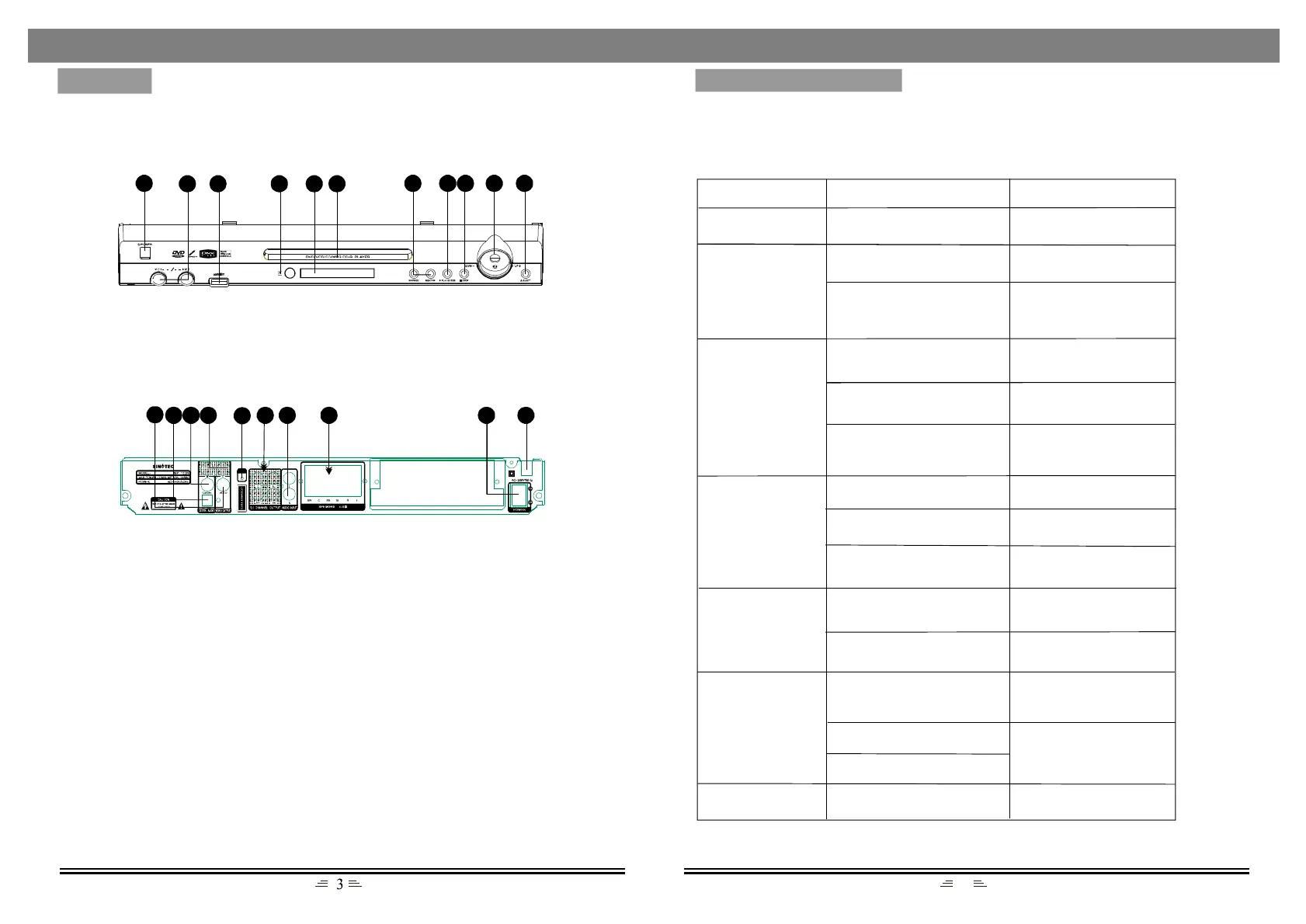
1.Power
2.Micsockets
3.USBport
4.Remotecontrolsensor
5.Displayscreen
6.Discdoor
7.Previous/Next
8.Play/Enter
9.Stop
10.Volume+/-
11.Eject
1
PANELS
TROUBLESHOOTING
2
7 8 9 10
11
14
16
17 18 19
20
21
12.Videooutput
13.Opticalfiberoutput
14.Coaxialoutput
15.L/Raudiooutput
16.FMantennainterface
17.5.1channeloutput
18.L/Raudioinput
19.5.1CHspeakersoutput
20.Poweron/off
21.Powersupplyinput
Foryourconvenience,wehavelistedsomemethodstosolvecommonproblemsyoumay
encounterwhilstyouareusingthesystem.Iftheproblemoccursrepeatedly,contactthenearest
maintenancecentre.
Operationincorrect
Possiblecause
Solution
Powersupplydoes
notwork
Powersocketisnotfully
insertedintothepowersocket
Fullyinsetthepowerplug
intothepowersocket
Remotecontroldoes
notwork
Thebatteriesareflat
Replacetheoldbatterieswith
newones
Theremotecontrolisnot
aimingattheremotecontrol
sensor
Pleaseaimtheremotecontrol
correctly;inlinewiththe
remotesensor
NoimageontheTV
screen
Thesystemisnotconnected
correctly
Reconnectthesystemby
referringtotheillustration
TVnotsetinvideomode
SettheTVinvideomode
Thescanningmodedoesnot
matchtotheTVscanning
mode
Resetthescanningmode
Playisunavailable
Nodiscinserted
Insertadisc
Discincorrectlyinserted
Reinsertthediscwithpicture
facingupwards
Discisnotcompatiblewith
thedevice
Nosoundfrom
speakers
Audiowireisnotconnected
correctly
Connecttheaudiowire
correctly
Incorrectlyconnectedto
amplifier
Connecttheamplifiercorrectly
byreferringtotheillustration
Discontinuoussound
ordistortedpictures
Discisnotclean
Discscratched
Discdistorted
Replacewithacleandiscor
useasoftclothtocleanthe
discbeforeinsertingitagain
Replacewithanewone
Invaliddisplayonthe
screen
Pleaserefertotheusermanual
Onlyusediscthatare
compatiblewiththisdevice
Problem
FRONT
BACK
54 6
1513
3
12


 To Next Page