FM
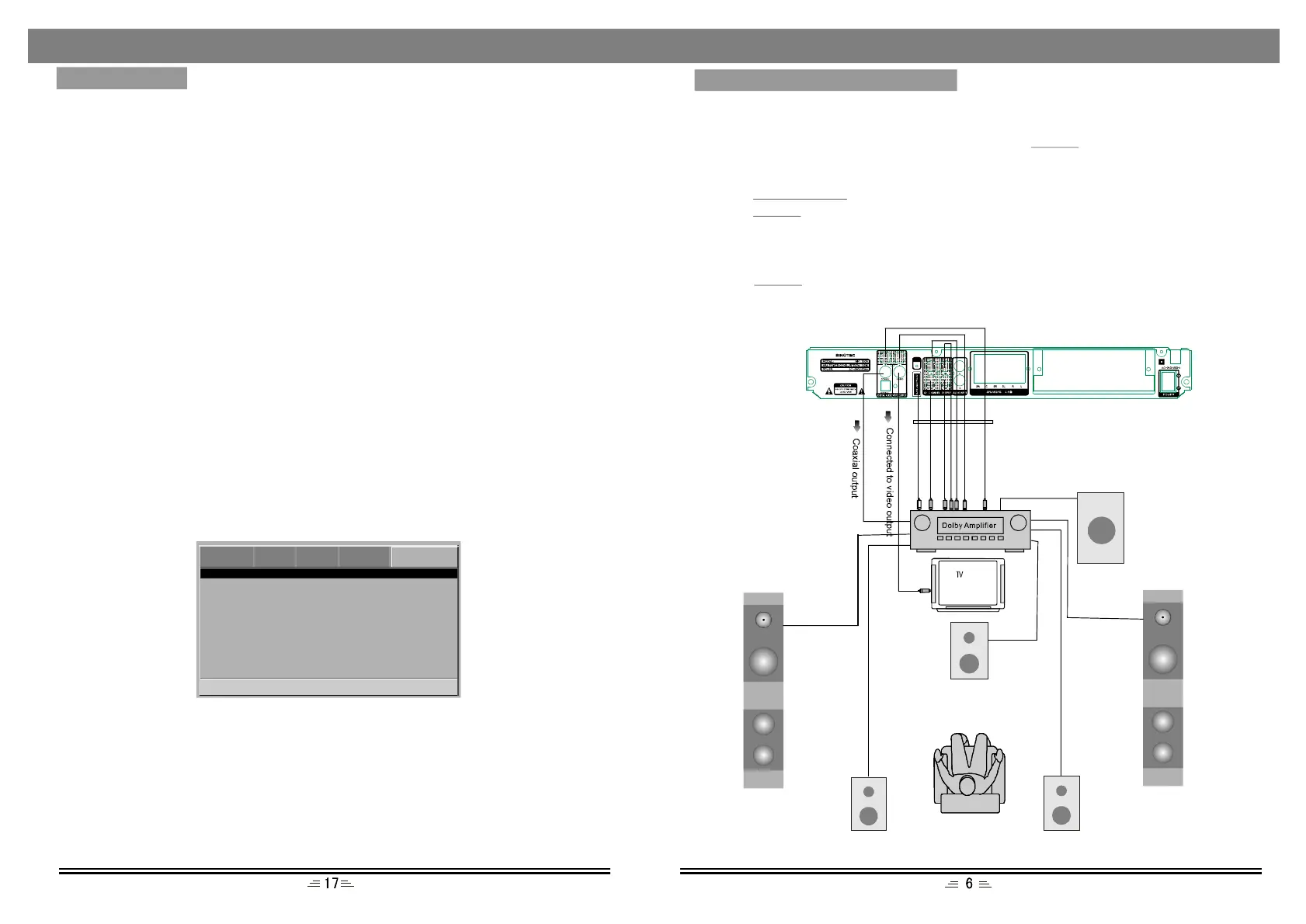
SurroundL
SurroundR
Digitalaudiooutputsetting
ettingof5.1channel
Connectcoaxialoropticaloutputoftheplayertothecorrespondinginputsofthe
amplifier.Whenadiscisinplayorstopped,pressthebuttonontheremote
controltoopentheDVDMENUpage.Usedirectionbuttonstomovetoaudiosetup
page.MovethecursortoSPDIFsetup,thenselectSPDIF/RAWorSPDIF/PCMand
pressthebuttontosavetheselectedoption.Toexitthesetupmenu
pressthebuttonagain.
S
Connectthe5.1Channeloutputtothe5.1channelinputterminaloftheamplifier.
PressthebuttontoopentheAUDIOsetuppage,selectspeakersetupandset
thedownmixtobe5.1CH.
SETUP
PLAY/ENTER
SETUP
SETUP
AngleMark
Whenthedischasmultianglepicturesettings;AngleMarkdisplaysamultiangle
markonthescreen.Thisoptionhastwosettings:
ON:Displaymulti-anglemark
OFF:Multi-anglemarkisnotdisplayed
CloseCaption
WhenplayingDVDdisc`s,setthisoptionOFFtoclosecaption,choosetheONoption
toopenthecaption.
Screensaver
Tosetscreensaveronoroff.
Memory
WhentheoptionissettoON;thesystemautomaticallyrememberstheplayeddisc`s
content.ThedisccontentisnotrememberedwhentheOFFoptionisselected.
S/WVersion(SoftwareVersion)
Thisoptionisusedtodisplaythemodelofthissystemanditsfactoryname.
Default
Onlywhentheplayerisinejectorinnodiscstatus;choosedefaultoptiontoresume
totheDVDplayer`soriginalsetup.
PasswordSetupPage
ParentalControl
GoToPasswordPage
--PasswordPage--
Password
ParentalControl
Thisunithas8differentageratingsforselection.Youcanmovethecursortoselect
oneofthem,thenpressPlay/Enterbuttonontheremotecontroltoenter.Youare
remindedtoenterthepassword.
Password
Theoriginalpasswordofthisunitis"138900"andyoucanchangeittoanewone.
DVD VIDEOAUDIOSYSTEMPASSWORD
Subwoofer
MENUSETUP
CONNECTTOTHEAMPLIFIER
Centralspeaker
Leftspeaker
Rightspeaker
5.1CHAudiooutput


 To Next Page