FM
5
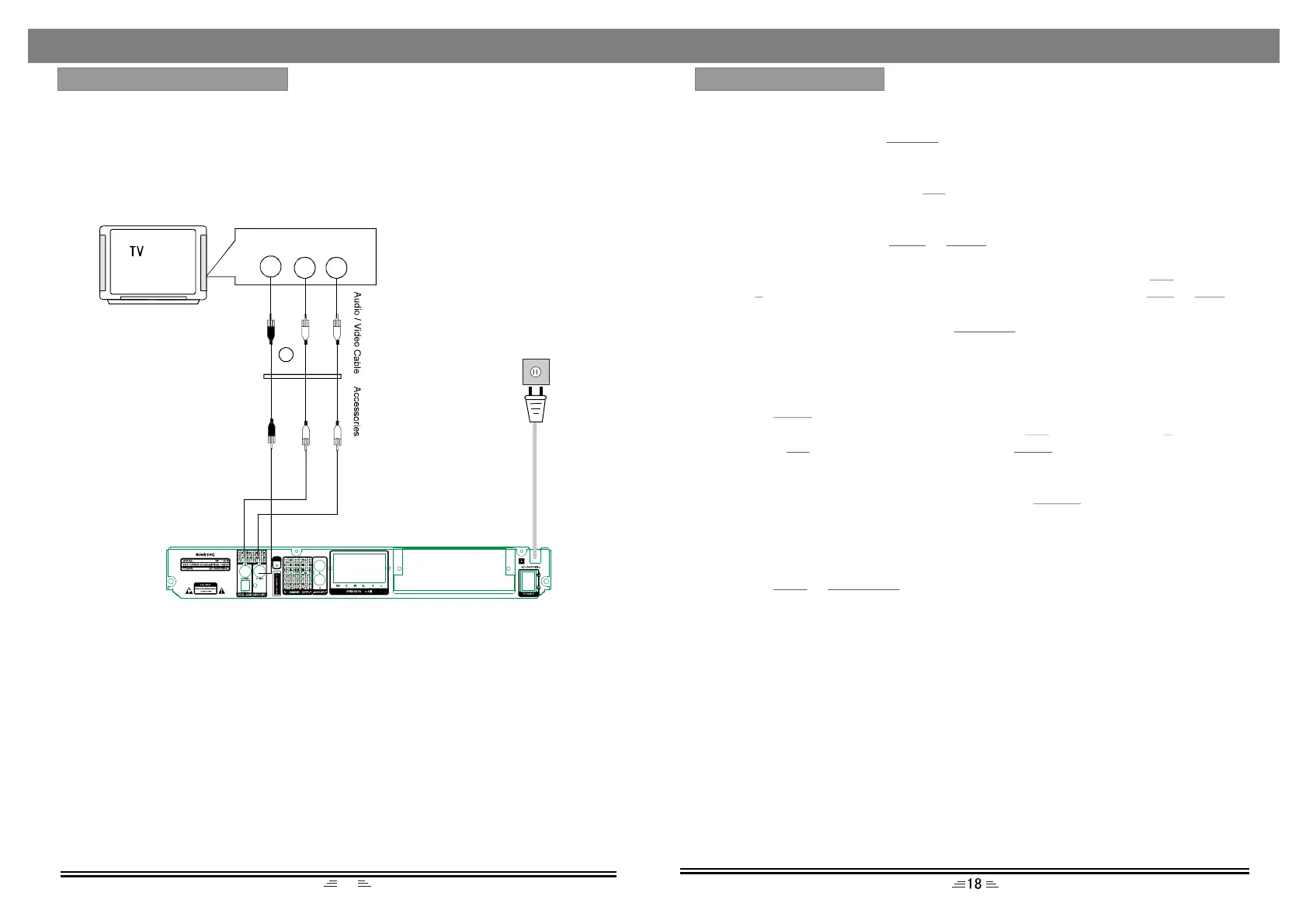
CONNECTTOTHETV-SET
1.IfyourTV-sethasanAVinput,usetheAVcabletoconnecttheplayertotheTV-set.
Afterwardsmakesuretheconnectionisright;byselectingtheAVstatusforyour
TV-set..
2.IfyourTV-sethasaudiooutput,connecttheAudio(L/R)cablefromtheTV`saudio
outputtotheDVDplayer`saudioinputjacks.
NOTES:
1.BeforeconnectingtheplayertotheTV-set;turnoffandunplugboththeunits.
2.Whenadiscisbeingplayedwerecommendchangingthesettingsoftheplayerin
ordertomakeitcompatiblewithTV-set.
3.YoucanconnecttheplayertotheTV-setindifferentways.Chooseonlyoneofthem
asMultipleconnectionsnegativelyinfluencethesourceandpicturequality.
4.DonotturnON/OFFtheplayerrepeatedly;allowforintervalsofmin.3secondsin
between.
5.Donotusecoaxialoropticaloutputoftheplayerandanalogueoutputatthesame
time.
EnterFMFunction
Whilsttheunitison,pressthebuttonontheremotecontroltoenterFMmode.
SelectBands
1)Directinputfrequency:pressthebuttonontheremotecontrol,thenenterthe
frequencythatyouwant.TherangeofFMfrequencyisfrom87.50MHzto108.00
MHz.
2)Selectthebandbypressingorbutton:pressthisbuttontoadjustthe
frequencyupordownastep.ThestepofFMis0.1MHz.
3)Selectsavedstationsbypressingnumberbuttons.Forexample:pressbutton
twice,buttononce,youmayselectthe25thsavedstation.Presstheor
buttontoswitchthepreviousornextband.
4)Automaticallysearchbands:pressthebutton,thissystemautomatically
searchesfromalowtohighfrequencyforbands.Thesearchedbandsaresaved
automatically.Pressthisbuttonagaintostopsearching.
SaveBands
Pressthebuttontosavethecurrentfrequencyofaband.Forexample:ifyou
wanttosave99.3MHzinthe28thchannel,pressbuttontwiceandbutton
once,pressbuttontoinput993,thenpressbutton.
SoundtrackSelection
ToselectMonoorStereowhileinFMmode,pressbutton.Whenyouselect
stereo,thedisplayshowsSTEREO.Ifthesignalisnotstrongenough,youcannot
selectStereo.
ExitFMmode
PresstheorbuttonontheremotecontroltoexitFMstatus,and
switchtoothermodes.
TUNER
T/F
Tune-Tune+
10+
5CH-CH+
SEARCH
SAVE
10+8
T/FSAVE
MO/ST
DVDAUDIO-IN
(Pleasevarytheantennadirectiontofindthestrongestsignalforeachstation.)
RADIOOPERATION
1
VideoInput
AudioR
AudioL


 To Next Page