FM
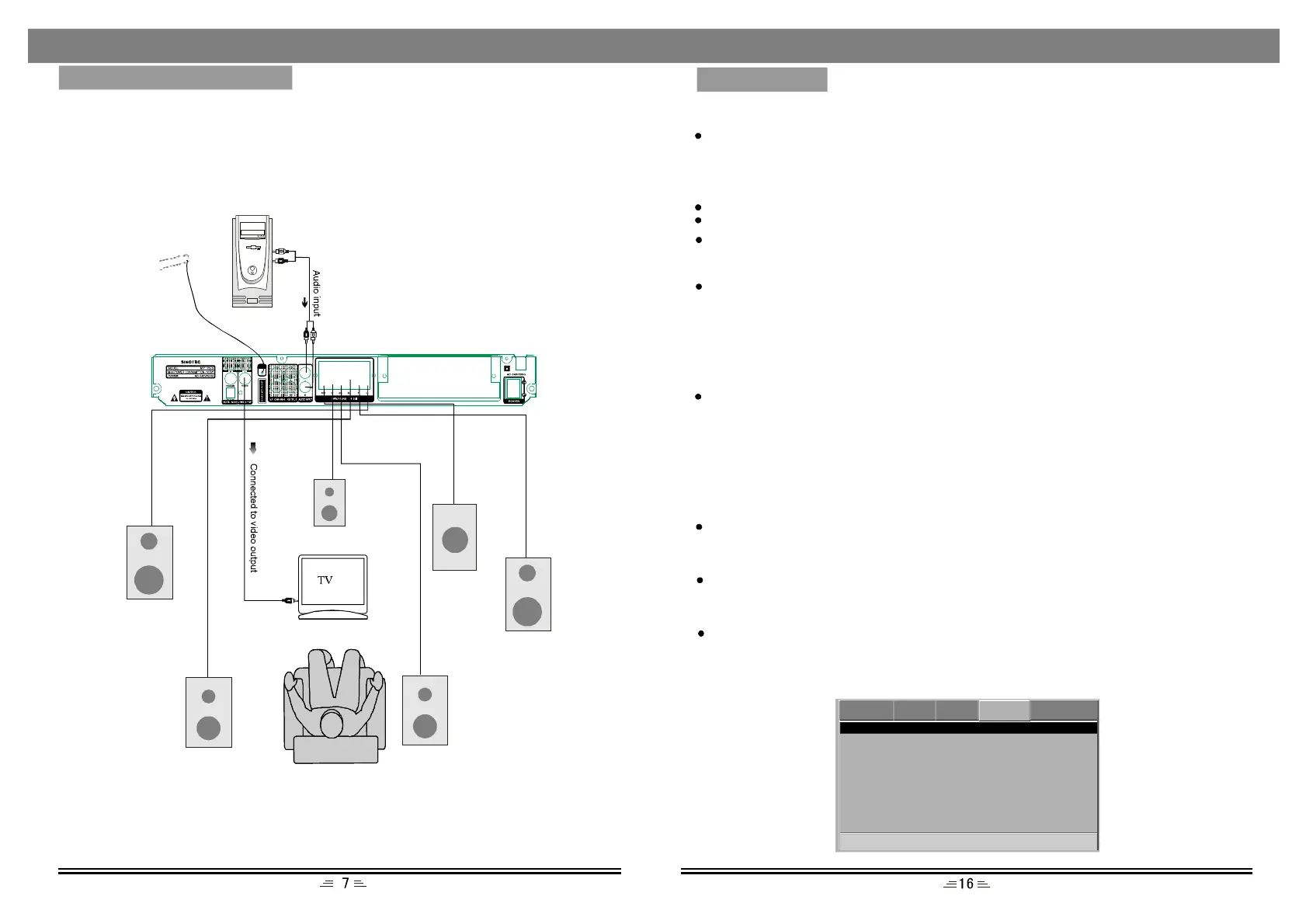
Beforeconnectingtheacousticsystem,payattentiontothepicturebelow.
Eachconnectionmustbesafeandfirm.Onlyconnectthepowercablewhenyou
havefinishedalltheconnections.
DownmixMode
LT/RT:leftandrightsoundtrackaudiooutput
Stereo:Stereoaudiosignaloutput
5.1CH:setthe5.1CHaudiooutput.
Front,CentreandRearspeakerscontrolthevolumeofcorrespondingoutputaudio.
DualMono
Thisoptionisusedtosetthemodeofaudiooutput,includingL-Mono,R-Mono,
Mix-Mono,andStereo.
Dynamicrange
Thisoptionischosenwhenlineoutputisselectedforthecompressionmode.Linear
compressionrationisadjustedtoacquiredifferentcompressioneffects.Whenthe
FULLoptionischosen,thepeakvalueoftheaudiosignalswillbeatitsmaximum
andatitsminimumwhenOFFischosen.
SystemSetupPage
CloseCaption
ScreenSaver
GoToSystemSetupPage
--SystemSetupPage--
AngleMark
Memory
S/WVersion
Default
On
Off
On
On
DVD VIDEOAUDIOSYSTEMPASSWORD
SpeakerSetup
SPDIFSetup
WhenplayingtheDOLBYorMPEGdiscs,thecoaxialandopticalterminaloutputs
inSPDIF/RAWformat.Theconnectedamplifiermustbeabletosimultaneously
decodetheDOLBYDIGITALorMPEG.
DigitalOutput
SPDIF/PCMmaybeselectedwhentheplayerisconnectedwitha2CHdigitalstereo
amplifier
HDCD
Thisoptionhasthreesettings:off,44.1K,88.2K.Pleasesetitaccordingtothedisc.
KaraokeSetup
MicSetup
Thefollowingoperationscanbeselected:settheMicrophoneONorOFF;adjustthe
volumeofmicrophone;adjusttheecholevel.
MicThreshold:ThisoptionisusetoadjustthethresholdoftheMicrophone.
MENUSETUP
SYSTEMCONNECTION
Subwoofer
SurroundR
SurroundL
Centrespeaker
Rightspeaker
Leftspeaker
Subwoofer:Tosetsubwooferonoroff.(5.1CHSubwooferOffisnotavailable.)
FMAntenna
PC


 To Next Page