Sinterit LISA X User Manual | 5
17
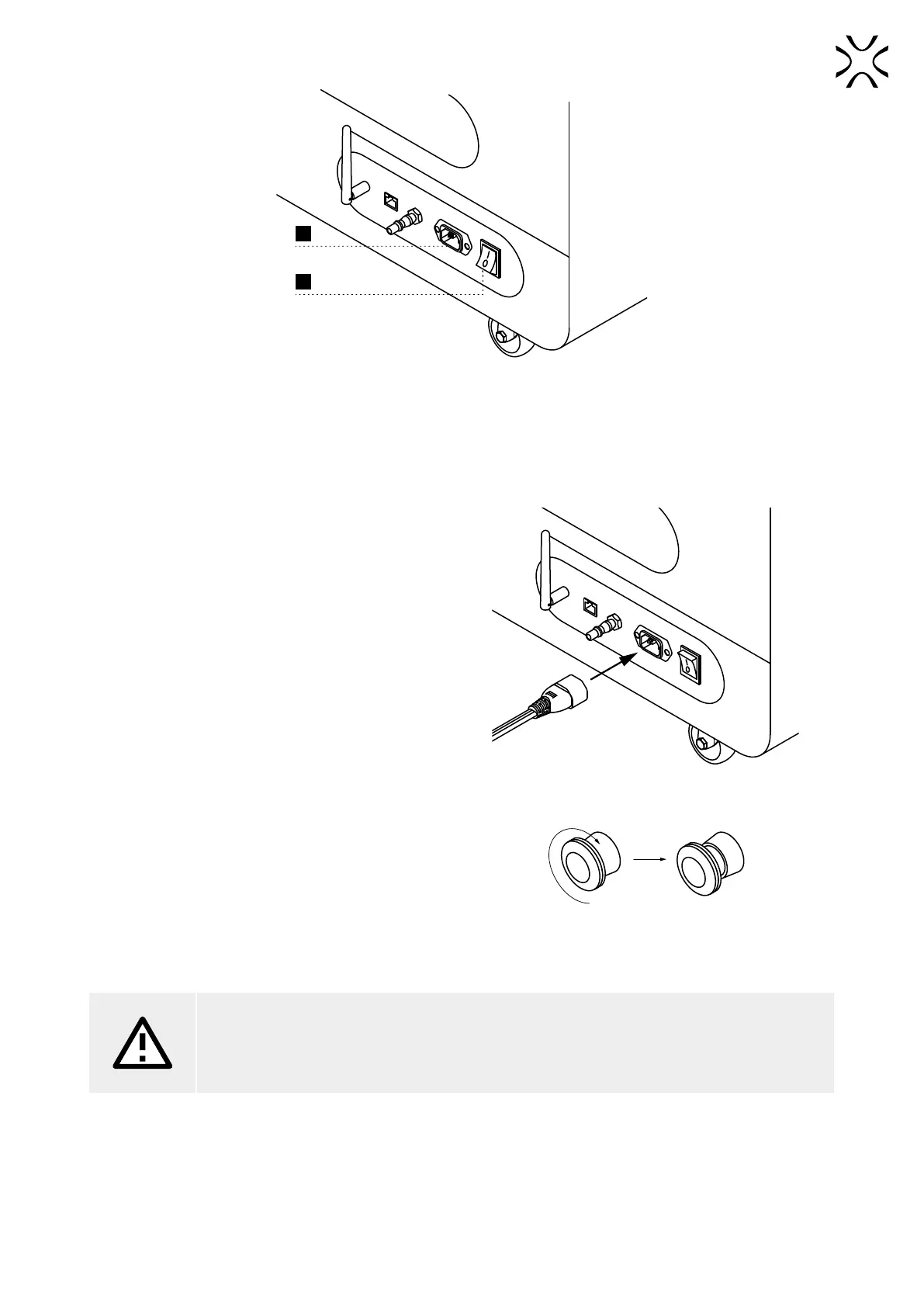
POWER SOCKET
18
POWER SWITCH (ON/OFF)
1.3 View of the back of the printer.
2. Preparing to print
2.1 Starting the printer
1. Connect the printer to a power source (g. 2.1). Power
socket is located on the back of the printer.
2. Flip the power button on the back of the printer to the
I position.
Fig. 2.1 Connecting the power cord to the power socket.
3. Make sure that the E-STOP button is released. If not,
turn it clockwise as much as possible and release it.
(g. 2.2).
Fig. 2.2 Releasing the E-STOP button.
4. After a few seconds, the main menu should appear on
the printer screen.
ATTENTION!
While preparing the printer for use, it is necessary to read and acknowledge any messages on the
screen. Disregarding or skipping any crucial steps of the process can negatively impact the quality
of printouts or damage the printer.



 To Next Page