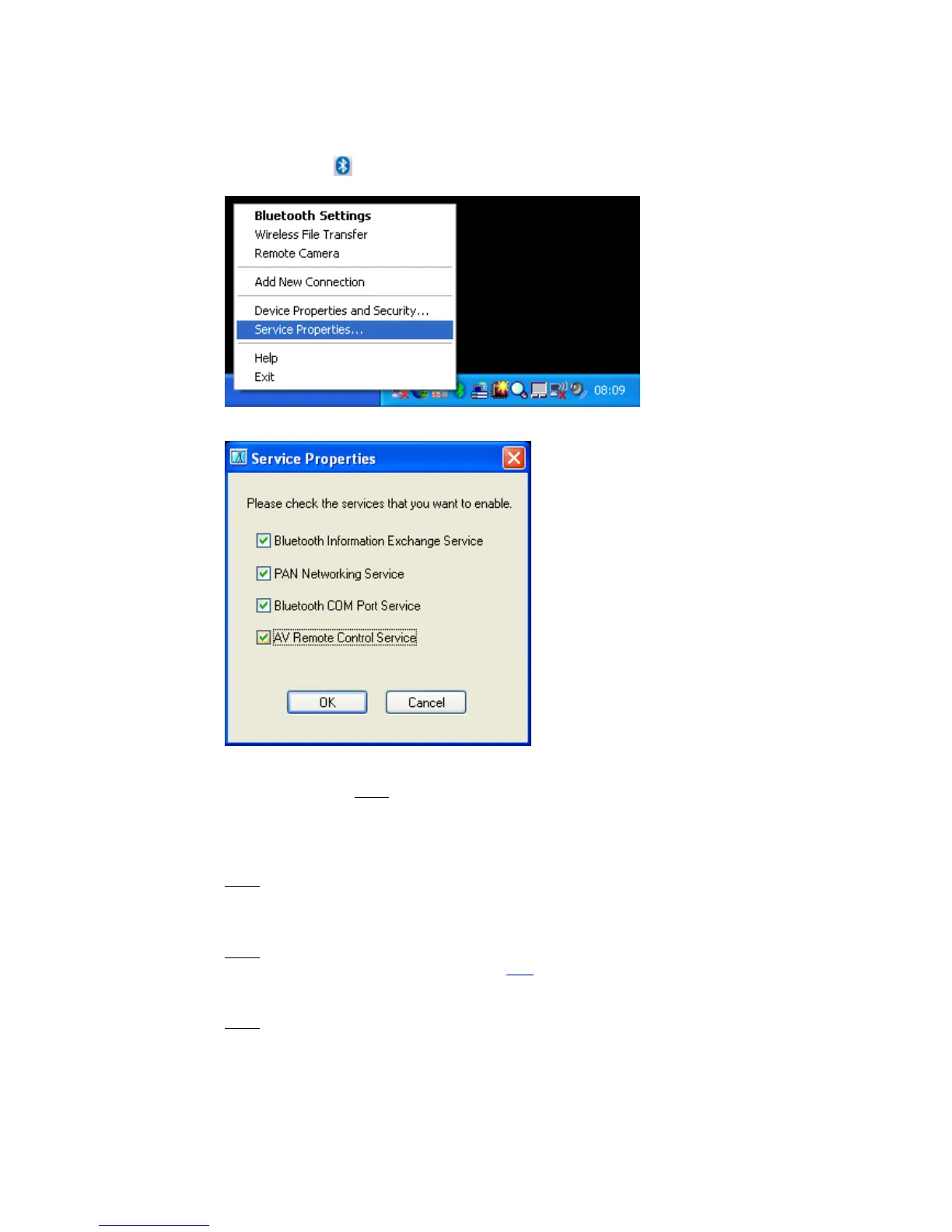
2. Configuring Bluetooth services
• Right click the ICON in the tray bar and select Service Properties...
from the menu to open the ‘Service Properties’ window
• Now you are able to toggle the following Bluetooth™-services
Bluetooth Information Exchange Service:
... enables a (server) function that allows files, images and business cards
to be transferred from
a remote device using Bluetooth Information
Exchanger.
I.e. Send a business card from a mobile phone to the PC
PAN Networking Service:
... enables a (server) function that allows networking to be performed
from
a remote device using the PAN Networking Service.
I.e. Bluetooth™ Network connection from a PDA to the PC
Bluetooth COM Port Service:
... enables a (server) function that allows COM Service to be performed
from
a remote location using the Serial Port Profile.
I.e. ActiveSync from a PC<->PDA via SPP
AV Remote Control Service:
... enables a (server) function that allows remote control to be performed
from
a Bluetooth™ device supporting the AV Remote Control Service.
I.e. Control Microsoft Media Player from a stereo headset
Copyright © 2005 Toshiba Corporation
All rights reserved



 To Next Page