EasyManua.ls Logo

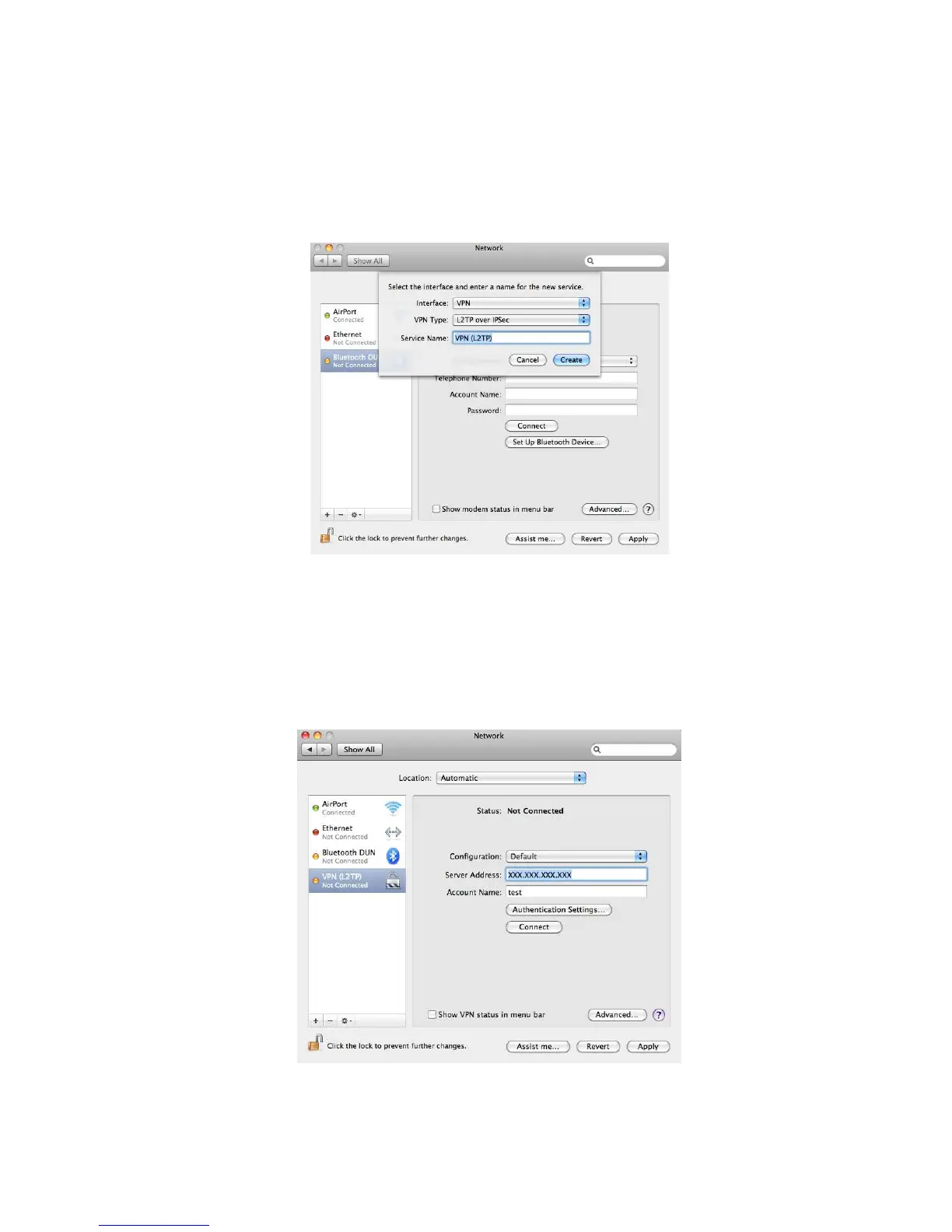
Sitecom WLR-4002B - Under the VPN Type dropdown, select the option that corresponds to the VPN Type you have configured in the WLR-4002 B. Enter a name for this profile (this name is for reference purpose only); Server address Enter the WAN IP address of the WLR-4002 B. Account Name Enter the name used to log onto the VPN tunnel (this must be one of the users you have set in the VPN user table of the WLR-4002 B)

Sitecom WLR-4002B
130 pages
Print Icon
To Next Page IconTo Next Page
To Previous Page IconTo Previous Page
Loading...
87
5.
Under the VPN Type dropdown, select the option that corresponds to the
VPN Type you have configured in the WLR-4002B. Enter a name for this
profile (this name is for reference purpose only)
6. Complete the following fields:
Server address Enter the WAN IP address of the WLR-4002B.
Account Name Enter the name used to log onto the VPN tunnel
(this must be one of the users you have set in the
VPN user table of the WLR-4002B)
Click Authentication Settings to continue.


Related product manuals