EasyManua.ls Logo

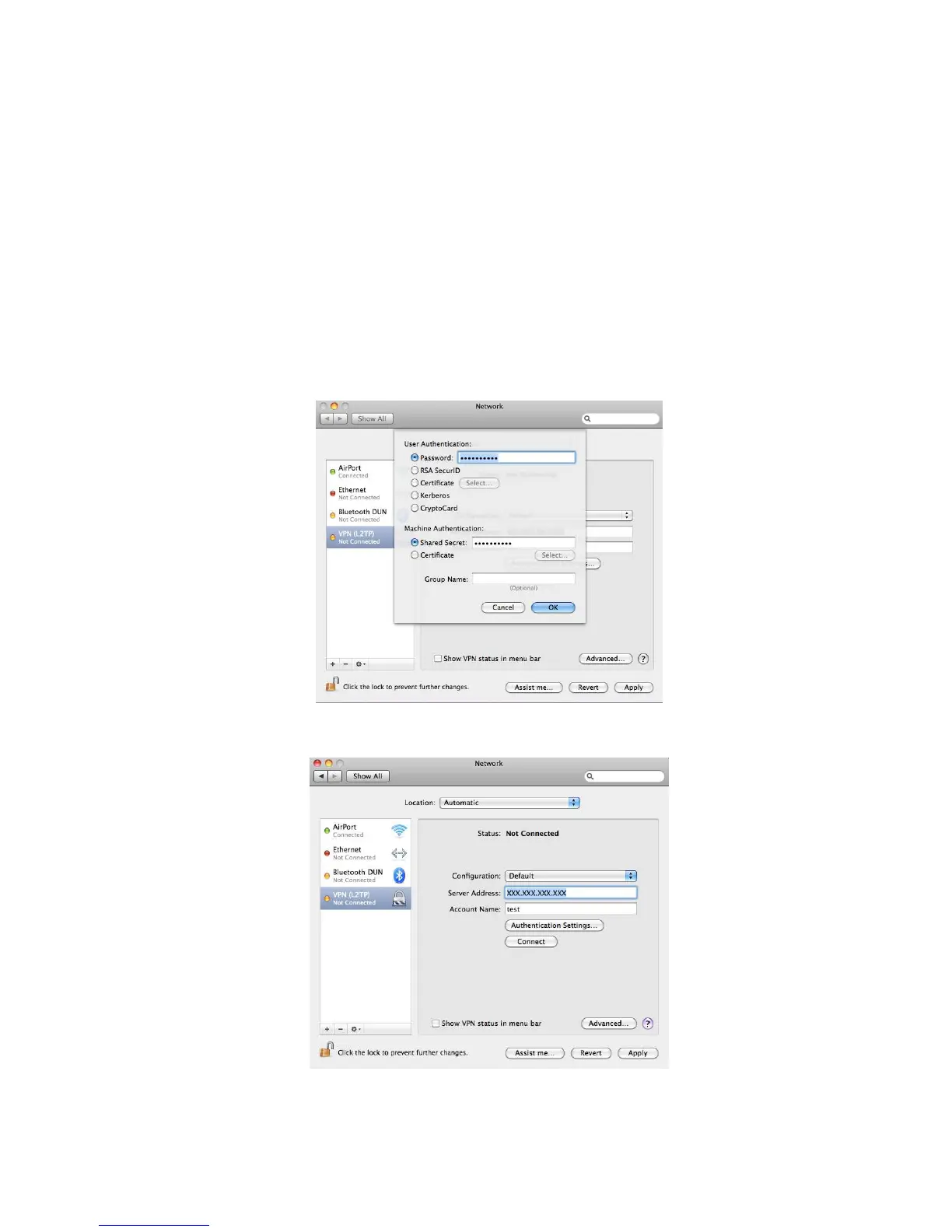
Sitecom WLR-4002B - Password Enter the password that belongs to the Account name which you have entered in step 6 of this Guide. Shared Key If the VPN Type of the VPN tunnel you have set up in the WLR-4002 B is L2 TP over IPSec You have also entered a Shared key in the WLR-4002 B(see step 7 of chapter Using the Wizard to Configure the WLR-4002 B for L2 TP over IPSec for reference) Enter the same key in this field.

Sitecom WLR-4002B
130 pages
Print Icon
To Next Page IconTo Next Page
To Previous Page IconTo Previous Page
Loading...
88
7. Complete the following fields:
Password Enter the password that belongs to the Account name
which you have entered in step 6 of this Guide.
Shared Key If the VPN Type of the VPN tunnel you have set up in
the WLR-4002B is L2TP over IPSec You have also
entered a Shared key in the WLR-4002B(see step 7
of chapter Using the Wizard to Configure the
WLR-4002B for L2TP over IPSec for reference)
Enter the same key in this field.
Click OK to continue.
8. Click on Advanced in the network panel to continue.


Related product manuals