A2 mini User Manual V1.1
31
2023 SIYI Technology Co., Ltd, All Rights Reserved
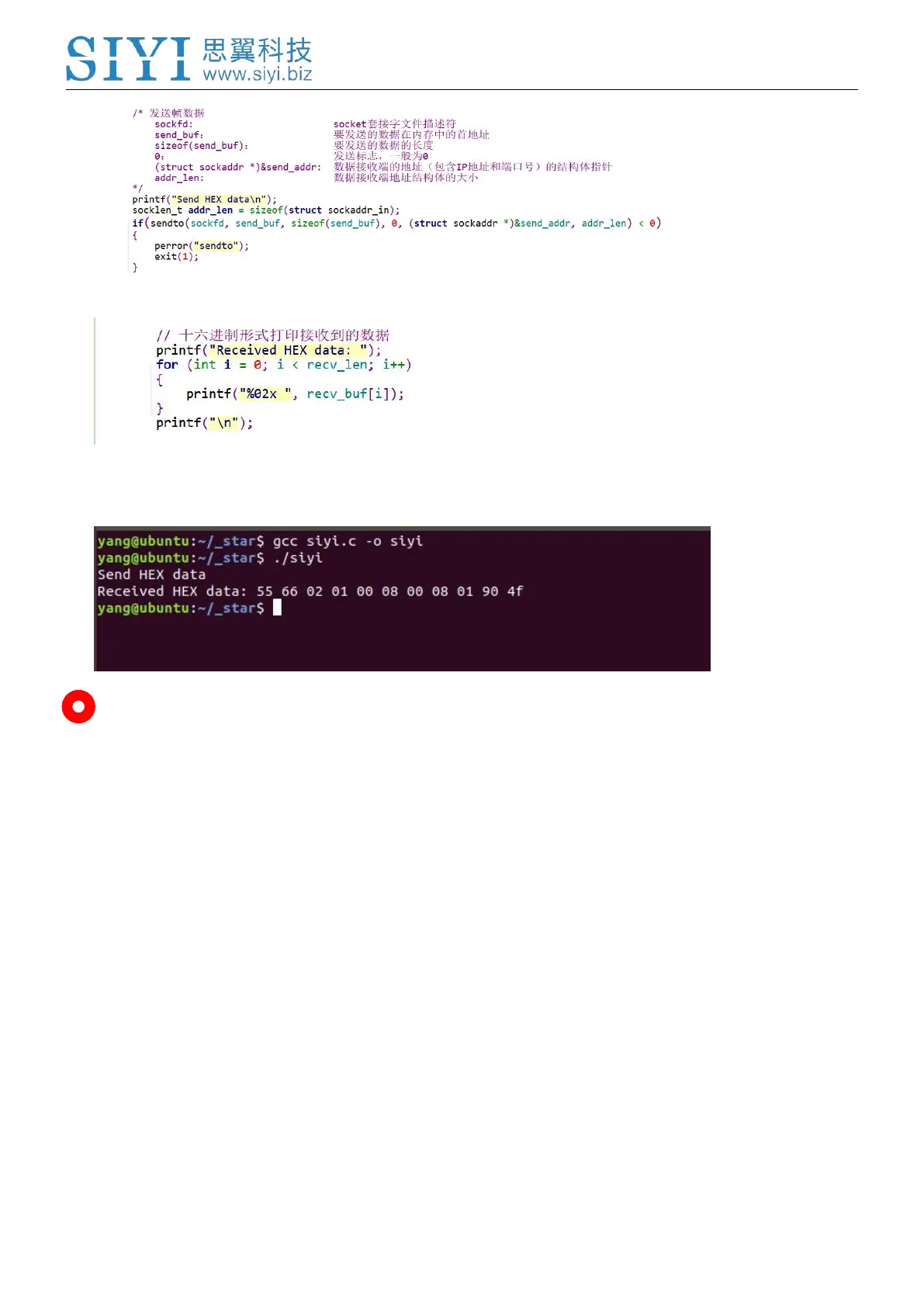
6. Print the received data in hexadecimal and do not revise.
7. Following the above steps, compile and run the SDK and you will see the printed data below,
which means data can be sent and received normally. At this moment, please observe if the
gimbal camera executes the relevant actions.
Mark
Before using the SDK to communicate with the gimbal camera in UDP protocol, please do make sure that
the device and the gimbal camera are in the same gateway, which means that ubuntu can ping the gimbal
camera’s IP addresses successfully.
If they still didn’t communicate, the possible reason is that the Windows firewall is interrupting the
sending and receiving of data, then try to disable Windows firewall temporarily.
Relevant Code Examples
#include <stdio.h>
#include <stdlib.h>
#include <string.h>
#include <errno.h>
#include <sys/socket.h>
#include <netinet/in.h>
#include <arpa/inet.h>
#include <unistd.h>
#define RECV_BUUF_SIZE 64
#define SERVER_PORT 37260 // Gimbal Camera (Server) Port
#define SERVER_IP "192.168.144.25" // Gimbal Camera (Server) IP Addresses


 To Next Page