Need help?
Do you have a question about the SJCAM A30 and is the answer not in the manual?
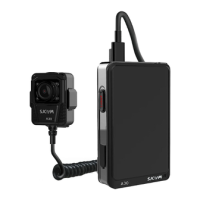
The SJCAM A30 is a versatile body camera designed for various recording needs, offering both video and photo capture capabilities. It features a robust PC/ABS material body with an aluminum alloy frame, ensuring durability. The device is equipped with an Ambarrella A12 low-power and high-performance CMOS process image processor and a SONY 2MB IMX323 CMOS image sensor, which contribute to its high-quality imaging.
The A30 serves as a personal recording device, capable of capturing Full HD 1080P video at 30fps, 720P at 60fps, and 720P at 30fps. It supports loop recording, ensuring continuous capture by overwriting older files when storage is full. The camera also features a Wide Dynamic Range (WDR) function for improved image quality in varying light conditions and a file locking mechanism to prevent important recordings from being overwritten. For still photography, it offers a "Photo Shooting Mode" for single shots and a "Burst Mode" for capturing multiple successive snapshots.
A key feature of the A30 is its infrared light capability, which can be set to manual or automatic operation based on a light sensor. This allows for recording in low-light environments. The device also includes a separate camera connection slot, suggesting expandability with external camera modules. It has a built-in microphone and speaker for audio recording and playback. Connectivity options include a Type-C USB port for charging and data transfer, and standard Wi-Fi 802.11n for use with the SJCAM APP. The APP enables camera control, live preview, playback, video download, and firmware updates.
The A30 is designed for user-friendly operation. To power on/off, the power button needs to be pressed and held for 3 seconds. Switching between video recording and photo shooting modes is done by sliding left or right on the screen. Recording starts by pressing the "Video" button or tapping the recording icon, while photos are taken by pressing the "Photo" button. The device supports a "Burst Mode" for rapid photo capture.
For storage, the camera has a built-in 64GB memory. Users can expand storage by inserting a micro SD card (FAT32 format, Class 10 or higher) after removing a screw from the back door. It's crucial to insert or remove the card only when the camera is completely turned off to ensure data safety. The storage settings can be configured to use built-in memory, TF card, or an automatic mode that switches to the TF card when internal memory is full.
The A30 can record footage while charging, and charging is possible even when the camera is on. It connects to a computer via a USB cable for charging and file transfer, or can be charged using a wall or car charger. Files can be reviewed directly on the camera by clicking the "playback" icon. The device also supports a "Reset" function, activated by simultaneously pressing and holding the "Photo" and "IR Cut" buttons for 3 seconds.
To ensure optimal performance and data integrity, users are advised to format any external micro SD card to FAT32 before use. The camera's battery can be installed or detached by removing a screw from the back door, allowing for easy replacement or maintenance. Charging indicator details are provided in the product diagram for monitoring charging status. The device's IP64 protection level indicates resistance to dust and splashing water, contributing to its durability in various environments. Firmware updates are supported via the SJCAM APP, which can help in maintaining and improving the camera's functions over time. Users are encouraged to download the "SJCAM ZONE" app from the App Store or Google Play for enhanced control and management of the device.
 General
| Brand | SJCAM |
|---|---|
| Model | A30 |
| Category | Action Cameras |
| Language | English |

 To Next Page