EasyManua.ls Logo

Skil 3104 - Adjusting Upper Blade Guides; Adjusting Upper Thrust Roller; Adjusting Table Square to Blade

Skil 3104
15 pages
Print Icon
To Next Page IconTo Next Page
To Previous Page IconTo Previous Page
Loading...
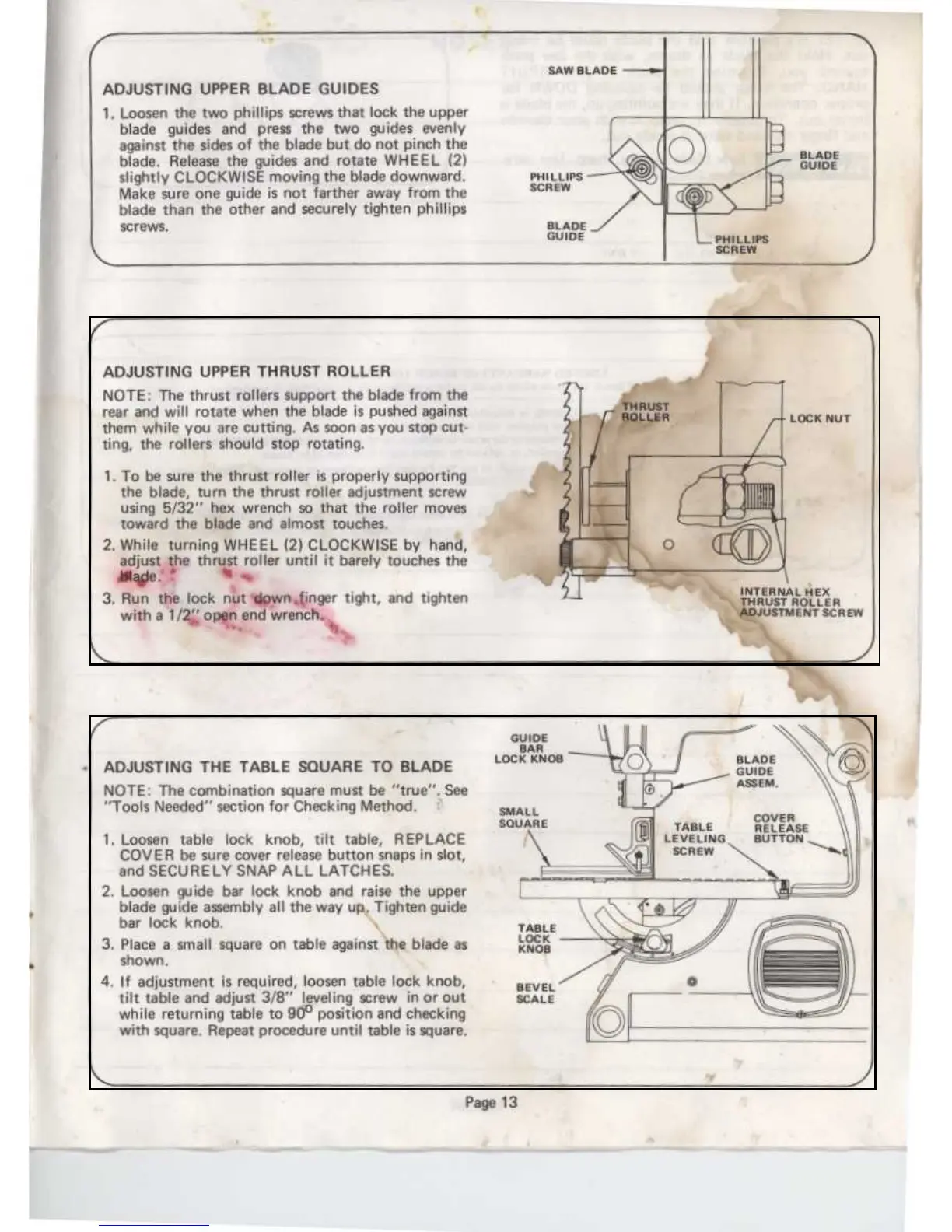
ADJUSTING
UPPER
BLADE
GUIDES
1
.
Loosen
the
two
phillips
screws
that
lock
the
upper
blade guides
and
press
the
two
guides evenly
against
the
sides
of the blade but
do
not
pinch
the
blade
.
Release
the
guides
and
rotate
WHEEL
(2)
slightly
CLOCKWISE
moving
the
blade
downward
.
Make
sure
one
guide
is
not
farther
away
from
the
blade
than
the
other
and
securely
tighten
phillips
screws
.
Page
1
3
ADJUSTING
UPPER
THRUST
ROLLER
NOTE
:
The
thrust
rollers
support
the
blade
from
the
rear
and
will
rotate
when
the
blade
is
pushed
against
them
while
you
are
cutting
.
As
soon
as
you
stop
cut-
ting,
the
rollers
should
stop
rotating
.
1
.
To
be
sure
the
thrust
roller
is
properly
supporting
the
blade,
turn
the
thrust
roller
adjustment screw
using
5/32"
hex wrench
so
that
the
roller
moves
toward
the
blade
and
almost touches
.
2
.
While
turning
WHEEL
(2)
CLOCKWISE
by
hand,
adjust
the
thrust
roller
until
it
barely
touches
the
blade
'
%
.
3
.
Run
the
lock
nut
down
finger
tight,
and
tighten
with
a
1/2"
open
endwrench
.
.
LOCK
NUT
INTERNAL
HEX
THRUST
ROLLER
ADJUSTMENT
SCREW
ADJUSTINGTHE
TABLE
SQUARE
TOBLADE
NOTE
:
The
combination
square
must
be
"true"
.
See
"Tools
Needed"
section
for
Checking
Method
.
1
.
Loosen
table
lock
knob,
tilt
table,
REPLACE
COVER
be
sure
cover
release
button
snaps
in
slot,
and
SECURE
LY
SNAP
ALL
LATCHES
.
2
.
Loosen
guide
bar
lock
knob
and
raise
the
upper
blade guide
assembly
all
the
way
up
.
Tighten
guide
bar
lock
knob
.
3
.
Place
a
small
square
on
table
against
the
blade
as
shown
.
4
.
If
adjustment
is
required,
loosen
table
lock
knob,
tilt
table
and
adjust
3/8"
leveling
screw
in
or
out
while
returning
table
to
90o
position
and
checking
with square
.
Repeat
procedure
until
table
is
square
.

Related product manuals