Bluetooth* installation
1
2.4G
OFF
2.4G
OFF
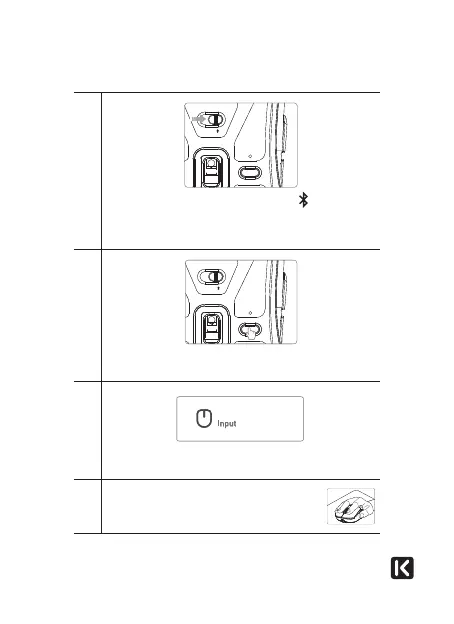
Slide the mode selector switch to position . Briefly press
the pairing button to select the bluetooth channel*: the
indicator light turns green for the BT1 channel or blue for
the BT2 channel.
2
2.4G
OFF
2.4G
OFF
Press and hold the pairing button for 3 seconds. The
indicator light flashes quickly
3
MU SKK BT1 / BT2MU SKK BT1 / BT2
Access your computer’s bluetooth* settings and select MU
SKK BT1 or MU SKK BT2 to pair your mouse.
4
Once the bluetooth* connection has been
successfully established, the indicator light
goes off.



 To Next Page